
Freelance Command Center
Know which invoices need chasing.
Use one freelance income and expense spreadsheet to track clients, projects, invoices and business records in Excel or Google Sheets.
Look inside the workbook ↓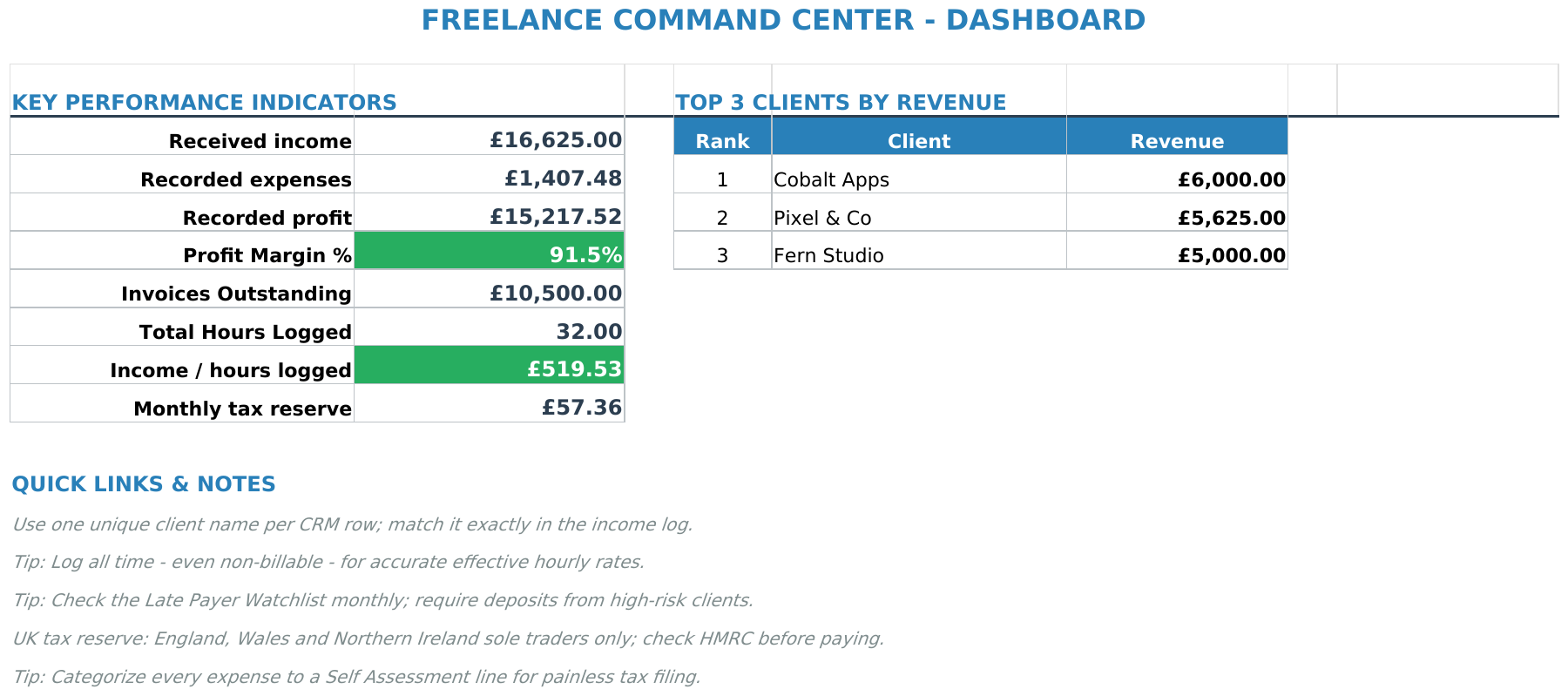
For the admin between projects
Less searching.
More seeing where you stand.
- Keep track of who you work with.
- Bring client details and invoice records into the same workbook.
- See the money coming in and going out.
- Keep income and expense records alongside your business overview.
- Have a place to start your weekly check-in.
- Review your records, update payments and decide what needs following up.
Look inside
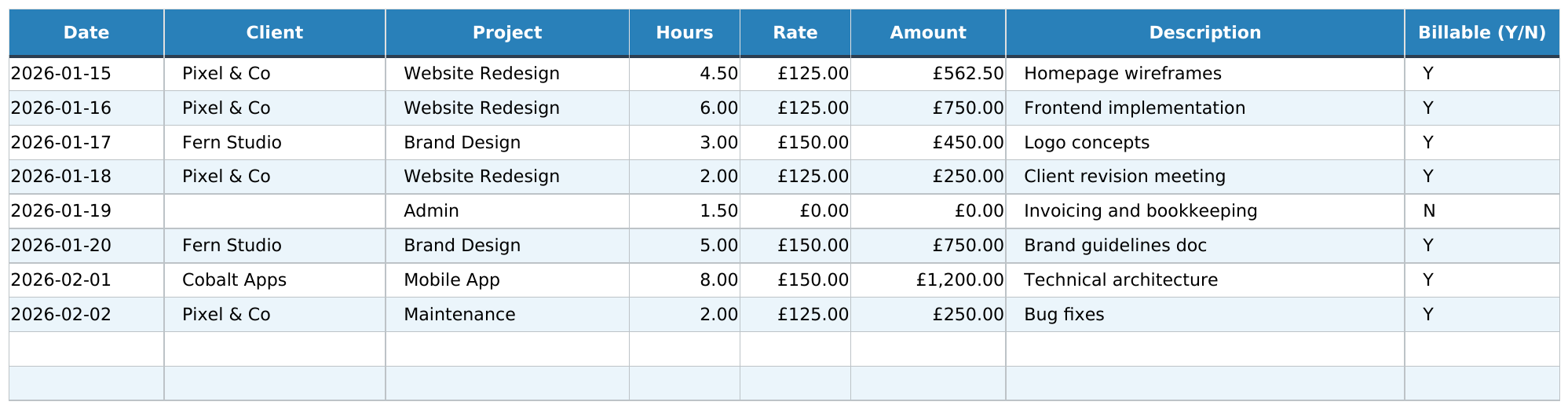
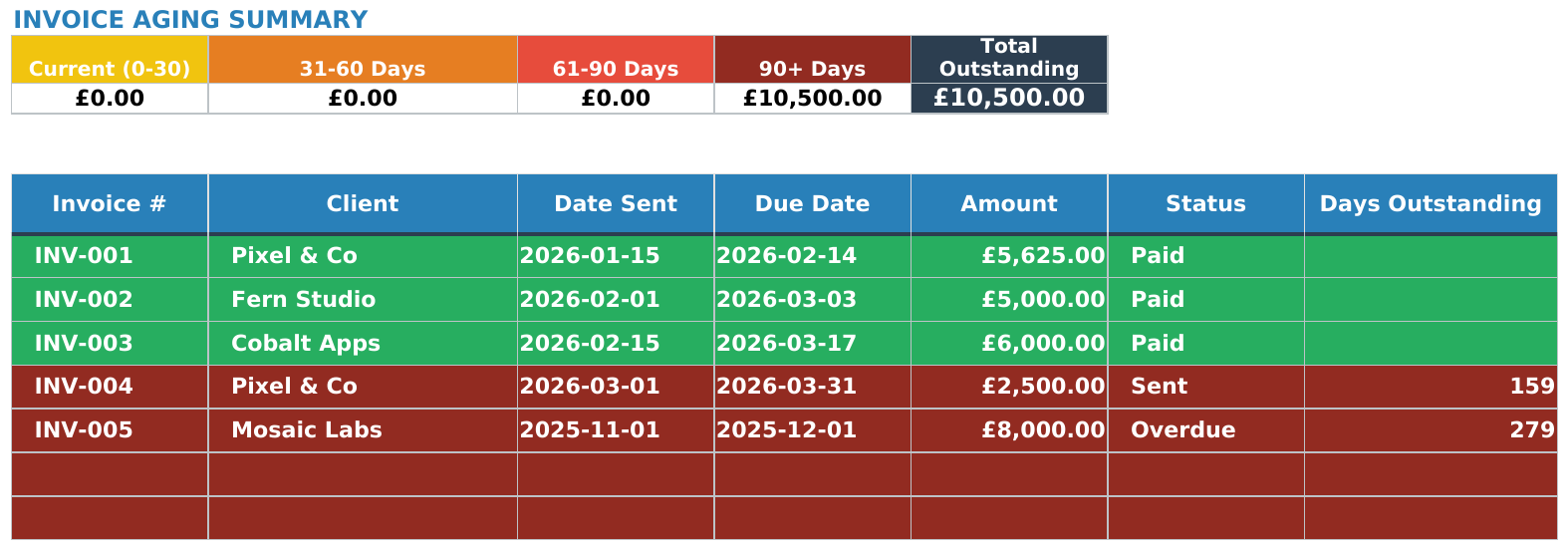
See the working tabs.
Actual workbook views with fictional example data. Open each image to read the detail.
Preview shown: UK edition with fictional example data. Your download includes separate UK, US and EU folders.



Getting started
Download. Open.
Make it yours.
Start with the instructions, then add the records you want to track.
- Download your files.Buy directly from Sort & Keep and use the download link provided after purchase.
- Keep an untouched copy.Open your working copy in Excel, or import the spreadsheet into Google Sheets.
- Add your information.Review the example entries and replace them with your client, invoice, income and expense records.
What arrives in your download
One ZIP. The files and instructions together.
9 Excel (.xlsx) files, including the supplied EUR, UK, US editions. Keep an untouched copy before replacing starting examples with your own records.
See the exact workbook files
freelance-command-center-toolkit/uk/Sort-and-Keep-Freelance-Command-Center-UK-Creator-Edition.xlsxfreelance-command-center-toolkit/uk/Sort-and-Keep-Freelance-Command-Center-UK-Example.xlsxfreelance-command-center-toolkit/uk/Sort-and-Keep-Freelance-Command-Center-UK.xlsxfreelance-command-center-toolkit/us/Sort-and-Keep-Freelance-Command-Center-Creator-Edition.xlsxfreelance-command-center-toolkit/us/Sort-and-Keep-Freelance-Command-Center-Example.xlsxfreelance-command-center-toolkit/us/Sort-and-Keep-Freelance-Command-Center.xlsxfreelance-command-center-toolkit/eur/Sort-and-Keep-Freelance-Command-Center-EUR-Creator-Edition.xlsxfreelance-command-center-toolkit/eur/Sort-and-Keep-Freelance-Command-Center-EUR-Example.xlsxfreelance-command-center-toolkit/eur/Sort-and-Keep-Freelance-Command-Center-EUR.xlsx
See the included instructions and notes
freelance-command-center-toolkit/README.mdfreelance-command-center-toolkit/START-HERE.mdSEPTEMBER-2026-UPDATE.mdSORT-AND-KEEP.txt
Excel files can be imported into Google Sheets; access to your chosen software is not included. EUR editions, where supplied, use euro formatting rather than exchange-rate conversions or country-specific tax rules.
Before you buy
Is this the right fit?
A practical file for freelancers who are comfortable entering and maintaining their own records.
What do I receive?
A digital download containing the Freelance Command Center spreadsheet and supporting instructions. The workbook brings together client, invoice, income, expense and dashboard information.
Which software do I need?
Use Microsoft Excel or import the spreadsheet files into Google Sheets. You will need access to your chosen spreadsheet software. A computer is the best place to set up and work through the file.
Is there a monthly fee?
No Sort & Keep subscription. $20.28 USD is a one-time purchase for the downloadable files.
Is this an accounting service?
No. It is a spreadsheet you maintain yourself. It does not replace professional accounting or tax advice.
What if there is a problem with the file?
If a file is faulty, not as described or does not meet applicable statutory requirements, contact us for help. Your statutory rights are unaffected. Digital-download and refund policy.
Freelance Command Center
Give the admin
a place to live.
One workbook. Your clients, invoices, income and expenses.
Still unsure? Ask a question ↗UK, US and EU editions are included. Open the matching regional folder in your download.
Made and supported by Tyler
A person behind the workbook.
I run Sort & Keep through MorpheOS Ltd. The September release was checked for formula integrity; the previews are taken directly from the supplied workbooks. If you are unsure whether a file fits your task, ask me before you buy.
Ask Tyler about this workbook · About the shop and its checks
We aim to reply within two working days.
Start with one part of your working week.
Try the free Weekly Capacity Planner to plan tasks around the hours you have. It is a separate mini workbook, not a trial of the paid product.
Read the guide and get the free planner →