
A lighter working week · Part 1 of 5
Plan your freelance week around the hours you actually have
Try the capacity calculator on this page ↓
Start with the calendar, not the wish list
A Monday list can look manageable until you remember the client call, the school appointment and the half-finished proposal. Start with the hours you can realistically work this week. Subtract fixed commitments and a deliberate allowance for unexpected work. What remains is the space you can offer to tasks. The free Weekly Capacity Planner makes those three quantities visible. It does not decide how many hours you should work.
Make one honest capacity calculation
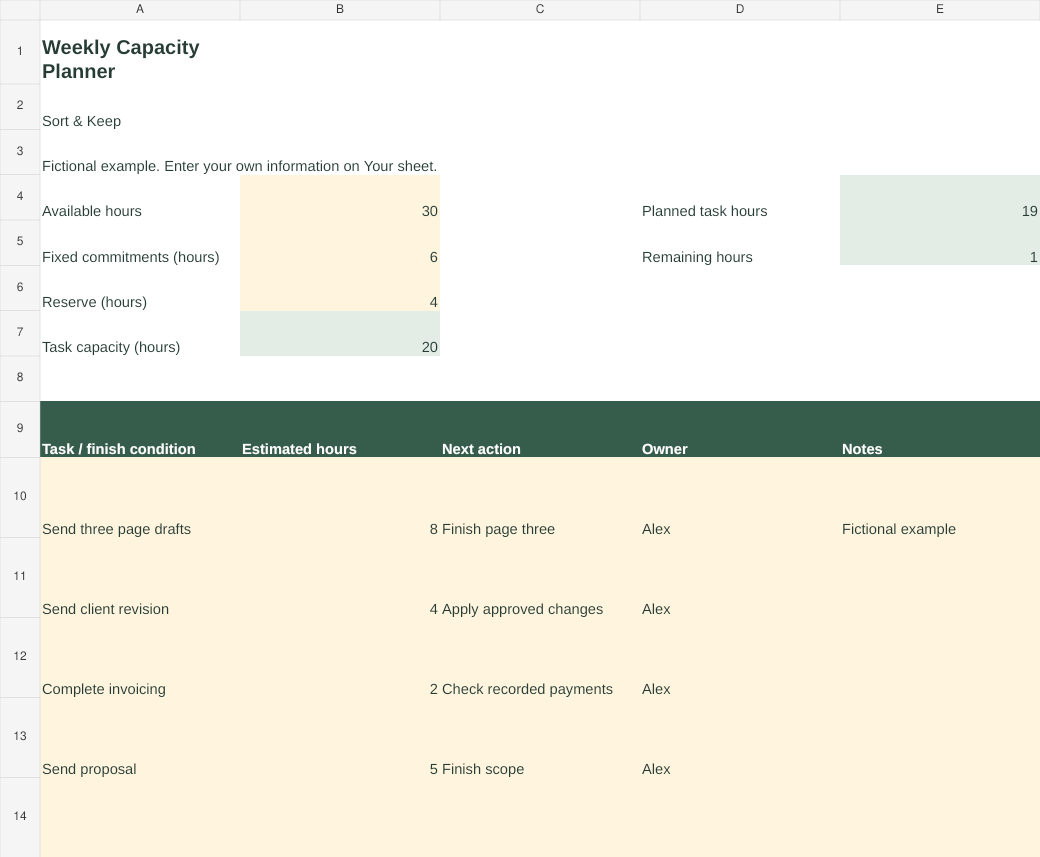
Here is a fictional example. Alex has 30 working hours available. Meetings and other fixed commitments take six hours. Alex reserves four hours for changes and interruptions, leaving 20 hours for planned tasks. A website draft needs eight hours, a revision needs four, invoicing needs two and a proposal needs five: 19 hours in total. There is one hour unallocated. Add another four-hour task and the sheet shows a three-hour shortfall. That is a reason to move or renegotiate work before accepting it, rather than a reason to hope Friday will be longer.
The four-hour reserve is an example, not a recommended percentage. Use what you know about your own week. If a large part of your work arrives unpredictably, keep more time uncommitted. If you are returning from leave, include the backlog you already know about.
Give each task an observable finish
Replace ‘website’ with ‘send the first three page drafts for review’. Replace ‘accounts’ with ‘match this month’s receipts to transactions’. A finish condition makes estimating and stopping easier. Put waiting work on a separate list: ‘client to send images’ is a dependency, not four hours of work you can schedule today. You can still plan a short follow-up if it is due.
Estimate in hours at a level that suits the task. Split anything too large to assess into a first deliverable. Include checking and sending, not just producing. Do not count a meeting in both fixed commitments and the task list.
Keep related work together when you can
The American Psychological Association’s overview of task-switching experiments describes costs when people move between tasks. It supports reducing unnecessary switching; it does not tell us that everyone should use the same time blocks. Try keeping a proposal-writing session together and grouping routine replies into another slot, while preserving any response commitments you have made to clients. That scheduling suggestion is our practical application, not a tested feature of this workbook.
When the plan is over capacity
Choose one concrete change: reduce a deliverable with the client’s agreement, move a non-urgent task, ask for a missing input sooner, or offer a later delivery date. Changing a red cell to a smaller estimate without changing the work is not a solution. Keep the old estimate in your notes if it helps you learn.
At the end of the week, compare the original estimate with what happened. Pick one adjustment for next week. You are trying to improve the promise you make to yourself and your clients, not produce a perfectly filled calendar.
Try it this week
Open the workbook, replace Alex’s fictional example, and enter your own available hours, fixed commitments and reserve. Add only the work you intend to do this week. Check the remaining hours before adding another task. The workbook contains a blank planning sheet and an example, with formula cells distinguished from inputs. For a broader place to manage client work and business records, see Freelance Command Center below.
Sources and limits
- American Psychological Association: Multitasking, switching costs. Research overview supporting the narrow claim that switching between tasks has costs. Our capacity worksheet and suggested time allocations have not been tested in those studies.
For a related next step, see Freelance Command Center.
Read the series
- Plan your freelance week around the hours you actually have
- Interrupted again? Leave a useful note for your next working session
- A client follow-up routine that gets loose ends out of your inbox
- Give home admin a place in your week
- A weekly review you can restart after a messy week
Try a weekly capacity calculation
Available hours minus fixed commitments and a buffer gives you time for tasks. Change the fictional example below to see the trade-off. This teaching tool does not save or send your entries.