
Best Wedding Budget Spreadsheets in 2026
Compare wedding budget spreadsheets and planning tools. Keep quotes, commitments and payment dates clear, and find an approach that suits you.

From Sort & Keep, the maker of the linked templates. Updated 7 September 2026. Product links show current prices and what is included.
A wedding budget gets more useful as the quotes come in. The important questions become quite specific: what have you agreed to pay, how much has already gone out, and what is due next?
A spreadsheet can keep those figures together. An app or online planner may suit you better if that is where you already organise the wedding. This guide explains what to compare and where our Wedding Budget & Vendor Planner fits.
Sort & Keep sells the planner linked here. The alternatives below are starting points to explore, not a scored hands-on test of every product.
What to look for in a wedding budget spreadsheet
Start with the records you need to keep. A useful budget separates your original estimate, the amount agreed with the supplier and the amount paid so far. Those figures answer different questions.
- Quotes: supplier, package, included services and any optional extras.
- Commitments: the agreed total and a link or reference to the contract.
- Payments: deposit, instalments, final balance and the actual dates in your agreement.
- Guest costs: headcount and any charges that change with it.
- Notes: questions to resolve before booking, including cancellation and amendment terms.
You do not need a separate tab for every item. You do need to be able to find the next payment without searching through a folder of quotes.
Six approaches worth comparing
1. A free spreadsheet template
A free template can be enough for a small wedding or a straightforward list of costs. Open a copy, enter a sample quote and check how the totals respond when you add a row. Look for instructions and make sure both of you can understand the layout.
Before relying on it, check whether it has somewhere for payments already made and amounts still due. You can add those columns yourself if the rest of the sheet suits you.
2. Hitched's planning tools
Hitched includes a budget planner among its wedding tools and provides access through a free account. It is worth exploring if you already use the site to organise suppliers or guests.
Try the budget workflow with one of your own quotes. Check the sharing and export options if you want to keep a separate copy of your records.
3. The Knot's Budget Advisor
The Knot's Budget Advisor provides estimates based on what couples spend. That can help you explore likely costs while making an initial plan. Replace estimates with your own quotes as decisions become firmer.
An estimate and a payment record serve different purposes. Check how you will track deposits and outstanding balances alongside any planning tool you choose.
4. A paid marketplace template
Marketplace templates vary in layout, scope and support. Review the actual sheets shown in the listing, the software required and what happens after purchase. A clear example of the payment schedule is more useful than a long feature list.
If a feature matters, ask the seller how it works before buying. Check whether you can add suppliers, adjust categories and share the workbook with the people helping you plan.
5. Sort & Keep Wedding Budget & Vendor Planner
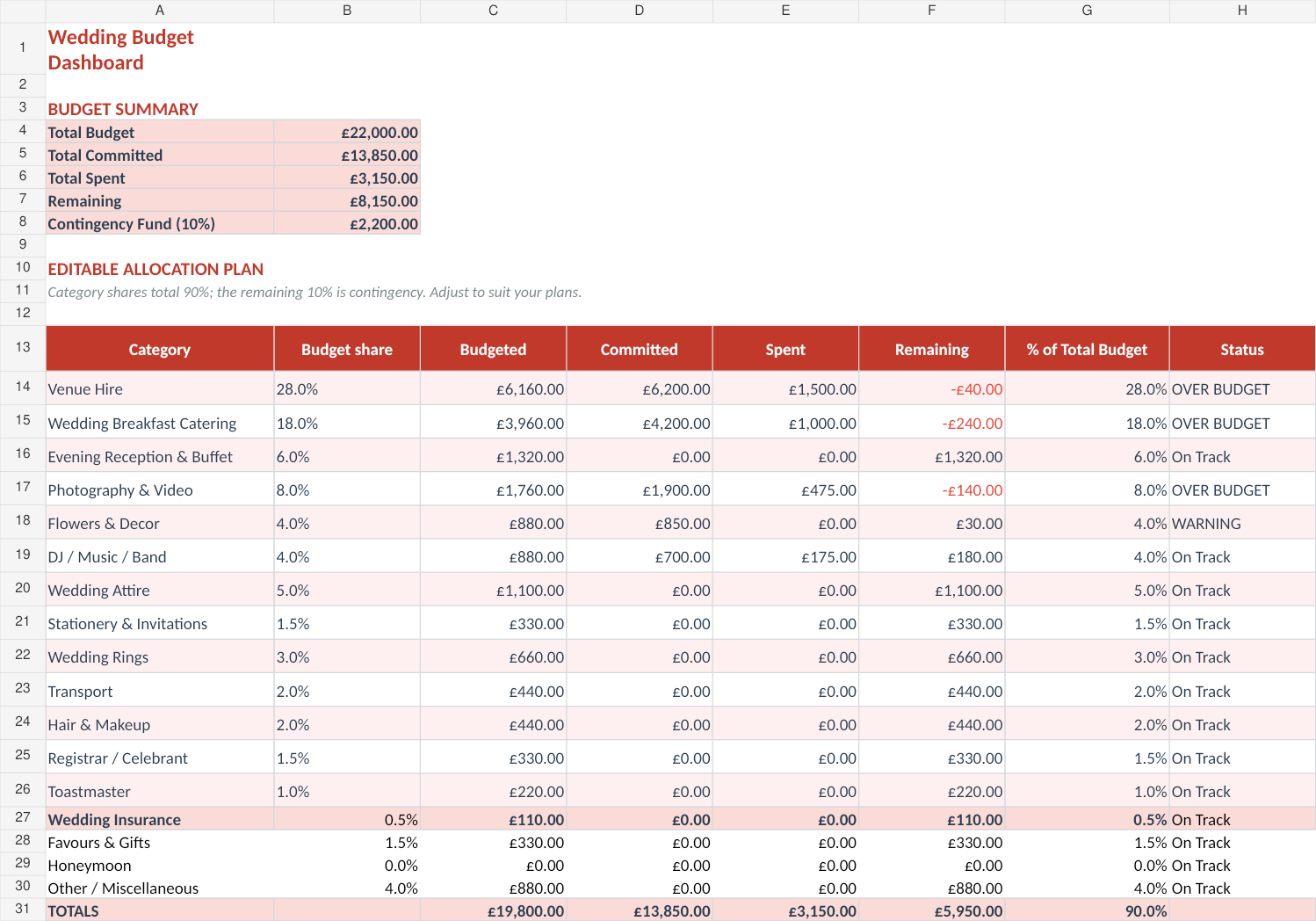
Our Wedding Budget & Vendor Planner brings wedding budgeting and supplier records into a ready-made workbook. Use the product screenshots and included-sheet list to decide whether the structure suits the way you plan.
A ready-made file saves the initial setup. You still need to enter quotes, check your contracts and keep the payment records current. See the product page for the current price, supplied editions and software requirements.
Get the Wedding Budget & Vendor Planner, or look through the workbook first.
6. Build your own
Building your own is a sensible option if you enjoy spreadsheets or have a wedding structure that needs a different layout. Begin with supplier, agreed total, paid, outstanding and next payment date. Add more detail when you need it.
Test the formulas with a small fictional example and ask the other person using the sheet to try it. A ready-made template is an alternative if you would prefer to spend less time on setup.
Choose by the job you need done
- A quick starting budget: explore an online planning tool or a simple free sheet.
- Your own layout: build a spreadsheet around your quotes and payment dates.
- A file with the structure prepared: compare paid templates, including ours, using screenshots and a sample workflow.
- Shared planning: check that everyone involved can access and use the chosen tool.
Track commitments before the final bill
Here is a fictional example. You allow £5,000 for catering, agree to a package costing £4,800 and pay a £1,000 deposit. Your record should show £4,800 committed, £1,000 paid and £3,800 outstanding. The £1,000 deposit is part of the agreed total, so avoid adding it to the £4,800 again.
If you later agree to £350 of extras, update the commitment to £5,150. You can then see that the catering total exceeds the original allowance by £150 and decide how to handle that before the balance is due.
Ask suppliers what their quote includes. Delivery, setup, extra hours, meals for suppliers and changes to guest numbers may affect the total. Record the terms actually offered to you rather than applying a standard percentage to every quote.
Sort upcoming payments by date. When a guest count changes, check the contract before assuming the price changes by the same amount; minimum charges and deadlines may apply.
Start with a quote you already have
Enter one real quote, its deposit and the outstanding balance into the tool you are considering. If the next payment and total commitment are clear, you have a useful starting point.
If you want a prepared workbook, explore the Sort & Keep planner. If a free sheet already covers what you need, you can keep using it.
Related guides
Choose the right next step
The Wedding Budget & Vendor Planner is a wedding vendor payment tracker spreadsheet for budgets, deposits, due dates and final balances in one place.



