
Free Budget Tracker vs Budget Dashboard: which fits your records?
Compare the free monthly budget tracker with Budget Dashboard, then find alternatives for meal plans, freelance invoices and wedding payments.

From Sort & Keep, the maker of the linked workbooks. Updated 8 September 2026.
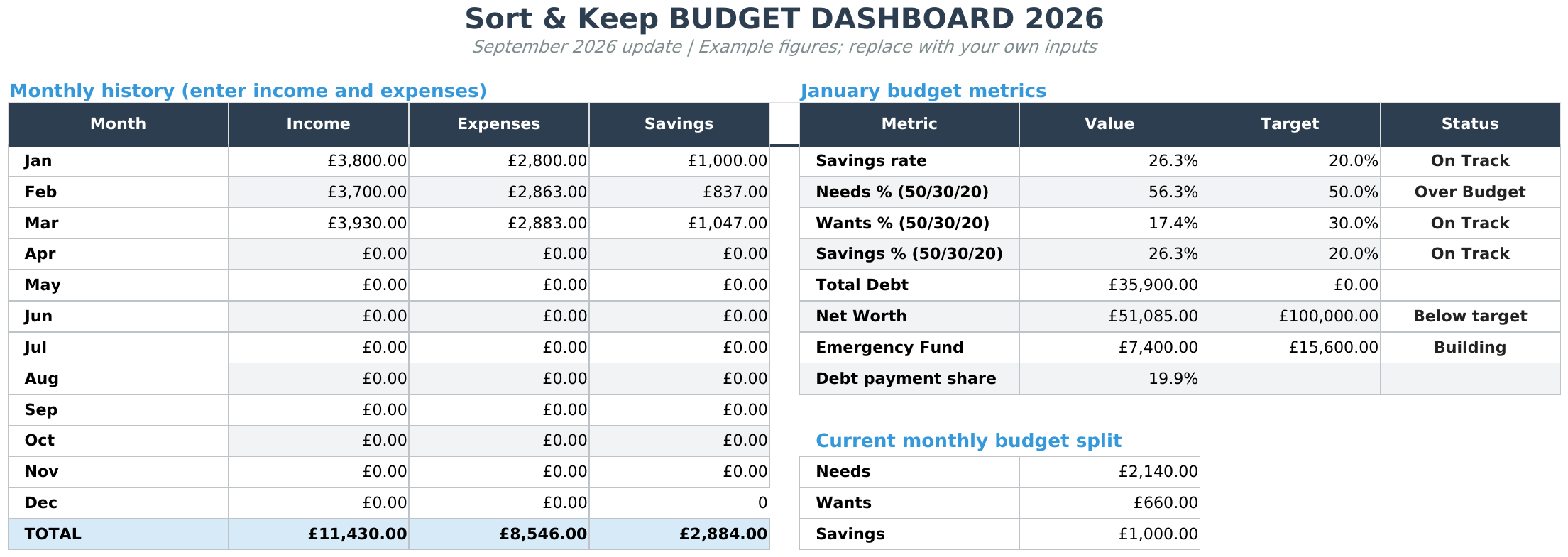
Start with Free Budget Tracker for monthly budgets and transactions. Compare Budget Dashboard 2026 when you also want debt, savings and net worth records. Both require you to enter and maintain your own figures.
Compare the two budget workbooks
The free workbook gives you monthly budget, transaction and summary tabs. The paid dashboard brings budget, debt payoff, savings and net worth views together. Check the examples on each product page against the records you actually need; more tabs are useful only if you have a reason to use them.
For example, recording £40 of groceries is a monthly transaction. Recording a savings balance alongside money you owe is a different view of your records. These examples explain the distinction; they are not a recommendation about how much to spend, save or borrow.
Choose your starting point
On a narrow screen, scroll across the table to see each workbook and its price.
| Your task | Workbook | Current price | Main records |
|---|---|---|---|
| Record monthly spending | Free Budget Tracker | Free | Budget, transactions and summary |
| Plan meals and groceries | Free Weekly Meal Planner | Free | Weekly meal plan and grocery list |
| Keep spending and longer-term records together | Budget Dashboard 2026 | $10.81 one-time | Budget, debt, savings and net worth |
| Keep freelance administration together | Freelance Command Center | $20.28 one-time | Clients, invoices, income and expenses |
| Organise wedding supplier payments | Wedding Budget & Vendor Planner | $6.75 one-time | Budget, suppliers and payment schedule |
These are five starting points from the Sort & Keep catalogue, not a ranking of competing products. The prices above follow your selected shopping region. Open the product page for the current files, examples and purchase details.
When the free workbook is enough
If your immediate task is recording this month's transactions, start with the Free Budget Tracker. You do not need a wedding planner or freelance client record just because those tools are available.
The same applies to meal planning. If you need to write down the week's meals and a grocery list, try the free weekly planner first. A specialist planner serves a different task; paying does not make an ordinary grocery list more complete.
The free files require an email address for the download link. Newsletter subscription is optional. You keep your own copy and update the records yourself.
When to compare the paid workbook
Compare the Budget Dashboard if you want debt, savings and net worth records alongside monthly spending. See the Budget Dashboard product examples before deciding whether those additional records fit your task.
For client work, look at the invoice and income-record examples in the Freelance Command Center rather than trying to turn a household budget into an invoice ledger. The freelance records guide shows why £1,200 invoiced and £300 received are different entries.
For wedding planning, review the supplier and payment-schedule views. The instalment timeline example shows a £1,500 agreement split into three payments. That structure is different from a monthly spending summary.
What file do you receive?
These products are supplied as Excel (.xlsx) files in a ZIP, with UK, US and EUR editions. Their product pages describe importing the files into Google Sheets. That does not mean every application displays every feature identically; follow the supplied instructions and check the working copy in the software you use.
The EUR edition uses euro formatting. It does not automatically convert currencies or apply country-specific tax rules. Access to your spreadsheet application is separate from the workbook download.
Start with the standard workbook for your chosen region, keep an untouched copy, and use the matching example to understand the layout. Follow the setup guide if you are unsure which file to open.
Try one task before adding another
Pick a small, real task: enter a week's transactions, plan next week's dinners or record one supplier instalment. Check whether you can find the result again and understand what each total includes. Then decide whether you need more records or whether the smaller workbook already does the job.
Choose the right next step
Need a simple budget tracker spreadsheet? Start with the Free Budget Tracker. Use Budget Dashboard 2026 when you want budgets, debt, savings and net worth in one workbook. Choose the Complete Collection when several parts of life admin need sorting.



