
Tax Deduction Tracker Spreadsheet: Maximise Your SA Refund
Tax deduction tracker spreadsheet to claim every allowable expense on self-assessment. Five options tested. See the full breakdown.

From Sort & Keep, the maker of the linked templates. Our current product prices update with your selected currency. Worked examples and third-party prices keep their stated currency and date.
HMRC estimates roughly £800 million in allowable deductions go unclaimed every year. Not because people are ineligible. Because they didn't track them. The average self-employed person misses between £1,200 and £2,400 in legitimate deductions, simply because they have no system for recording expenses throughout the year. A tax deduction tracker spreadsheet fixes this: one place to log every deductible expense, categorised to match your self-assessment return, so nothing slips through when January rolls around.
We built a tracker from scratch in Google Sheets, tested it across a full tax year alongside four other methods, and here's what we found. If you'd rather skip the build and get straight to tracking, the Freelance Command Center has it done for you. Grab it for $20.28 on Sort & Keep →
What You Can Actually Deduct on Self-Assessment
Before you build or buy a tracker, you need to know what you're tracking. Allowable deductions depend on which supplementary pages you file.
SA103. Self-Employment Income
Office and premises: Rent, business rates, utilities, insurance. If you work from home, claim the flat-rate working from home relief at £6 per week (£312/year) without receipts, or calculate actual costs based on the proportion of your home used for business.
Travel and vehicle: Business mileage at 45p per mile for the first 10,000 miles, then 25p after that. Parking, tolls, public transport, hotel stays for business trips. Your normal commute doesn't count.
Staff costs: Salaries, subcontractor payments (CIS deductions), employer NI, staff pension contributions.
Stock and materials: Raw materials, goods for resale, direct production costs.
Legal and financial: Accountancy fees, business-related legal fees, bank charges, business loan interest, credit card charges.
Marketing and subscriptions: Advertising, website hosting, domains, professional body subscriptions (RICS, ACCA, Law Society), trade journals, software subscriptions.
Clothing: Only uniforms, costumes, or protective clothing. A suit you also wear socially doesn't count.
Training: Courses that update existing skills related to your trade. Not courses teaching entirely new, unrelated skills.
Tools and equipment: Under £1,000, claim the full cost in the year of purchase. Over £1,000, use the Annual Investment Allowance. Laptops, phones, cameras, software licences, office furniture.
Phone and internet: The business proportion of your bills. Use your phone 60% for business? Claim 60%.
SA105. Property Income
Finance costs: Mortgage interest gets a 20% tax credit (not a direct deduction) since Section 24. Loan arrangement and broker fees stay deductible.
Repairs and maintenance: Like-for-like replacements and repairs. Fixing a boiler: deductible. Upgrading to a smart system: not deductible (that's improvement, added to CGT cost base).
Professional fees: Letting agent fees, lease renewal legal costs, accountancy fees, inventory clerk fees.
Insurance: Landlord, buildings, and rent guarantee insurance.
Ground rent and service charges: For leasehold properties.
Replacement of domestic items: Replacing furnishings and appliances in furnished lets, capped at like-for-like cost.
The Tax Deductions People Consistently Forget
These are the ones accountants confirm fall through most often:
- Working from home relief (£312/year flat rate, no receipts needed)
- Professional body subscriptions (£150-£500/year depending on the body)
- Mileage to client sites (8,000 business miles = £3,600 claimed)
- Business proportion of phone and broadband (typically £200-£400/year)
- Bank charges on the business account (small but cumulative)
- Eye tests and VDU glasses if you work at a screen
- Reference books, journals, and research subscriptions
Add those up and you're looking at £800-£2,000 in missed deductions per year.
The Receipt Problem
Here's the pattern that plays out every January. A freelancer earning £35,000-£50,000 sits down with a carrier bag of receipts, a bank statement, and a growing sense of dread.
You forget things. That £180 professional subscription from March? Gone from memory. The mileage to a client site in June? Never written down. The working from home relief? Didn't know it existed until your mate mentioned it in the pub. After you'd filed.
You can't categorise properly. HMRC wants specific categories. Nine months later, you're guessing. Was that Amazon order a business book or a birthday present?
You panic and under-claim. When you're unsure if something's deductible, you leave it out. Multiply that across 50-100 line items and you've left hundreds of pounds on the table.
You over-claim by accident. Some people throw everything in and hope for the best. That's how you claim personal meals as business entertainment and attract an enquiry.
Record transactions regularly while receipts and details are easy to find.
Building a Tax Deduction Tracker Spreadsheet in Google Sheets
Here's the structure we use. Build it in about 30 minutes. Or skip the build entirely and use the Freelance Command Center, which has HMRC-aligned expense tracking built in alongside income logging and tax estimates.
The Core Columns
| Column | Purpose | Example |
|---|---|---|
| Date | When the expense occurred | 2026-03-14 |
| Description | What you bought or paid for | Adobe Creative Cloud annual |
| HMRC Category | Matching SA103/SA105 categories | Software & subscriptions |
| Amount (£) | The deductible amount | £599.88 |
| Receipt Ref | Where the receipt lives | receipt-2026-0314-adobe |
| Deductible | Yes / No / Partial (with %) | Yes |
| Notes | Context for filing time | Annual plan, 100% business use |
Category Dropdown
Create a data validation dropdown for the HMRC Category column: Office & premises, Travel & vehicle, Staff costs, Stock & materials, Legal & financial, Marketing & subscriptions, Clothing & uniform, Training & CPD, Tools & equipment, Phone & internet, Working from home, Property finance costs, Property repairs, Property professional fees, Property insurance, Replacement domestic items.
This forces consistency. At filing time, filter by category and drop the totals straight into the corresponding boxes on your return.
The Summary Tab
Create a second sheet with a SUMIFS formula for each category:
=SUMIFS(Tracker!D:D, Tracker!C:C, "Office & premises", Tracker!F:F, "Yes")
Running totals per category, updated every time you add a row. Multiply the grand total by your marginal tax rate (20% basic, 40% higher) to see your estimated tax saving in real time. For a full breakdown of how those rates hit your take-home, the freelance tax calculator UK guide is worth a read.
The Receipt System
HMRC can enquire into your return for up to 5 years, so keep receipts that long. Our approach: photograph every receipt immediately, name the file to match the Receipt Ref column, dump it in a Google Drive folder by tax year. A folder called "2025-26 Receipts" with 200 named photos beats a shoebox every time.
Tax Deduction Tracker Spreadsheet Alternatives: Options to compare
1. DIY Google Sheets Tracker
Platform: Google Sheets
Price: Free
Best for: People who want full control and don't mind manual entry
Pros: Completely free. Categories match HMRC exactly. Running totals update automatically. No vendor lock-in.
Cons: Manual entry for every transaction. No receipt scanning or bank feeds. Requires discipline. Skip a week and you're reconstructing from memory.
Verdict: Works if you're consistent. About 10 minutes per week for a typical sole trader. The problem is that consistency.
2. Dext (formerly Receipt Bank)
Platform: Mobile app + web
Price: From £18/month
Best for: High-volume expense tracking with receipt scanning
Dext photographs a receipt and its OCR extracts date, supplier, amount, and VAT. Around 95% accuracy in our testing. It categorises expenses and pushes them to your accounting software.
Pros: Receipt scanning is fast and accurate. Integrates with Xero, QuickBooks, FreeAgent, Sage. Mobile capture is effortless.
Cons: £216/year is steep for a sole trader. Categorisation maps to accounting codes, not always HMRC categories. Overkill without cloud accounting software.
Verdict: Justifiable if you're already paying for Xero or FreeAgent with 50+ expenses per month. For 20-30 expenses, a free spreadsheet does the job.
3. FreeAgent Receipt Capture
Platform: Built into FreeAgent (web + mobile)
Price: Included with FreeAgent (£24/month, or free via NatWest/Mettle)
Best for: UK sole traders already using FreeAgent
Same receipt scanning concept as Dext, but within FreeAgent. Expenses flow directly into your self-assessment categories with real-time tax liability updates.
Pros: No extra cost on FreeAgent. SA103/SA105 categories built in. Expenses feed straight into your tax return.
Cons: Only useful if you're on FreeAgent. OCR slightly behind Dext (~90% accuracy). Full accounting platform, not a standalone tracker.
Verdict: If you're a UK sole trader on FreeAgent, especially free through your bank, this is the obvious choice. No translation between categories, no export needed.
4. HMRC-Matching Spreadsheet Templates (Various)
Platform: Google Sheets / Excel
Price: Free to £15 one-time
Best for: Ready-made spreadsheet without building from scratch
Quality varied wildly.
Pros: Pre-built categories save setup time. Some include notes on what's deductible. No subscription.
Cons: Two of three had incorrect category mappings. Most lack running totals or dashboards. Often not updated for the current tax year.
Verdict: The concept is right but execution is often poor. Verify categories yourself against HMRC SA103/SA105 guidance notes. We found errors in two out of three.
5. Freelance Command Center Spreadsheet
Platform: Google Sheets
Price: £14.39 one-time
Best for: Freelancers who want deduction tracking alongside income, clients, and tax estimates
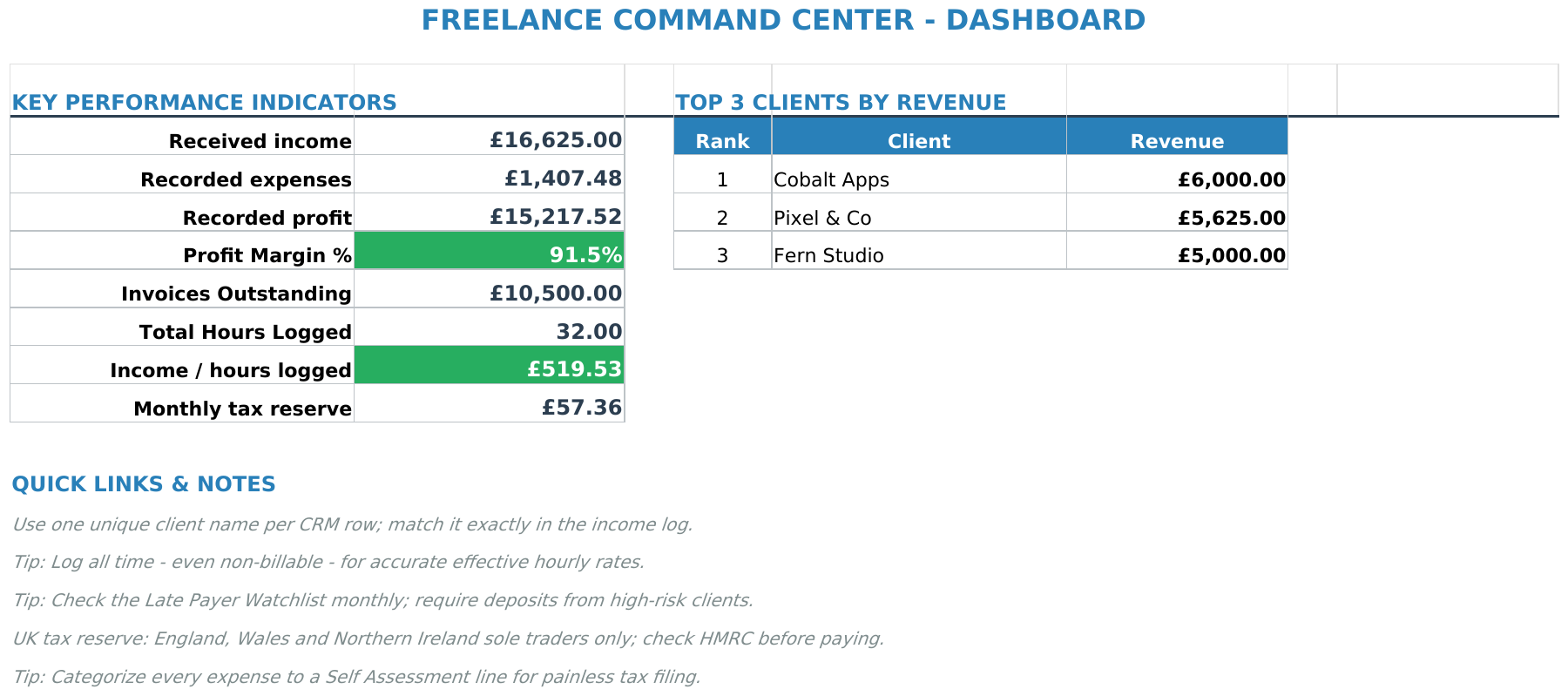
Full disclosure: we built this. The Freelance Command Center includes an expense tracker with HMRC-aligned categories, plus client tracking, income logging, tax set-aside calculations, and a dashboard showing deductions alongside your effective tax rate.
UK edition built for British finances. HMRC Self Assessment categories, National Insurance (Class 2 and Class 4) calculations, ISA allowances, and GBP formatting throughout. US edition included with IRS tax brackets, 401(k) tracking, and USD formatting.
Pros: HMRC SA103 categories built in. Running deduction totals. Tax set-aside calculator shows the net effect. Client profitability view. £14.39 one-time, no subscription.
Cons: Google Sheets only. Manual data entry. Designed for freelancers, not landlords (no SA105). Won't replace accounting software for MTD.
Verdict: If you need to track deductions alongside income, clients, and tax liability in one place without a monthly fee, this is what we built it for. Get the Freelance Command Center on Sort & Keep →
Price Comparison
| Tool | Price | Receipt Scanning | HMRC Categories | Running Totals | Tax Impact Estimate |
|---|---|---|---|---|---|
| DIY Google Sheets | Free | No | Manual setup | Yes | Manual |
| Dext | From £18/month | Yes | Partial | Via integration | No |
| FreeAgent | £24/month (or free) | Yes | Yes | Yes | Yes |
| HMRC Templates | Free to £15 | No | Yes (verify) | Sometimes | No |
| Freelance Command Center | £14.39 one-time | No | Yes (SA103) | Yes | Yes |
The Quarterly Reconciliation Habit
The single best thing you can do for your self-assessment: spend 15 minutes every three months reviewing your tracker. Four sessions per year instead of one panicked marathon in January.
Check bank statements against your tracker. Scan the last three months. Flag anything deductible you didn't log. The forgotten subscription, the mileage you didn't record, the broadband bill you've been paying without claiming.
Verify your categories. That client lunch logged as "marketing"? HMRC doesn't allow deductions for entertaining clients (unlike the US), so it should come out.
Update your receipt file. Name any receipts you photographed but didn't label properly. Download digital receipts sitting in email.
Check the running total. If deductions look low compared to last year, you're probably missing something. Suspiciously high? You may be over-claiming.
15 minutes, four times a year. One hour total replaces the 4-6 hours of January panic most sole traders endure. If you want to track income and expenses together, our guide on how to track freelance income and expenses walks through the full system.
The Bottom Line
Record expenses while the details are available and keep the receipts. That gives you a clearer record to review when preparing your return.
A tax deduction tracker spreadsheet costs two minutes per transaction. The return is typically £300-£800 in additional tax savings for basic-rate payers, double that for higher-rate. Whether you build it yourself or grab the Freelance Command Center, the key is logging expenses when they happen, not three months later.
Start with the seven-column tracker described above. Set a quarterly calendar reminder. Log expenses as they happen. The spreadsheet doesn't need to be fancy. It needs to be used. Get the Freelance Command Center for $20.28 on Sort & Keep →
Related Reads
- How to Track Freelance Income and Expenses
- Freelance Tax Calculator UK: Estimate Your Self-Assessment Bill
- Freelance Command Center Spreadsheet: Full Review
Get free spreadsheet templates and updates. New templates, feature updates, and practical guides delivered to your inbox. No spam, unsubscribe anytime.
Subscribe free → | Already have a template? Download the free budget tracker or free meal planner. Email required for delivery; newsletter optional.
Choose the right next step
Need a simple budget tracker spreadsheet? Start with the Free Budget Tracker. Use Budget Dashboard 2026 when you want budgets, debt, savings and net worth in one workbook. Choose the Complete Collection when several parts of life admin need sorting.



