
The 50/30/20 Budget Rule: Build a Simple Google Sheet
Build a simple 50/30/20 budget in Google Sheets, check your category totals and explore ready-made templates.

From Sort & Keep, the maker of the linked templates. Updated 7 September 2026. Product links show current prices and what is included.
A 50/30/20 budget gives you three broad categories for your take-home pay: needs, wants, and savings or extra debt repayments. It can be a useful starting point if you want to see where your money goes without maintaining a long list of categories.
This guide shows how to build a simple version in Google Sheets. If you prefer a ready-made workbook, you can compare the Free Budget Tracker with the Budget Dashboard 2026.
How the 50/30/20 rule works
The usual split is 50% for needs, 30% for wants and 20% for savings and extra debt repayments. The Consumer Financial Protection Bureau's spending worksheet describes this approach and invites readers to adapt it to their circumstances.
- Needs: essential costs such as housing, household bills, food, necessary transport and minimum debt payments.
- Wants: discretionary spending, such as entertainment, meals out and hobbies. What belongs here depends on your circumstances.
- Savings and extra repayments: money set aside for future costs, an emergency fund or debt payments above the required minimum.
For a fictional monthly take-home income of £3,200, the split gives £1,600 for needs, £960 for wants and £640 for savings and extra repayments. These are example allocations, not a judgement about what your own spending should be.
When the split does not fit
Housing, childcare or other essential costs may already take more than half your income. Record those costs as they are. A budget is useful when it reflects the bills you have to pay.
If your income varies, look at when money arrives as well as the monthly total. An average can hide a shortfall in a quieter month. Our payday budgeting guide covers organising bills around individual payments.
Build a simple budget in Google Sheets
1. Enter your income and targets
Put your monthly take-home income in B1. In rows 4 to 6, enter Needs, Wants and Savings in column A, then 50%, 30% and 20% in column B. Use these formulas in column C:
C4: =$B$1*B4
C5: =$B$1*B5
C6: =$B$1*B6
The cell labels above show where each formula goes; enter only the part beginning with =. Format column C as currency. Changing B1 will update the three targets.
2. Add a transaction log
In row 8, add Date, Description, Amount and Category in columns A to D. Start entering transactions in row 9. Use positive amounts for spending and savings allocations in this simple example.
Select D9:D500 and choose Insert → Dropdown. Add Need, Want and Savings as the three options, following Google's dropdown instructions. Consistent category names keep the totals working.
Record a purchase once. If you record credit-card purchases as spending, do not count the payment of that same balance as new spending as well.
3. Compare totals with your targets
Use F3, F4 and F5 for the three recorded totals:
F3: =SUMIFS(C9:C500,D9:D500,"Need")
F4: =SUMIFS(C9:C500,D9:D500,"Want")
F5: =SUMIFS(C9:C500,D9:D500,"Savings")
For the difference between each target and recorded amount, use =C4-F3, =C5-F4 and =C6-F5 in G3:G5. A positive savings difference means there is still money to allocate towards that target.
4. Make the differences easy to read
For the Needs and Wants differences, conditional formatting can highlight negative values. Give the savings row a separate rule so that saving more than the target is not shown as overspending.
5. Add a chart if it helps
A bar chart comparing targets with recorded totals can make the summary easier to scan. The numbers work without one, so add it when the basic log is useful to you.
Keep the routine manageable
Choose a regular time to update the sheet. Some people prefer a few entries each day; others work through their transactions once a week. Keep receipts or use your bank statement to fill gaps.
Review the category totals at the end of the month. If a target repeatedly does not fit, look at the underlying costs and adjust the plan. You can also try a zero-based budget if you prefer allocating each pound individually.
Check these before relying on the totals
- Use take-home income consistently rather than mixing gross and net figures.
- Include annual and irregular costs in your planning. Dividing a known annual bill by 12 gives a monthly amount to set aside.
- Keep category names consistent and check for entries beyond row 500, which the example formulas do not include.
- Use one copy of this simple sheet per month, or add date conditions to the formulas before combining several months.
Choose a ready-made template
The Free Budget Tracker is a starting point for recording income and spending. Check its product page for the supplied format and download requirements.
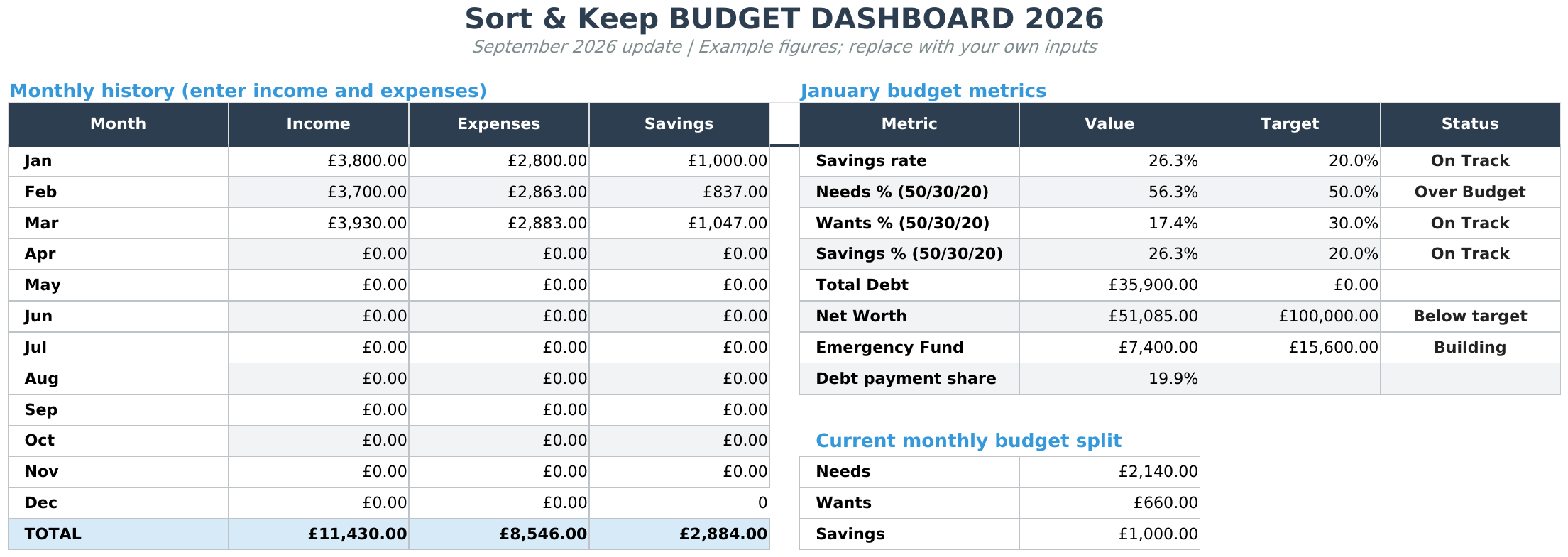
For a broader workbook covering budgets, debt, savings and net worth, see Budget Dashboard 2026. The product page shows the included sheets, example screenshots and current price.
Related guides
Try it with one month
Start with a month of actual income and spending. That gives you a useful baseline for deciding whether three categories are enough, where the targets need adjusting and what you want the spreadsheet to help you do next.
Choose the right next step
Need a simple budget tracker spreadsheet? Start with the Free Budget Tracker. Use Budget Dashboard 2026 when you want budgets, debt, savings and net worth in one workbook. Choose the Complete Collection when several parts of life admin need sorting.



