Best Budget Spreadsheet Templates in 2026

Budget spreadsheet templates compared for 2026. Free and paid options for every situation. Find the right fit.

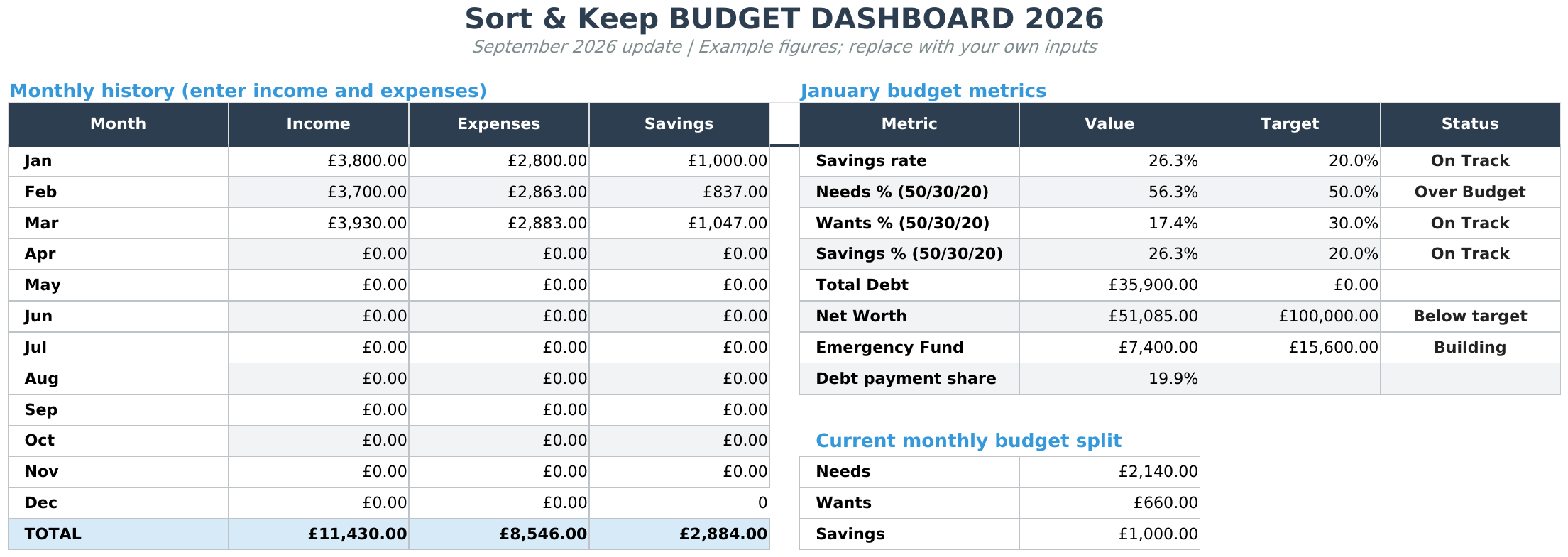
Dashboard with fictional example data from the September 2026 workbook
Actual September 2026 workbook · fictional UK example data

From Sort & Keep, the maker of the linked templates. Our current product prices update with your selected currency. Worked examples and third-party prices keep their stated currency and date.

Most budget apps want $10/month to do what a spreadsheet does for free. The real problem isn't finding a budget spreadsheet template. It's finding one you'll actually open past January. Some are free. Some cost a few pounds. A handful are genuinely worth it. Here are the main considerations. Our top pick is up front.

Best overall: Budget Dashboard 2026 by Sort & Keep. £7.99 one-time, covers budget + debt + net worth + savings goals in a single Google Sheet.

Get the Budget Dashboard 2026 →

What Makes a Good Budget Spreadsheet?

Before the list, here's what separates a template you'll use from one you'll abandon in two weeks:

  • Low setup friction. If it takes more than 15 minutes to configure, you won't finish.
  • Categorization that makes sense. "Miscellaneous" shouldn't be your biggest category.
  • Visual feedback. Charts and progress bars keep you honest.
  • Works on mobile. You'll want to log expenses from your phone.
  • Doesn't require manual math. Formulas should handle everything.

With that in mind, here's the full breakdown.


1. Sort & Keep Budget Dashboard 2026. Best All-in-One Budget Spreadsheet

Platform: Google Sheets / Excel
Price: £7.99 one-time (free lite version available)
Best for: Anyone who wants one spreadsheet to handle everything

Full disclosure: we built this one. But here's why it's at the top.

You need one spreadsheet for your monthly budget, another for debt payoff, another for net worth tracking, another for savings goals. The Budget Dashboard 2026 puts all of that in a single Google Sheet. No toggling between files. No copy-pasting between tabs.

Pros:

  • Monthly budget, net worth tracker, debt payoff calculator, and savings goals in one sheet
  • Clean dashboard with charts that update automatically
  • Couples mode with proportional income splitting
  • £7.99 one-time. No subscription, ever
  • Free lite version lets you try before buying
  • Setup takes under 10 minutes

Cons:

  • Manual transaction entry, no bank feeds
  • Fewer customization options than Tiller
Debt Payoff with fictional example data from the September 2026 workbook
Actual September 2026 workbook · fictional UK example data

The Budget Dashboard pulls budget, debt, savings, and net worth into a single view.

Verdict: This is the one I'd recommend to most people. £7.99 for a tool that replaces four separate spreadsheets, with no recurring fee. If you want budget, debt, savings, and net worth without paying monthly, this is it.

The download includes UK, US and EUR currency editions where relevant. Check the supplied instructions for the scope of any tax-reserve fields; EUR editions use manual local inputs.

Grab it on Sort & Keep for £7.99


2. Tiller Money. Best for Automation

Platform: Google Sheets / Excel
Price: $79/year (30-day free trial)
Best for: People who hate manual data entry

Tiller automatically pulls transactions from your bank accounts into a Google Sheet or Excel workbook. You get the flexibility of a spreadsheet with the automation of Mint (RIP).

Pros:

  • Automatic bank feeds. No manual entry
  • Highly customizable with community templates
  • Works with 17,000+ financial institutions
  • You own your data in your own spreadsheet

Cons:

  • $79/year adds up. That's $6.58/month
  • Bank connection breaks occasionally and needs re-linking
  • Categorization AI is hit-or-miss; you'll still do manual cleanup
  • Overkill if you only have 1-2 accounts

Verdict: The gold standard for automation, but you're paying a recurring fee for what's essentially a bank API wrapper. Worth it if you have 5+ accounts and hate logging transactions. If you'd rather skip the subscription entirely, the 50/30/20 rule template gives you a proven framework without any ongoing cost.


3. Google Sheets Built-in Budget Template. Best Free Starting Point

Platform: Google Sheets
Price: Free
Best for: Absolute beginners

Google has a "Monthly Budget" and "Annual Budget" template built right into Sheets. Go to File, New, From template gallery, and scroll to the finance section.

Pros:

  • Completely free
  • Zero setup. Just start typing
  • Clean, simple layout
  • Already in Google Sheets, so mobile-friendly by default

Cons:

  • Extremely basic. No charts, no dashboards, no goals
  • Categories are generic and limited
  • No year-over-year tracking
  • No debt payoff or net worth features

Verdict: Fine for your first month of budgeting. You'll outgrow it fast.


Platform: Google Sheets
Price: Free
Best for: Envelope budgeting fans who don't want to pay for YNAB

Aspire is an open-source Google Sheets template inspired by YNAB's envelope method. It's shockingly full-featured for something that costs nothing.

Pros:

  • Truly free, no catch
  • Envelope budgeting built in
  • Dashboard with spending charts
  • Active community on Reddit
  • Monthly reports with category breakdowns

Cons:

  • Steep learning curve. Plan for 30-45 minutes of setup
  • Google Sheets only; no Excel version
  • Can feel sluggish on mobile due to sheet complexity
  • No bank feed integration; everything is manual

Verdict: If you want YNAB's philosophy without the $14.99/month price tag, this is your best bet. Just be ready for the setup time. And if you want something in between, full-featured but quick to set up, check out our free budget tracker as a starting point.


5. Vertex42 Budget Templates. Best Variety

Platform: Excel (some Google Sheets)
Price: Free (basic) / $15-30 (premium)
Best for: Excel power users who want options

Vertex42 has been making spreadsheet templates since 2003. They offer about a dozen different budget templates: monthly, annual, household, personal, wedding. Good breadth.

Pros:

  • Huge template library with specific use cases
  • Professional formatting
  • Excellent Excel compatibility
  • Free versions are genuinely usable

Cons:

  • Premium versions feel overpriced for what you get
  • Design looks dated compared to newer options
  • Each template is standalone. No unified system
  • Limited Google Sheets support

Verdict: Great if you need a very specific template for a one-off situation. Less useful as a long-term personal finance system.


6. YNAB (You Need A Budget). Best App (Not a Spreadsheet)

Platform: Web app + mobile
Price: $14.99/month or $99/year
Best for: People who want a polished app experience

YNAB isn't a spreadsheet, but it's the benchmark every budget template gets compared against. Including it here because you should know what you're choosing between.

Pros:

  • Beautiful, intuitive interface
  • Automatic bank syncing
  • Excellent educational content
  • Goal tracking built in
  • Large, active community

Cons:

  • $14.99/month is steep. That's $180/year
  • Not a spreadsheet. Less flexible, less portable
  • Proprietary system; your data lives in their cloud
  • Learning curve for the "give every dollar a job" method

Verdict: The best budgeting app, full stop. But at $180/year, a £7.99 spreadsheet that does 80% of the same job starts looking very attractive very quickly.


7. R/personalfinance Wiki Spreadsheet. Best Bare-Bones Free Option

Platform: Google Sheets / Excel
Price: Free
Best for: Minimalists

The Reddit personal finance community maintains a simple budget spreadsheet in their wiki. It's nothing fancy: income, expenses, a summary. That's it.

Pros:

  • Dead simple
  • Free
  • Backed by a massive community
  • Easy to customize since there's not much to break

Cons:

  • Almost too simple. No charts, no goals, no tracking
  • Design is purely functional (read: ugly)
  • No documentation or setup guide
  • Hasn't been updated meaningfully in years

Verdict: Works if you literally just want income minus expenses equals savings. Nothing more.


8. Notion Budget Templates. Best for Notion Users

Platform: Notion
Price: Free (Notion is free for personal use)
Best for: People already living in Notion

Not a spreadsheet in the traditional sense, but Notion's database features can handle budget tracking. Hundreds of community templates exist.

Pros:

  • Free
  • Good-looking layouts with databases, calendars, and dashboards
  • Fits with the rest of your Notion workspace
  • Highly customizable

Cons:

  • Notion databases aren't real spreadsheets. Formulas are limited
  • No proper charts or graphs
  • Slow on mobile
  • You're trusting Notion with your financial data

Verdict: Fine if you already live in Notion. But spreadsheets are fundamentally better tools for financial math.


9. Microsoft 365 Budget Templates. Best for Excel Diehards

Platform: Excel
Price: Free with Microsoft 365 subscription
Best for: People already paying for Office

Microsoft offers a dozen budget templates inside Excel. They're polished, well-designed, and free if you already have a Microsoft 365 subscription.

Pros:

  • Professional design
  • Included with Microsoft 365, no extra cost
  • Desktop Excel performance. Fast even with lots of data
  • Good variety of templates

Cons:

  • Requires Microsoft 365 subscription ($69.99/year)
  • Mobile experience is clunky compared to Google Sheets
  • Collaboration features lag behind Google Sheets
  • Templates are standalone; no unified system

Verdict: If Excel is your home turf and you're already paying for Microsoft 365, these are solid. Otherwise, Google Sheets templates offer better value.


Price Comparison

Template Price Platform Bank Feeds Dashboard Debt Tracker Net Worth
Sort & Keep Dashboard £7.99 one-time Sheets / Excel No Yes Yes Yes
Tiller Money $79/year Sheets / Excel Yes Yes No No
Google Sheets Built-in Free Sheets No No No No
Aspire Budget Free Sheets No Yes No No
Vertex42 Free / $15-30 Excel No Some Some No
YNAB $14.99/mo Web / Mobile Yes Yes No No
Reddit PF Spreadsheet Free Sheets / Excel No No No No
Notion Templates Free Notion No Sort of No No
Microsoft 365 Free w/ sub Excel No Some No No
Monthly Budget with fictional example data from the September 2026 workbook
Actual September 2026 workbook · fictional UK example data

Even the free lite version gives you a clean monthly budget layout. The paid dashboard adds debt, net worth, and savings goal tracking on top.


So Which Budget Spreadsheet Should You Pick?

Here's the quick decision tree:

  • "I hate entering transactions manually." Tiller Money ($79/year)
  • "I've never budgeted before." Google Sheets built-in template (free)
  • "I want envelope budgeting for free." Aspire Budget (free)
  • "I want budget + debt + net worth in one place." Sort & Keep Budget Dashboard 2026 (£7.99 one-time)
  • "Money is no object, give me the best app." YNAB ($14.99/month)
  • "I just want income minus expenses." Reddit PF spreadsheet (free)
  • "I live in Notion." Notion budget template (free)
  • "I'm an Excel person." Microsoft 365 templates (free with subscription)

Budget Templates by Life Stage

A general-purpose template works for most people. But if your financial situation has specific wrinkles (irregular income, military allowances, retirement drawdown, a new baby), a template built for your life stage saves you from retrofitting a generic one.

We've built guides for each of these situations, covering the budgeting framework, the tools that work, and the ones that don't:

Family & Relationships:

Career & Income Type:

Life Stage:

Special Situations:

Budgeting Methods & Tools:


The best budget template is the one you'll actually open every week. If that's a free Google Sheet, great. If spending £7.99 on something with a proper dashboard keeps you motivated, that's a better investment than most finance apps charging monthly.

Start with the free options. If you outgrow them, upgrade. And if you're ready to skip straight to the one that covers everything, the Budget Dashboard 2026 is where to start.

Get the Budget Dashboard 2026 →


Get free spreadsheet templates and updates. New templates, feature updates, and practical guides delivered to your inbox. No spam, unsubscribe anytime.

Subscribe free → | Already have a template? Download the free budget tracker or free meal planner. No email required.

Choose the right next step

Need a simple budget tracker spreadsheet? Start with the Free Budget Tracker. Use Budget Dashboard 2026 when you want budgets, debt, savings and net worth in one workbook. Choose the Complete Collection when several parts of life admin need sorting.


UK, US and EUR editions are included where the workbook uses money. Training and habit workbooks use their existing editions.

Read more