
Best Workout Log Spreadsheets for Progressive Overload (2026)
Workout log spreadsheets and apps tested for progressive overload tracking. Here's what actually helps you get stronger. Compare options.

From Sort & Keep, the maker of the linked templates. Our current product prices update with your selected currency. Worked examples and third-party prices keep their stated currency and date.
Fitness apps in 2026 can track your heart rate, estimate calories burned during a walk, and show you a 3D animation of every muscle fiber engaged during a cable fly. What most of them can't do is answer the only question that matters for muscle growth: are you lifting more than you did last month? A good workout log spreadsheet can.
Progressive overload. Adding weight, reps, or sets over time. It's the single mechanism that forces your muscles to adapt. Not muscle confusion, not switching routines every three weeks, not training to failure on every set. Structured, measurable increases in training stimulus, tracked over weeks and months. That's what builds muscle.
We went looking for the tools that actually help you track progressive overload. The best option we found is a well-built workout log spreadsheet. One in particular stands out above the rest.
Get the Sort & Keep Strength Training Log & Progressive Overload Tracker on Sort & Keep for $6.75 →
Why Spreadsheets Beat Apps for Serious Lifters
This sounds backwards until you think about what matters at the intermediate-to-advanced stage of lifting. You already know the exercises. You already have a program. What you need is a tracking system that does exactly what you tell it to. Nothing more, nothing less.
Here's where spreadsheets win:
Customizable programming. Every serious lifter eventually runs a program that no app fully supports. Maybe you're running a GZCL variant with custom T3 accessories, or a conjugate setup with rotating max effort movements. Apps force you into their structure. A spreadsheet bends to yours.
No subscription. Strong charges $69.99/year. Hevy Pro is $89.99/year. A spreadsheet is a one-time cost, and it doesn't stop working when you cancel a payment.
Full data ownership. Your training data from the last two years lives in your Google Drive or on your hard drive. Not on a server that might shut down, change their export format, or get acquired.
Works offline in the gym. Basement gyms with no signal, commercial gyms with spotty Wi-Fi. A downloaded spreadsheet on your phone works regardless.
Tracks unconventional exercises. Good luck finding "landmine meadows row" or "1.5 rep pause squat" in an app's exercise database. A spreadsheet lets you type whatever you want.
What a Good Workout Log Spreadsheet Must Track
Not all workout log spreadsheets are equal. The minimum bar for serious progressive overload tracking:
- Exercise name with some form of categorization (muscle group, movement pattern)
- Sets, reps, and weight per exercise. The absolute basics.
- RPE or RIR (Rate of Perceived Exertion or Reps in Reserve). Because 3x8 at 185 when you're fresh is different from 3x8 at 185 when you're ground down.
- Volume load (sets x reps x weight). The best single proxy for training stimulus.
- Progressive overload indicators. Week-over-week volume comparisons, PR tracking, trend lines showing whether numbers are going up, down, or stagnant.
A spreadsheet that only records sets, reps, and weight is a diary. A spreadsheet that calculates volume load and shows you trends is a training tool. There's a significant gap between the two.
1. Free Google Sheets Gym Templates. Best Starting Point
Platform: Google Sheets
Price: Free
Best for: Beginners who want to start tracking immediately
Google's template gallery includes a handful of fitness-related templates, and there are dozens more shared freely on Reddit and lifting forums. Search "workout log template" in the Sheets template gallery and you'll find basic options.
Pros:
- Completely free, zero setup
- Mobile-friendly by default through the Google Sheets app
- Easy to customize if you know basic spreadsheet formulas
- Shareable. Hand a copy to your training partner.
Cons:
- Most free templates only track sets, reps, and weight. No volume load calculation.
- No progressive overload tracking or trend visualization
- Generic exercise lists that don't map to muscle groups
- You'll outgrow these within a month if you're serious
Verdict: Fine for your first month of tracking, the same way a notebook is fine. You'll quickly realize you need more.
2. NSuns 5/3/1 Spreadsheet. Best Free Strength Program Template
Platform: Google Sheets / Excel
Price: Free
Best for: Intermediate lifters running nSuns or any 5/3/1 variant
The nSuns spreadsheet is a Reddit legend. Originally built around Jim Wendler's 5/3/1 programming, the community has iterated on it for years. It auto-calculates your training weights based on your training max, tells you exactly what to lift each day, and tracks your maxes over time.
Pros:
- Completely free and community-maintained
- Auto-calculates training weights from your 1RM or training max
- Built-in progression logic. Tells you when to increase weight.
- Massive Reddit community (r/nSuns) for troubleshooting
- Includes accessory work tracking
Cons:
- Locked to the nSuns/5/3/1 program structure. Breaks if you deviate.
- Confusing layout; multiple tabs with dense formulas
- No RPE tracking, no volume-per-muscle-group calculations
- Doesn't handle exercise substitutions well
- Looks intimidating to anyone who isn't already familiar with the program
Verdict: If you're running nSuns or a 5/3/1 variant, this is purpose-built and excellent. Running any other program? It won't adapt. See our full 5/3/1 spreadsheet template comparison for a deeper breakdown.
3. GZCL Method Spreadsheet. Best for Tiered Programming
Platform: Google Sheets / Excel
Price: Free
Best for: Lifters running GZCL, VDIP, Jacked & Tan, or UHF
Similar to the nSuns sheet, the GZCL community spreadsheet is built specifically for Cody Lefever's tiered training method (T1 heavy compounds, T2 moderate compounds, T3 light accessories). It auto-calculates weights and progression for each tier.
Pros:
- Free and well-maintained by the community
- Supports multiple GZCL variants (LP, UHF, Jacked & Tan 2.0, VDIP)
- Tiered structure naturally organizes training by priority
- AMRAP tracking for progression decisions
- Clean layout compared to nSuns
Cons:
- Only works for GZCL-family programs
- Progression logic is program-specific. Can't generalize.
- No volume load or progressive overload visualization beyond the program's built-in progression
- No RPE or fatigue tracking
- Accessory tracking is minimal
Verdict: The best way to run a GZCL program. Not useful for anything else.
4. Strong / Hevy / FitNotes. Best Apps (Not Spreadsheets)
Platform: iOS and Android
Price: Strong: Free (limited) / $69.99/year. Hevy: Free (limited) / $89.99/year. FitNotes: Free (Android only).
Best for: Lifters who prioritize speed of logging over depth of analysis
Including these because they're the most common alternative to a workout log spreadsheet, and you should know the trade-offs.
Strong has the cleanest interface. Logging a set takes about 5 seconds. It tracks PRs and shows basic charts. The free tier limits you to 3 routines.
Hevy has the best social features and a larger exercise database. Progress charts are decent. The free tier shows ads and limits history exports.
FitNotes is Android-only, completely free, and surprisingly capable. No social features, no cloud sync, just solid local tracking with volume charts.
Pros (general):
- Fastest logging experience. Optimized for between-set input.
- Rest timer built in
- Exercise databases with 500+ movements
- Basic PR tracking and progress charts
Cons (general):
- Subscription pricing adds up ($70-90/year for premium features)
- Limited customization. You use their structure or nothing.
- Data export is often CSV-only, hard to analyze further
- No volume load calculations, no periodization support
- No RPE tracking (Strong) or limited RPE (Hevy)
- Proprietary data. If the company shuts down, your history goes with it.
Verdict: Best for pure logging speed. Worst for serious analysis, periodization, or anyone who wants to own their data long-term.
5. Sort & Keep Strength Training Log & Progressive Overload Tracker. Best All-in-One Spreadsheet
Platform: Google Sheets / Excel
Price: $6.75 one-time
Best for: Intermediate-to-advanced lifters who want data-driven training in any program
Full disclosure: we built this one. We built it because everything above either locks you into one program or stops at basic logging. Neither is good enough for a lifter who's been at it for more than a year.
This is a workout log spreadsheet built around the question most trackers ignore: is your training stimulus actually increasing over time? It tracks volume load per exercise and per muscle group, estimates your 1RM from working sets using both Epley and Brzycki formulas, and shows week-over-week progressive overload with color-coded indicators. Green means progress. Red means regression. Yellow means maintenance. No guessing required.
It works with any program. Push/pull/legs, upper/lower, full body, bro split, conjugate, whatever. You bring the programming. The spreadsheet handles the math and the visualization. For a full walkthrough of how it handles progressive overload specifically, see our complete feature breakdown.
Pros:
- Tracks volume load, progressive overload trends, and estimated 1RM automatically
- 150+ exercises pre-categorized by muscle group and movement pattern
- RPE tracking per set with fatigue trend analysis
- Periodization planner with phase-appropriate volume targets
- Works with any training program or split
- $6.75 one-time. Less than one month of any premium app.
- Google Sheets and Excel compatible
- Mobile-optimized logger built for between-set speed
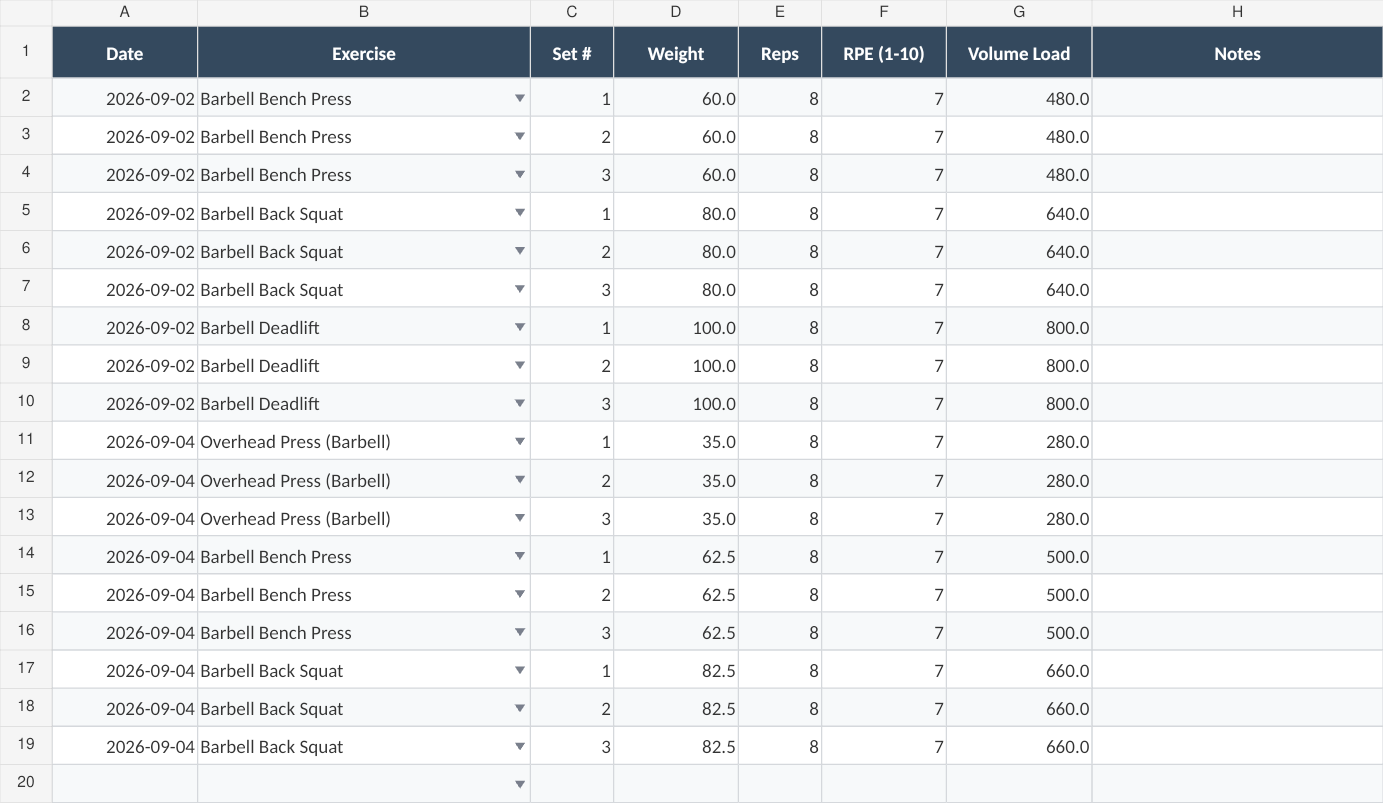
The logging view is built for speed between sets. Tap in weight, reps, and RPE, and volume load calculates instantly. Color-coded cells flag when you've exceeded or fallen short of last week's numbers.
Cons:
- Manual data entry (no barcode scanning or wearable integration)
- Newer product. Smaller community than Reddit-born templates.
- Requires Google Sheets or Excel (no standalone app)
Verdict: This is the one. Volume tracking, progressive overload indicators, 1RM estimation, periodization support, RPE per set, per-muscle-group fatigue. At $6.75 one-time, it's less than a protein bar and it doesn't run out. Grab it for $6.75 on Sort & Keep →
Sort & Keep fitness templates come in UK and US editions. Kg/press-ups/personal bests or lbs/push-ups/personal records. Same programming science, your preferred units.
Programming Features That Actually Matter
Beyond basic logging, here are the spreadsheet features that separate productive training from spinning your wheels:
1RM Calculators
Knowing your estimated one-rep max lets you program training weights as percentages. If your estimated squat 1RM is 315, you know that 245 (78%) is appropriate for strength work and 205 (65%) is hypertrophy range. Without this, you're guessing.
The best spreadsheets calculate e1RM automatically from your working sets. You log 225x6 on bench, and the tracker tells you your estimated max is approximately 261 (Epley) or 254 (Brzycki). Over weeks, you watch that number climb.
Periodization Tracking
Linear progression (add 5 pounds every session) stops working after your first year. After that, you need periodization: structured training phases that manipulate volume and intensity over weeks. A hypertrophy block (higher volume, moderate weight) followed by a strength block (lower volume, heavier weight) followed by a deload.
A workout log spreadsheet that supports periodization lets you set phase targets and flags when your actual training drifts outside those targets. Training in a hypertrophy block but your volume is below your minimum effective volume? The spreadsheet should tell you. If you want to understand how to set this up in Google Sheets yourself, our guide on tracking progressive overload in Google Sheets walks through it step by step.
Deload Week Flagging
Most lifters either never deload (and wonder why they feel beaten up after 8 weeks) or deload too often (and wonder why they're not progressing). Smart spreadsheets track cumulative fatigue indicators. RPE creeping up at the same weight. Volume stalling despite effort. Then flag when a deload makes sense.
Body Measurement Logging
Bodyweight alone is misleading. A lifter who gains 5 pounds over 3 months might have added muscle, fat, or water. Tracking waist, chest, arm, and thigh measurements alongside bodyweight tells a much more complete story. The 4-week moving average matters more than any single weigh-in.
Workout Density Tracking
Total volume divided by total session time. If you did the same volume in 45 minutes that used to take 60 minutes, your work capacity improved. Even if the weight on the bar didn't change. This is an underrated progress metric that almost no tracker measures.
Common Tracking Mistakes That Kill Progress
We see these patterns repeatedly in lifting forums, and every one of them is a tracking problem disguised as a training problem.
Tracking too many variables. If you're logging sets, reps, weight, RPE, rest time, tempo, grip width, mood, sleep quality, and what you ate for breakfast, you'll burn out on tracking before the data becomes useful. Start with sets, reps, weight, and RPE. Add variables later only if they answer a specific question.
Not tracking volume load. "I did 3x10 at 135 last week and 3x8 at 145 this week." Which session had more training stimulus? Most lifters can't answer this without a calculator. Volume load makes it obvious: 4,050 vs 3,480. You actually did less work despite using more weight. A good workout log spreadsheet calculates this automatically so you never train blind.
Changing exercises too often to see trends. If you switch from barbell bench to dumbbell bench to machine press every three weeks, you have no trend data for any of them. Progressive overload requires consistent exercise selection for at least 4-6 weeks. Track the same movements long enough to see whether the numbers are moving.
Ignoring per-muscle-group volume. You might be doing 20 sets per week for chest (plenty) and 8 sets per week for back (not enough). Without a spreadsheet that aggregates volume by muscle group, including secondary muscles from compound movements, these imbalances stay invisible until they become injuries.
Never reviewing the data. A workout log you fill in but never analyze is just a ritual. Block 15 minutes every Sunday to review the past week: what went up, what went down, what stayed flat. This is where spreadsheets earn their keep. The dashboard tells the story at a glance.
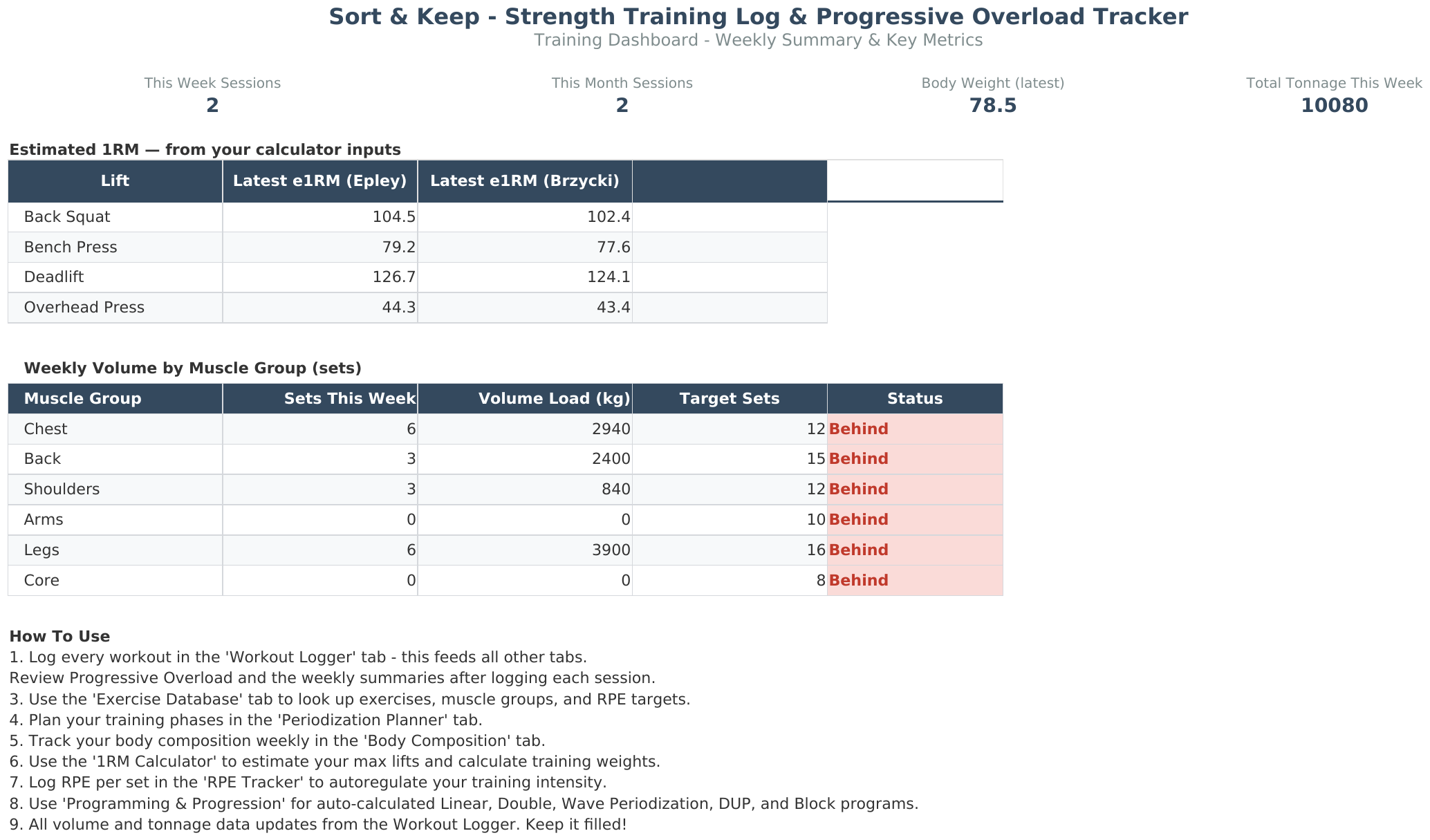
The training dashboard during a weekly review. Green indicates progressive overload, red flags regression, and the volume-per-muscle-group chart immediately surfaces imbalances like undertrained back volume.
Which Workout Log Spreadsheet Should You Pick?
Here's the quick decision tree:
- "I just started lifting and want something simple." --> Free Google Sheets template (free)
- "I'm running nSuns or 5/3/1." --> nSuns community spreadsheet (free)
- "I'm running a GZCL variant." --> GZCL community spreadsheet (free)
- "I want the fastest possible logging between sets." --> Strong or Hevy app ($70-90/year)
- "I want serious progressive overload tracking with any program." --> Sort & Keep Strength Training Log ($6.75)
The program-specific spreadsheets are excellent at what they do, but they do exactly one thing. The apps are fast but shallow. If you want depth of analysis. Volume trends, 1RM estimation, periodization support, per-muscle-group tracking. Without being locked into a single program, a dedicated workout log spreadsheet built for progressive overload is the tool that scales with you.
Compare a free log with the workbook previews before deciding which fits your training records. The Strength Training Log & Progressive Overload Tracker at $6.75 is available as a one-time purchase. Get it on Sort & Keep for $6.75 →
Related Reads
- Strength Training Log & Progressive Overload Tracker: Full Feature Breakdown
- Best 5/3/1 Spreadsheet Template: Free and Paid Options Compared
- How to Track Progressive Overload in Google Sheets
- Budget Spreadsheet Templates 2026: Compare Free and Paid Options
Get free spreadsheet templates and updates. New templates, feature updates, and practical guides delivered to your inbox. No spam, unsubscribe anytime.
Subscribe free → | Already have a template? Download the free budget tracker or free meal planner. Email required for delivery; newsletter optional.
Choose the right next step
The Strength Training Log is a progressive-overload tracker spreadsheet and workout log for Google Sheets or Excel, built for recording the work and deciding what to increase next.



