
Budget Template for Expats: Managing Money Across Two Countries
Budget template for expats managing money across two countries. Multi-currency tracking, FX costs, and dual tax obligations. Get the template.

From Sort & Keep, the maker of the linked templates. Our current product prices update with your selected currency. Worked examples and third-party prices keep their stated currency and date.
Your salary lands in euros. Your mortgage back home is in pounds. Your parents' birthday gifts go out in the currency you grew up with, your groceries come off a card denominated in something else entirely, and once a quarter you wire money between countries and lose somewhere between 2% and 5% without fully understanding where it went.
This is the default state of expat finances. Not chaotic because you're bad with money; chaotic because no single budgeting tool was designed for someone whose financial life spans borders, currencies, and tax jurisdictions. We know, because we've lived it.
Most broke within the first month. Here's what works, what doesn't, and how to build a budget that treats your two-country life as normal rather than an edge case.
Why You Need a Budget Template for Expats
The 50/30/20 rule is a solid starting point for most people. For expats, it falls apart in four specific ways.
Currency conversion eats your budget silently. If you earn in euros and send money home in pounds, the exchange rate on transfer day changes how much actually arrives. A 2% swing on a monthly transfer of EUR 2,000 is EUR 40; nearly EUR 500 a year. Use a high-street bank instead of a specialist service and the markup alone costs 3-5% per transaction. Your budget says you transferred EUR 2,000. Your UK account received the equivalent of EUR 1,900. The budget doesn't capture that gap.
You have expenses in two countries. Rent and groceries in your host country. A mortgage, storage unit, insurance, or family obligations at home. Maybe pension contributions in both places. A standard budget with one currency and one set of categories can't hold this without becoming a mess of manual conversions.
Tax obligations multiply. The UK has double taxation treaties with over 130 countries, but "double taxation treaty" doesn't mean "no tax"; it means you won't be taxed twice on the same income. You may still need to file in both places. US citizens are taxed on worldwide income regardless of residence, with a Foreign Earned Income Exclusion covering $126,500 (2024) that requires careful documentation. Your budget needs to set aside for both obligations.
Emergency funds need to exist in two currencies. If you lose your job in Berlin, you need euros for next month's rent. If there's a family emergency at home, you need pounds available immediately; not euros that take three days to convert. A single-currency emergency fund is half an emergency fund when your life spans two countries.
The Expat Budget Framework
Before choosing a tool, you need the right framework. Here's the approach that actually works across borders.
Step 1: Choose a Base Currency
Pick one currency as your budgeting currency. This should be the currency you earn in, since that's the number you can predict. Everything else gets converted to this base currency for tracking purposes. You'll still hold and spend in multiple currencies, but your budget speaks one language.
If you earn EUR 4,500/month in the Netherlands, your base currency is euros. Your UK mortgage of £850 gets recorded at whatever the conversion rate was when you actually transferred the money; not the mid-market rate, not the rate you wish you'd gotten. The rate you actually paid.
Step 2: Map All Income Sources (with Currency)
| Source | Currency | Monthly Amount | Base Currency Equivalent |
|---|---|---|---|
| Salary | EUR | 4,500 | EUR 4,500 |
| UK rental income | GBP | 600 | ~EUR 700 |
| Freelance work | USD | 500 | ~EUR 460 |
| Total | ~EUR 5,660 |
The "approximately" matters. Those GBP and USD figures shift every month. Your budget should record the actual converted amount each month, not a fixed estimate.
Step 3: Split Expenses by Country
Host country (where you live):
- Rent, utilities, groceries, transport, healthcare, social life, local taxes
Home country (where obligations remain):
- Mortgage or rent, insurance, pension contributions, family support, storage, subscriptions, tax payments
Cross-border:
- Transfer fees, currency conversion costs, flights home (2-4 times a year at £150-400 per trip adds up fast), international health insurance, VPN and streaming subscriptions that work in both countries
Most expats we've spoken to find their cross-border costs run ~EUR 200-500/month; money that effectively disappears if you're not tracking it as its own category.
Step 4: Track FX Rates on Every Transfer
Every time you move money between countries, log the date, amount sent, amount received, and the effective exchange rate. If you transferred EUR 2,000 and received GBP 1,680, your effective rate was 0.84. The mid-market rate that day might have been 0.855. That gap is £30 per transfer; £360 a year. Tracking makes it visible. Visible costs get optimised.
Step 5: Fund Emergency Reserves in Both Currencies
We recommend three months of local expenses in your host country currency and three months of home-country fixed obligations in your home currency. For a typical expat with EUR 2,200/month in local expenses and £1,200/month in UK obligations: EUR 6,600 in a euro savings account and £3,600 in a UK savings account. More capital tied up than a single-currency fund, yes; but the alternative is needing £3,600 urgently and discovering that a rush Friday afternoon transfer costs you 4% and takes until Tuesday to arrive.
Budget Tools and Approaches for Expats: Options to compare
1. Multi-Currency Banking Apps (Wise, Revolut)
Platform: Mobile + web
Price: Free tier available; Wise charges 0.35-1% per conversion, Revolut free tier allows GBP 1,000/month fee-free exchange (then 0.5%)
Best for: Expats who want cheap conversions and multi-currency holding
Compare transfer services using the currencies, fees and rates offered for your transaction. Record the amount sent, the fee and the amount received in your budget.
Pros:
- Dramatically cheaper transfers (0.35-1% vs. 3-5% at traditional banks)
- Hold balances in multiple currencies simultaneously
- Local bank details in several countries (Wise: USD, GBP, EUR, AUD, etc.)
Cons:
- Not a budgeting tool; no expense categories, no budget tracking, no goals
- Revolut free tier has monthly exchange limits (then 0.5% markup)
- Neither handles tax set-aside or cross-border tax obligations
Verdict: Essential infrastructure, not a complete solution. Use Wise or Revolut for transfers, then pair with a proper budgeting tool. If you're still using your high-street bank for international transfers, switching to Wise alone will save you £400-600 a year.
2. Google Sheets with Live FX Rates
Platform: Google Sheets
Price: Free
Best for: Expats who want full control and don't mind building their own system
Google Sheets has a built-in function most people don't know about: =GOOGLEFINANCE("CURRENCY:EURGBP") returns the current EUR/GBP exchange rate. This means you can build a spreadsheet where your home-country expenses automatically convert to your base currency at live rates. We built one. It took about three hours to get something functional; income tracker with currency column, dual-country expense sheets, FX rate log, and a dashboard. It worked, but it was fragile. The GOOGLEFINANCE function occasionally returns errors, historical rate lookups are limited, and every new expense category or currency pair means more formula maintenance.
Pros:
- Free and fully customisable
- Live FX rates via GOOGLEFINANCE
- Can model any complexity (dual tax, pension comparison, FX tracking)
Cons:
- Three-plus hours to build, ongoing maintenance
- GOOGLEFINANCE is unreliable; rates sometimes lag or error out
- No mobile-friendly input (Google Sheets on a phone is painful)
Verdict: The most powerful option if you have the patience. Most expats start here, get it working, then stop updating it because entering expenses on a phone in a foreign supermarket isn't fun. If you want a pre-built starting point, our free budget tracker (Sort & Keep) saves the first two hours of setup; add currency columns and FX formulas on top.
3. Expat-Specific Apps (Nova Money, Toshl)
Platform: Mobile + web
Price: Toshl Pro ~$3/month, Nova Money free tier + premium
Best for: Expats who want dedicated multi-currency expense tracking on mobile
Toshl Finance handles multiple currencies natively. You set a base currency, and every expense you log in a foreign currency gets automatically converted at the rate on that date. Nova Money was built specifically for expats and digital nomads, with multi-currency wallets and location-based expense tracking.
Pros:
- Multi-currency support is core, not bolted on
- Mobile-first (actually usable for daily expense entry)
- Automatic currency conversion at point of entry
Cons:
- Limited budgeting framework (categories and limits, but no dual-country structure)
- No tax tracking or pension comparison features
- Smaller apps with smaller teams; longevity risk
Verdict: Best option for day-to-day multi-currency expense tracking. But neither app provides the strategic layer; tax obligations, pension comparison, emergency fund targets across currencies. You still need a spreadsheet for the big picture.
4. Traditional Accounting Software (YNAB, Monarch Money)
Platform: Web + mobile
Price: YNAB $14.99/month, Monarch Money $9.99/month
Best for: Expats who want a mature budgeting platform and can work around currency limitations
YNAB is arguably the best budgeting software available. Its envelope method; every pound/euro/dollar gets a job; works brilliantly for the discipline side of budgeting. Monarch Money offers similar features with bank syncing and a cleaner interface. The problem: neither handles multiple currencies well. YNAB operates in a single currency. You can manually convert expenses, but it doesn't track FX rates or show conversion costs. Monarch has the same limitation.
Pros:
- Mature, well-designed budgeting methodology (especially YNAB)
- Bank syncing in supported countries
- Strong reporting and trend analysis
Cons:
- Single-currency only; multi-currency is manual and clunky
- No FX rate tracking or conversion cost visibility
- YNAB at $14.99/month is $180/year; steep for a tool that doesn't fully fit
Verdict: If you're already a YNAB user and your expat situation is simple (one foreign income, one home-country mortgage), you can make it work with manual conversions. If you're starting fresh as an expat, the single-currency limitation is a dealbreaker at that price.
5. Pre-Built Budget Spreadsheets with Manual FX Layer
Platform: Google Sheets / Excel
Price: Free to $10 one-time
Best for: Expats who want structure without building from scratch, and who don't mind a monthly FX update
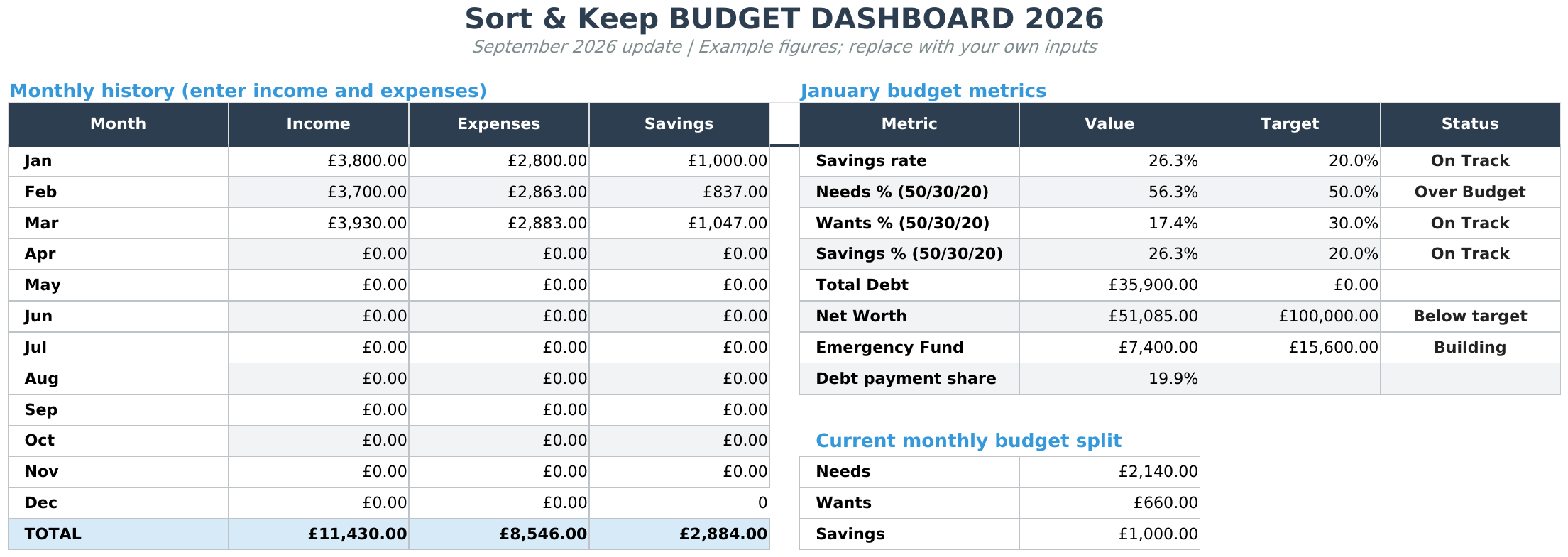
This is the approach we've settled on recommending for most expats. Take a well-structured budget template and add a currency layer on top. The Budget Dashboard 2026 (Sort & Keep) at $10.81 already handles multiple income sources, categorised expenses, net worth tracking, and monthly/yearly views. For expat use, add a "Currency" column to the income and expense tabs, a simple FX rate reference table you update monthly, and a conversion formula that translates everything to your base currency. Thirty minutes of customisation versus three hours of building from scratch, and the core template is already tested and stable.
UK edition built for British finances. HMRC Self Assessment categories, council tax tracking, National Insurance (Class 2 and Class 4) calculations, ISA allowances, and GBP formatting throughout. US edition included with IRS tax brackets, 401(k) tracking, and USD formatting.
Pros:
- Pre-built structure saves hours of setup
- One-time cost, no subscription
- Full control to add expat-specific features (FX log, dual emergency fund, tax tracker)
- Net worth tracking works across currencies with the FX layer
Cons:
- Requires manual FX rate updates (monthly is fine for budgeting)
- Some spreadsheet comfort required for customisation
- No bank syncing
Verdict: Best balance of structure, cost, and expat-relevance. For most people, the Budget Dashboard 2026 (Sort & Keep) plus 30 minutes of customisation gives you a more useful expat budget than a $15/month app that still can't track your pension in two countries.
Features a Budget Template for Expats Must Include
Whatever tool you choose, make sure it can handle these; natively or through customisation.
Multi-Currency Tracking
Every income source and expense should have a currency tag. Your budget should show both the local currency amount and the base currency equivalent. Most templates only have one currency column, and manually converting everything at month-end means you're using one rate for 30 days of transactions at different rates.
FX Rate Log
A simple table that records: date of transfer, amount sent, amount received, effective rate, mid-market rate that day, and the cost (difference between the two). Over 12 months, this log will tell you exactly how much currency conversion costs you and whether your transfer method is competitive.
| Date | Sent | Received | Effective Rate | Mid-Market | Cost |
|---|---|---|---|---|---|
| 1 Mar | EUR 2,000 | GBP 1,690 | 0.845 | 0.856 | GBP 22 |
| 1 Apr | EUR 2,000 | GBP 1,714 | 0.857 | 0.861 | GBP 8 |
| 1 May | EUR 2,000 | GBP 1,676 | 0.838 | 0.849 | GBP 22 |
Three months, GBP 52 in conversion costs. Annualised, that's over GBP 200; and that's with a decent provider. A high-street bank would be three to four times that.
Tax Residency Tracker
You need to know how many days you've spent in each country each tax year. The UK's Statutory Residence Test has a 183-day threshold as its simplest rule, but the actual test considers ties, work patterns, and previous residence. Other countries have similar day-count rules. A simple tracker that logs which country you're in each day and sums by tax year can prevent a nasty surprise when you discover you've accidentally become tax resident somewhere you didn't intend.
Pension Contribution Comparison
If you're contributing to a pension in your host country and have a pot back home, you need a side-by-side comparison: local contribution requirements, employer match, pension age (UK State Pension is currently 66, rising to 67), and whether cross-border transfers are possible or advisable. Even a simple summary table updated annually helps you make informed decisions.
Remittance Tracking
Record each cross-border transfer, including the currencies, exchange rate and fees. Keep the supporting records and check any tax questions against current official guidance or with a qualified adviser.
Dual Emergency Fund Calculator
A simple calculator that shows: host country monthly essential expenses multiplied by three (target emergency fund in local currency) and home country monthly obligations multiplied by three (target emergency fund in home currency). Display both targets, both current balances, and the percentage funded. When both hit 100%, your two-country safety net is in place.
Price Comparison
| Approach | Price | Multi-Currency | FX Tracking | Tax Support | Dual Emergency Fund |
|---|---|---|---|---|---|
| Wise/Revolut (transfers only) | Free/low-cost | Yes | Partial | No | No |
| DIY Google Sheets | Free | Manual | Manual | Manual | Manual |
| Expat apps (Toshl, Nova) | ~$3/month | Yes | Automatic | No | No |
| YNAB / Monarch | $10-15/month | No (single) | No | No | No |
| Budget Dashboard + FX layer | $10.81 one-time | Manual + formulas | Manual | Manual | Manual |
What We Actually Recommend
Here's the setup that works.
For transfers: Wise. Transparent fees, near-mid-market rates, and you can hold balances in both currencies to transfer when rates are favourable rather than when your mortgage is due tomorrow.
For day-to-day tracking: Toshl if you want an app, the Budget Dashboard 2026 (Sort & Keep) if you want a spreadsheet.
For the big picture: A spreadsheet. No app handles pension comparison, tax residency tracking, dual emergency funds, and FX cost analysis in one place. The Budget Dashboard (Sort & Keep) gives you income tracking, expense categories, and net worth monitoring as a foundation. Add tabs for FX log, tax residency day-count, and dual emergency fund targets. Or start free with our budget tracker (Sort & Keep) and build the expat layer on top.
For tax: Talk to an accountant who specialises in expat tax. Budget £300-500 for an annual consultation; it will save you multiples of that in avoided mistakes.
Total cost: $7.99 once for the dashboard, zero ongoing fees for Wise, and a monthly update habit. Compare that to $180/year for YNAB that still can't track two currencies.
The Bottom Line
Managing money across countries means keeping track of currencies, payment dates and records from several providers.
Choose a base currency for your records and log each transfer with its fees and exchange rate. The best budget templates provide the structure. The expat layer; FX tracking, dual emergency funds, tax residency days; is what makes it reflect your life.
Get that right, and the two-country chaos becomes a two-country system. Your budget stops lying to you, and you stop discovering at year-end that currency conversion quietly ate three holidays' worth of money.
Related Reads
- The 50/30/20 Budget Rule: Build a Simple Google Sheet
- How to Track Your Net Worth in Google Sheets
- Budget Spreadsheet Templates 2026: Compare Free and Paid Options
Get free spreadsheet templates and updates. New templates, feature updates, and practical guides delivered to your inbox. No spam, unsubscribe anytime.
Subscribe free → | Already have a template? Download the free budget tracker or free meal planner. Email required for delivery; newsletter optional.
Choose the right next step
Need a simple budget tracker spreadsheet? Start with the Free Budget Tracker. Use Budget Dashboard 2026 when you want budgets, debt, savings and net worth in one workbook. Choose the Complete Collection when several parts of life admin need sorting.



