
Budget Template for Remote Workers: Home Office Costs & Tax Relief
Budget template for remote workers handling home office costs, utility splits, and HMRC tax relief. Five approaches tested. Find the right fit.

From Sort & Keep, the maker of the linked templates. Our current product prices update with your selected currency. Worked examples and third-party prices keep their stated currency and date.
You stopped commuting. You saved £5,000 a year on trains. And then you opened your January energy bill.
Remote work is sold as a financial win, and on the surface the numbers check out. No season ticket. No £3.50 coffee from the Pret next to the office. But nobody warns you about the costs that creep in from the other direction: your electricity bill climbing 20-30% because you're heating a house all day, the £400 ergonomic chair your back demanded after three months on a dining chair, the broadband upgrade from "good enough for Netflix" to "can handle four hours of Zoom without dropping," and the slow, invisible bleed of running a home office that your employer used to pay for.
Label work-related costs clearly when they share a bill with household spending. Keep the supporting records and check their treatment separately.
Here's what actually works.
Why You Need a Budget Template for Remote Workers
If you used the 50/30/20 rule when you commuted to an office, your budget categories made sense. Income came in, fixed costs went out, and the line between "work expense" and "personal expense" was clear because your employer paid for the office.
Remote work blurs that line in three specific ways:
Your home is now a workplace, but your bills don't split themselves. Your electricity bill doesn't have a line item for "powered the laptop and desk lamp for 8 hours." Your broadband serves both your job and your evening streaming. Without a system for calculating your work-use percentage, you're either absorbing costs your employer should cover or missing tax relief you're entitled to.
Equipment costs shift to you. In an office, the employer provides the desk, chair, monitor, keyboard, and headset. At home, you buy your own. A basic setup; monitor (£250), ergonomic chair (£300-600), keyboard and mouse (£80), headset (£60); runs £700-1,000. That cost doesn't appear in traditional budgets because it used to be someone else's problem.
Tax relief exists, but most people don't claim it. Check current HMRC guidance on eligibility and record-keeping before claiming work-from-home costs. Keep records of the costs you incur and the method you use.
Include the costs that apply to your own working arrangements.
The Remote Worker Budget Framework
Instead of forcing remote work costs into a standard budget, we use a five-layer framework:
Layer 1; Base Personal Budget
Start with a standard monthly budget: income, fixed costs (rent/mortgage, council tax, food, insurance, subscriptions), variable spending, savings. This is your foundation. If you've already got a working budget from the best budget spreadsheet templates for 2026, keep using it.
Layer 2; Home Office Running Costs
These are the ongoing costs of working from home. The big three:
- Energy. The average UK household spends around £1,568/year on gas and electricity (2026 price cap). Working from home full-time adds roughly 20-30% to your electricity bill and 10-15% to your gas bill (heating an extra room during the day). That's £250-450 per year in additional energy costs.
- Broadband. If you upgraded from a basic package to a faster one for work, the difference is a work cost. Typical upgrade: £10-20/month, or £120-240/year.
- Consumables. Printer paper, ink, stationery, coffee (yes, the coffee you'd have bought at work anyway). Small individually, but they add up to £15-30/month.
Layer 3; Equipment Amortisation
Home office equipment doesn't cost £1,000 in one month. It costs £1,000 spread over its useful life. Amortising these costs gives you a realistic monthly figure instead of a budget-wrecking spike in the month you bought them.
A reasonable home office setup amortised monthly:
| Item | Cost | Lifespan | Monthly Cost |
|---|---|---|---|
| Ergonomic chair | £450 | 8 years | £4.69 |
| Monitor (27") | £250 | 5 years | £4.17 |
| Keyboard & mouse | £80 | 4 years | £1.67 |
| Headset | £60 | 3 years | £1.67 |
| Desk | £200 | 10 years | £1.67 |
| Desk lamp | £40 | 5 years | £0.67 |
| Total | £1,080 | £14.54 |
£14.54/month. That's what your home office actually costs when you spread it properly. Most people either ignore this completely or panic about the upfront number.
Layer 4; Tax Relief Claims
HMRC offers two routes for working-from-home tax relief:
- Flat rate: £6/week (£312/year). No evidence needed. You just claim it. At 20% tax, that's £62.40 back. At 40%, it's £124.80.
- Actual costs: Calculate the proportion of your home used for work and claim that percentage of household bills (energy, broadband, council tax, mortgage interest or rent). If your home office is 10% of your floor area and household costs are £15,000/year, that's a £1,500 claim; £300 at basic rate or £600 at higher rate.
Most people take the flat rate because it's easy. If your actual costs are higher (and for anyone with a dedicated office room, they usually are), the extra paperwork pays for itself.
Layer 5; Commute Savings Reallocation
This is the part people get wrong. You saved money on commuting, so you feel richer. But if that money dissolves into general spending, you haven't gained anything. The average UK rail commuter spends £4,800-5,400/year on a season ticket. Even a car commuter saves £1,800/year on fuel and parking. That money should go somewhere deliberate; savings, pension, home office upgrades, or debt. Not into "I don't know, it just sort of. Went."
Budget Templates and Tools for Remote Workers: Options to compare
1. Basic Spreadsheet (Google Sheets / Excel)
Platform: Google Sheets or Excel
Price: Free
Best for: Remote workers who want full control and know their way around formulas
You can build a remote worker budget from scratch. We did. It took about three hours: base budget, utility split calculator, equipment depreciation schedule, and a tax relief estimate.
Pros:
- Completely free
- Total flexibility to model your exact situation
- You can build the utility split calculation precisely for your home
- No data leaves your device (Excel) or your Google account
Cons:
- Three hours of setup, and it still looked rough
- Utility split formulas are fiddly; one wrong cell reference and your numbers are off
- No reminders for tax relief deadlines
- Equipment depreciation schedule needs manual updates when you buy or replace items
Verdict: Works if you enjoy the building process. For most people, three hours of setup is a barrier that means they never start. Our free budget tracker (Sort & Keep) handles the base budget layer without the build time; you'd add remote-specific features yourself.
2. Expense Tracking Apps (Emma, Plum, Cleo)
Platform: iOS / Android
Price: Free tiers available; premium £4-10/month
Best for: Remote workers who want automatic transaction categorisation
Banking aggregators connect to your accounts and auto-categorise spending. Tag work-related transactions and the app separates them from personal spending.
Pros:
- Automatic transaction import; no manual entry
- Can tag expenses as "work" or "personal" after the fact
- Good for spotting spending creep (that broadband upgrade, the extra heating)
- Real-time notifications on spending
Cons:
- Can't split a single bill between work and personal (your electricity bill is one transaction)
- No utility percentage calculator; the core remote work budgeting problem remains unsolved
- No equipment amortisation tracking
- No tax relief calculation
- Premium features (the ones that actually help) cost £5-10/month, or £60-120/year
Verdict: Fine for general spending awareness, but they can't tell you that 25% of your electricity bill is a work expense. Useful as a companion to a spreadsheet, not as a replacement.
3. HMRC Tax Relief Calculator (Gov.uk)
Platform: Web (gov.uk)
Price: Free
Best for: UK remote workers who just want to claim the tax relief and nothing else
HMRC's online portal lets you claim working-from-home tax relief directly. For the flat-rate claim (£6/week), you don't need to file a Self Assessment; apply for a tax code adjustment through your personal tax account.
Pros:
- Direct from HMRC; no intermediary
- Flat-rate claim takes about 10 minutes
- Tax code adjustment means the relief comes through your payslip automatically
- Free
Cons:
- Only handles the tax relief claim; not a budgeting tool at all
- Doesn't help you calculate actual costs if you want to claim more than the flat rate
- No tracking, no reports, no budget categories
- Interface is functional but basic (it's a government website)
Verdict: Every UK remote worker should do this regardless of what other tools they use. It's £62-125/year you're leaving on the table if you don't spend ten minutes on it. For the flat rate, go to gov.uk and search "tax relief for working from home." For actual costs, track expenses separately and claim through Self Assessment.
4. Budget Dashboard 2026 + Remote Work Customisation
Platform: Google Sheets
Price: $10.81 one-time
Best for: Remote workers who want a polished budget with room to add home office tracking
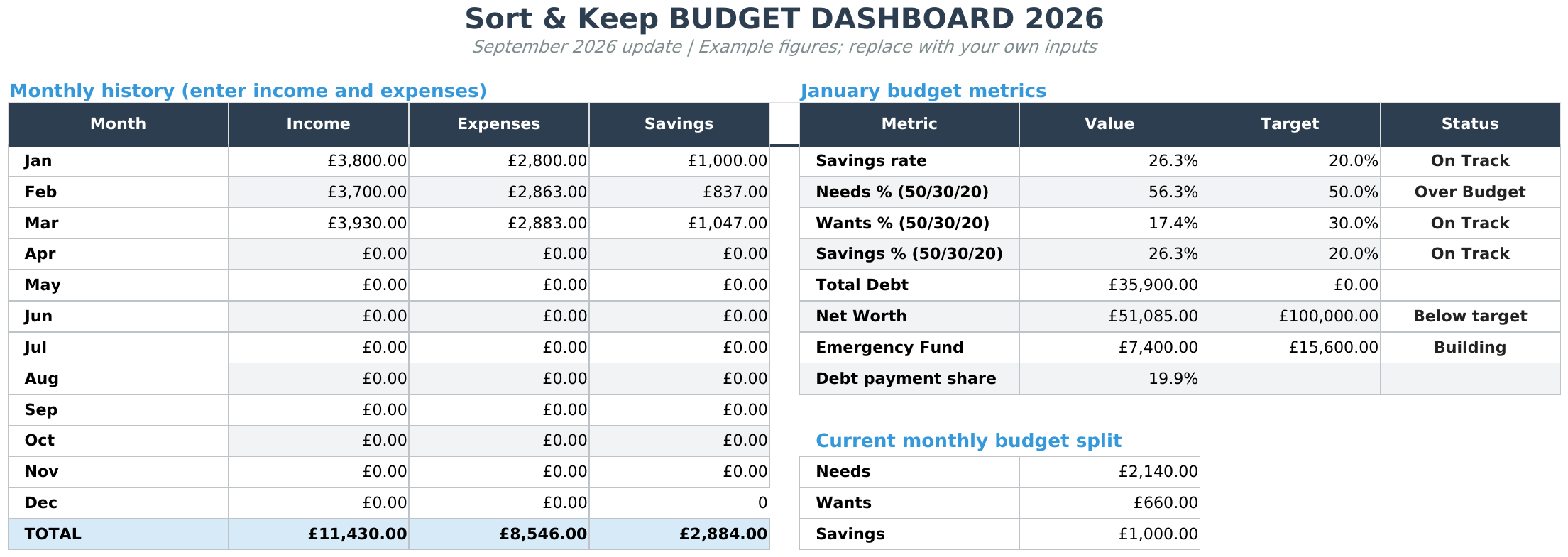
The Budget Dashboard 2026 (Sort & Keep) is a complete personal budget template with income tracking, expense categories, savings goals, and visual dashboards. It doesn't have remote-work-specific features out of the box, but its category system is flexible enough to add them. We set it up with custom categories; "Energy (work share)," "Broadband (work share)," "Equipment," and "Tax Relief"; and the dashboard tracked these alongside regular spending.
UK edition built for British finances. HMRC Self Assessment categories, council tax tracking, National Insurance (Class 2 and Class 4) calculations, ISA allowances, and GBP formatting throughout. US edition included with IRS tax brackets, 401(k) tracking, and USD formatting.
Pros:
- Clean dashboards and visual tracking out of the box
- Flexible categories; easy to add remote work line items
- Savings goals tracker (useful for equipment fund or commute savings reallocation)
- $10.81 one-time; no subscription
- Works on mobile via Google Sheets app
Cons:
- Remote work features require manual setup; you're adding them yourself
- No built-in utility split calculator
- No equipment amortisation formula included
- You need to calculate your work-use percentage separately
Verdict: The best option if you want a solid base and don't mind 30 minutes adding remote work categories. Handles Layers 1 and 5 well out of the box; bolt on Layers 2-4 with custom rows. Get the Budget Dashboard 2026 on Sort & Keep | Also on Sort & Keep.
5. Freelance Command Center (For Self-Employed Remote Workers)
Platform: Google Sheets
Price: $14.99 one-time
Best for: Self-employed remote workers who need business and personal budgeting in one place
If you are self-employed and work from home, keep business income, client invoices, expenses and personal spending clearly recorded.
The Freelance Command Center (Sort & Keep) combines client tracking, income and expense logging, tax set-aside calculations, and priority-tier budgeting in a single Google Sheet. You can log home office costs as business expenses, calculate your use-of-home deduction, and see the tax impact in real time.
Pros:
- Client CRM, invoicing tracker, tax estimator, and budget in one sheet
- Expense categories map cleanly to HMRC self-employment categories
- Tax set-aside calculator adjusts as income comes in
- Effective hourly rate per client; important for deciding which remote contracts to take
- $14.99 one-time, no subscription
Cons:
- Overkill if you're employed (not self-employed) and just working from home
- Google Sheets only
- Manual data entry; no bank feeds
- More complex than a simple personal budget
Verdict: The most complete single-tool solution for self-employed remote workers. It handles the freelancer budget problem and the remote work budget problem simultaneously. If you're employed and working from home, this is more than you need. Get the Freelance Command Center on Sort & Keep | Also on Sort & Keep.
Features Every Budget Template for Remote Workers Needs
Whatever tool you choose, make sure it covers these. They're the difference between a generic budget and one that reflects how remote work actually costs you money.
Home office utility split calculator. Measure your office space and divide by total floor area. A spare bedroom (12 sq m) in an 85 sq m flat is 14%. Apply that percentage to electricity, gas, water, and council tax. This gives you your monthly work-use cost; and the number you need for an HMRC actual-costs claim.
Equipment depreciation tracker. List every piece of home office equipment, its purchase price, and expected lifespan. Divide price by lifespan in months. Sum the column. That's your true monthly equipment cost; update it when you buy or replace something.
HMRC working from home relief tracker. Track both options side by side: the £6/week flat rate (£312/year) and your actual calculated costs. Whichever is higher is the one you should claim. If actuals are under £312, take the flat rate. If they're over, claim actuals through Self Assessment.
Co-working space cost comparison. A hot desk runs £150-300/month in most UK cities. A dedicated desk is £300-500/month. Track this and compare against home office running costs; if co-working is cheaper than heating a home office in winter, that's useful to know.
Hybrid work commute cost tracker. If you're two days in the office and three at home, you can't buy a season ticket; you're paying peak fares at £15-25 per trip. Two days at £20 return is £160/month. Track this separately to see the true cost of your arrangement.
Commute savings reallocation plan. Calculate what you used to spend commuting and set up a standing order for that amount into savings, investments, or pension. A £400/month saving redirected into a SIPP at 7% average returns becomes roughly £70,000 over ten years.
Price Comparison
| Tool | Price | Utility Split | Equipment Tracking | Tax Relief | Commute Savings |
|---|---|---|---|---|---|
| DIY spreadsheet | Free | Manual build | Manual build | Manual calc | Manual |
| Expense apps (Emma, Plum) | Free-£10/month | No | No | No | No |
| HMRC portal | Free | No | No | Flat rate only | No |
| Budget Dashboard 2026 | $10.81 one-time | Add manually | Add manually | Add manually | Yes (savings goals) |
| Freelance Command Center | $20.28 one-time | Business expenses | Business expenses | Tax estimator | Yes |
What Should You Actually Use?
Here's the decision tree:
"I'm employed, working from home full-time." Start with the Budget Dashboard 2026 (Sort & Keep). Add custom categories for home office costs. Claim the HMRC flat-rate relief. Redirect your commute savings.
"I'm hybrid." Same as above, plus a commute cost tracker row. Compare home office costs against commute days to see which arrangement saves money.
"I'm self-employed and working from home." The Freelance Command Center (Sort & Keep). Handles business finances, personal budget, and home office expense tracking for Self Assessment. Read the freelancer budget guide alongside this one.
"I just want the basics." Grab the free budget tracker (Sort & Keep) and use the 50/30/20 rule. At minimum, spend ten minutes claiming the HMRC flat-rate relief.
"I want to compare templates more broadly." Read our best budget spreadsheet templates for 2026 roundup and come back here for the remote work layer.
The Bottom Line
Remote work changed where you work. It also changed what you spend money on, and most budgets haven't caught up. A budget template for remote workers needs to do one thing standard templates don't: separate work costs from personal costs. Track your utility split. Amortise your equipment. Claim your tax relief. Redirect your commute savings.
The right tool makes this a ten-minute monthly habit. The wrong tool means you're absorbing hundreds of pounds in work costs you don't even see, and leaving tax relief unclaimed because nobody told you it existed. Now you know. Go claim it.
Related Reads
- Budget Template for Freelancers: Managing Irregular Income
- Budget Template for Gig Workers: Multiple Income Streams & Platform Fees
- Budget Template for Teachers: Term-Time Budgeting & Pension
- Budget Spreadsheet Templates 2026: Compare Free and Paid Options
Get free spreadsheet templates and updates. New templates, feature updates, and practical guides delivered to your inbox. No spam, unsubscribe anytime.
Subscribe free → | Already have a template? Download the free budget tracker or free meal planner. Email required for delivery; newsletter optional.
Choose the right next step
Need a simple budget tracker spreadsheet? Start with the Free Budget Tracker. Use Budget Dashboard 2026 when you want budgets, debt, savings and net worth in one workbook. Choose the Complete Collection when several parts of life admin need sorting.



