
Envelope Budget Spreadsheet: Digital Cash Envelopes in Sheets
Envelope budget spreadsheet for Google Sheets. Digital cash envelopes with running balances, transfers, and monthly resets. Get the template.

From Sort & Keep, the maker of the linked templates. Our current product prices update with your selected currency. Worked examples and third-party prices keep their stated currency and date.
The cash envelope system works. It has worked since before your grandparents had bank accounts, and the psychology behind it is dead simple: spending physical cash hurts more than tapping a card. An envelope budget spreadsheet takes that same psychological friction and moves it into Google Sheets, where it actually fits your life in 2026.
The original method means stuffing cash into labelled envelopes. Groceries, transport, entertainment. And when an envelope is empty, you stop spending. It forces discipline. But carrying eight envelopes of cash around is impractical. You can't pay for online shopping with a paper envelope. You can't split a dinner bill. And walking around with hundreds of pounds in your bag is a risk nobody needs.
The digital version keeps the constraint. Hard spending limits per category. Without the logistics. Here's how to build it.
How the Envelope Method Works
The core concept takes about 30 seconds to understand:
- Decide your categories. These are your "envelopes." Common ones: groceries, transport, entertainment, dining out, clothing, personal care, household items.
- Assign a monthly amount to each envelope. This comes from your take-home pay after fixed bills (rent, utilities, insurance, debt payments) are already accounted for.
- Track spending against each envelope. Every purchase reduces that envelope's balance.
- When an envelope hits zero, you stop spending in that category. No borrowing from next month.
- At the end of the month, reset. Leftover money can roll over or get swept into savings.
Here's what a typical setup looks like on a £2,800 monthly take-home:
| Category | Monthly Allocation |
|---|---|
| Groceries | £400 |
| Transport | £150 |
| Entertainment | £100 |
| Dining out | £120 |
| Clothing | £75 |
| Personal care | £50 |
| Household items | £60 |
| Gifts | £45 |
| Total envelopes | £1,000 |
The remaining £1,800 covers rent, bills, savings, and debt. Those are fixed costs, not envelopes. The envelope method only governs your variable spending, which is where most people lose control.
Physical Envelopes vs Digital: What Actually Changes
Physical cash creates genuine friction. Studies from the MIT Sloan School found that people spend 12-18% less when paying with cash compared to cards. On £1,000/month of variable spending, that's £120-180 saved. But you can't pay for Tesco online delivery with a £20 note. You can't split an Uber with cash. And if you lose an envelope, that money is gone.
Digital envelopes (spreadsheet or banking pots) let you track spending from your phone, handle online purchases, share access with a partner, and build historical data. The trade-off is you lose some of the psychological sting. Typing "£47.50" into a spreadsheet doesn't hurt the way handing over physical notes does.
The practical answer for most people: use digital envelopes for tracking, but consider withdrawing cash for your one or two weakest categories. If dining out is where you always overspend, carry your £120 dining budget in cash and track everything else digitally.
Building an Envelope Budget Spreadsheet in Google Sheets
This takes about 15 minutes. You'll end up with envelope categories, running balances, transfers between envelopes, and a monthly reset.
Step 1: Create the Envelope Summary Tab
Open a new Google Sheet. Name the first tab "Envelopes."
| A | B | C | D | E | |
|---|---|---|---|---|---|
| 1 | Envelope | Monthly Budget | Spent | Remaining | Rolled Over |
| 2 | Groceries | 400 | 0 | =B2-C2+E2 | 0 |
| 3 | Transport | 150 | 0 | =B3-C3+E3 | 0 |
| 4 | Entertainment | 100 | 0 | =B4-C4+E4 | 0 |
| 5 | Dining Out | 120 | 0 | =B5-C5+E5 | 0 |
| 6 | Clothing | 75 | 0 | =B6-C6+E6 | 0 |
| 7 | Personal Care | 50 | 0 | =B7-C7+E7 | 0 |
| 8 | Household | 60 | 0 | =B8-C8+E8 | 0 |
| 9 | Gifts | 45 | 0 | =B9-C9+E9 | 0 |
| 10 | Totals | =SUM(B2:B9) | =SUM(C2:C9) | =SUM(D2:D9) | =SUM(E2:E9) |
The "Rolled Over" column (E) is for leftover money from last month. At the start of each month, move any remaining balance into this column before resetting.
Step 2: Build the Transaction Log
Create a second tab called "Transactions."
| A | B | C | D | |
|---|---|---|---|---|
| 1 | Date | Description | Amount | Envelope |
| 2 | 2026-03-01 | Tesco weekly shop | 67.40 | Groceries |
| 3 | 2026-03-02 | Oyster top-up | 40.00 | Transport |
| 4 | 2026-03-03 | Nando's with mates | 22.50 | Dining Out |
For the Envelope column (D), add data validation: select column D from D2 downward, go to Data > Data validation > List from a range, and point it to Envelopes!A2:A9. Now your dropdowns always match your envelope names.
Step 3: Connect the Tabs with SUMIF
Go back to the Envelopes tab. Replace the zeros in the "Spent" column (C) with:
=SUMIF(Transactions!D:D, A2, Transactions!C:C)
Copy this formula down through C9. Every transaction you log now automatically reduces the correct envelope balance.
Step 4: Add Envelope Transfers
Sometimes you need to move money between envelopes. Create a third tab called "Transfers":
| A | B | C | D | |
|---|---|---|---|---|
| 1 | Date | From Envelope | To Envelope | Amount |
| 2 | 2026-03-15 | Clothing | Entertainment | 30 |
Update the "Spent" formula to account for transfers:
=SUMIF(Transactions!D:D, A2, Transactions!C:C)
 + SUMIF(Transfers!B:B, A2, Transfers!D:D)
 - SUMIF(Transfers!C:C, A2, Transfers!D:D)
This adds outgoing transfers to "spent" and subtracts incoming transfers.
Step 5: Conditional Formatting and Monthly Reset
Select the Remaining column (D2:D9) and add conditional formatting: red for values below zero, yellow for 0-20, green for above 20.
At the start of each new month: copy each envelope's Remaining value into the Rolled Over column (or zero it out if you sweep leftovers to savings), archive the current Transactions tab, and create a fresh one. Takes about 5 minutes on payday.
Comparing Envelope Budget Approaches
Not everyone wants to build a spreadsheet from scratch. Here are five ways to do envelope budgeting.
1. Physical Cash Envelopes
Platform: Your wallet | Price: Free
Pros: Maximum psychological impact. Zero technology required. Forces absolute spending limits.
Cons: No online shopping. Carrying cash is risky. No historical data or trends.
Verdict: Still effective for one or two problem categories. Impractical as a complete system.
2. Banking Pots (Monzo, Starling, Chase UK)
Platform: Mobile banking app | Price: Free
Pros: Automatic salary sorting on payday. Real-time balances. Built into your existing app.
Cons: Limited pot counts (Monzo caps at 20, Starling at 10). Moving money between pots is too easy. Not much friction. No spending reports. Locked into one bank.
Verdict: The easiest digital envelope system if your bank supports it. Monzo's salary sorting is particularly good.
3. Dedicated Apps (Goodbudget, Mvelopes)
Platform: iOS, Android, Web | Price: Goodbudget free (10 envelopes) / $10/month. Mvelopes $5.97-$19.97/month.
Pros: Purpose-built for envelope budgeting. Goodbudget's free tier is genuinely usable. Syncs between partners.
Cons: Free tier has no bank sync. Monthly fees add up (£96-£192/year for paid tiers). If the company shuts down, your data goes with it.
Verdict: Goodbudget's free tier works well for couples sharing envelopes. Paid tiers are hard to justify over a spreadsheet.
4. DIY Envelope Budget Spreadsheet (Google Sheets)
Platform: Google Sheets | Price: Free
Pros: Complete control. Free forever. Historical data for as long as you keep the sheet. Pairs with the 50/30/20 method or zero-based budgeting.
Cons: 15-20 minutes of setup. Manual transaction logging. Google Sheets on mobile works but isn't elegant.
Verdict: Best balance of flexibility, cost, and data ownership. The setup walkthrough above gets you there.
5. YNAB (You Need A Budget)
Platform: Web + iOS + Android | Price: $14.99/month ($99/year)
Pros: The original digital envelope system, polished to a shine. Automatic bank syncing. "Age of money" metric is genuinely motivating.
Cons: £143/year is the most expensive option here. Proprietary. If you cancel, you lose app access. Steeper learning curve than expected.
Verdict: The best envelope budgeting app, full stop. But a free spreadsheet gets you 80% of the functionality.
The Envelope Method on Irregular Income
If you're freelancing or doing gig work, the standard envelope method hits a wall: you can't divide a consistent monthly income into envelopes when your income isn't consistent. Here's how to adapt.
Find your baseline. Look at your last 6-12 months of income. Take the lowest month. That's your baseline. The amount you can always count on.
Build bare-minimum envelopes. Allocate your baseline across only essential categories. On a £1,800 low month:
| Envelope | Bare Minimum |
|---|---|
| Groceries | £300 |
| Transport | £100 |
| Household | £50 |
| Personal Care | £40 |
| Total | £490 |
Entertainment, dining out, clothing. Those get funded only when income exceeds the baseline.
Create a buffer envelope. In good months, sweep the excess into a buffer. Target at least one full month of envelope spending. In this example, £1,000. This reserve funds your envelopes during lean months.
Fund envelopes on invoice day, not a fixed date. Every time a payment lands, distribute across your envelopes by priority: essentials first, then wants, then buffer top-up. This approach works with the zero-based budget template too.
Get Started With a Template
If building from scratch isn't your thing, we have two options:
Free Budget Tracker | Also on Sort & Keep. A clean monthly budget template with category tracking. No email signup, just copy it to your Google Drive.
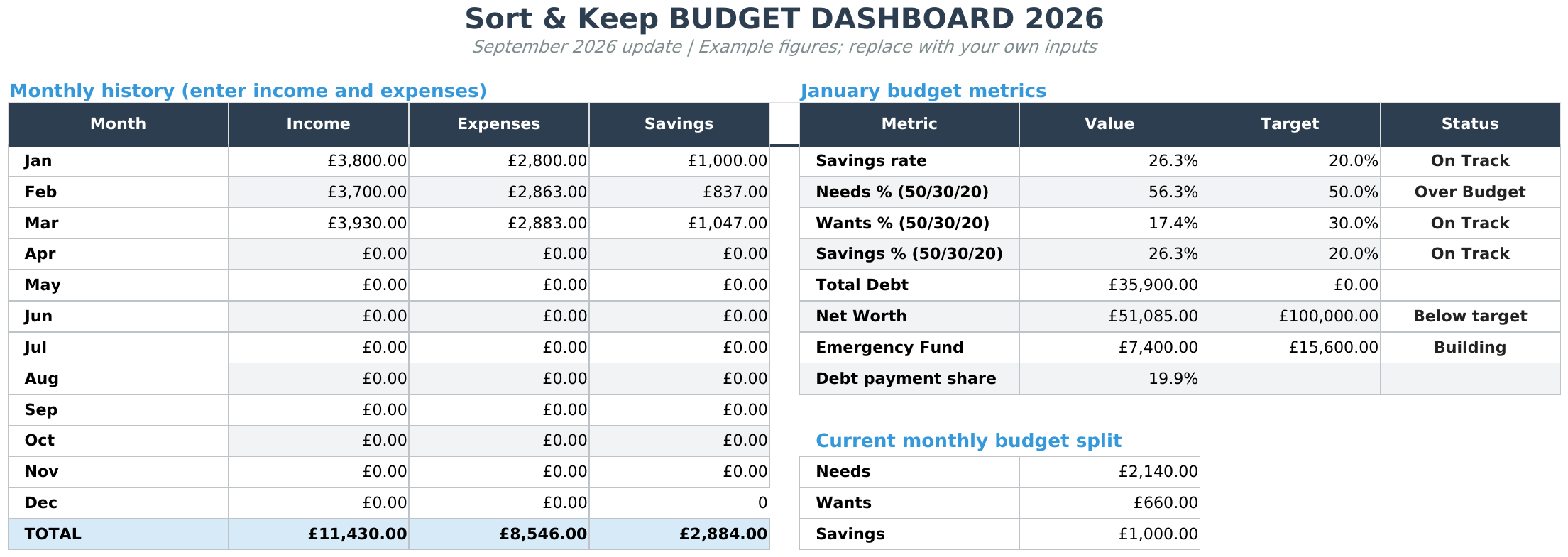
For envelope budgeting alongside debt payoff tracking, net worth monitoring, savings goals, and a proper dashboard, the Budget Dashboard 2026 | Also on Sort & Keep ($10.81 one-time) puts everything in a single Google Sheet. Set up your envelope categories, log transactions, and see exactly where every pound goes.
UK edition built for British finances. HMRC Self Assessment categories, council tax tracking, National Insurance (Class 2 and Class 4) calculations, ISA allowances, and GBP formatting throughout. US edition included with IRS tax brackets, 401(k) tracking, and USD formatting.
Related Reads
- Zero-Based Budget Template: Give Every Pound a Job
- Bi-Weekly Budget Template: Budget by Paycheck, Not by Month
- Savings Goal Tracker Spreadsheet
- Budget Spreadsheet Templates 2026: Compare Free and Paid Options
Final Thoughts
The envelope method works because it replaces willpower with structure. You don't need to decide in the moment whether you can afford another takeaway. You check the envelope. If there's money in it, go ahead. If there's not, the decision is already made.
Start simple. Pick 6-8 categories, set honest allocations, and track every purchase for one month. You'll learn more about your spending habits in those 30 days than in the previous year of vaguely promising to "spend less." The spreadsheet is just the tool. The habit is what changes your finances.
Get free spreadsheet templates and updates. New templates, feature updates, and practical guides delivered to your inbox. No spam, unsubscribe anytime.
Subscribe free → | Already have a template? Download the free budget tracker or free meal planner. Email required for delivery; newsletter optional.
Choose the right next step
Need a simple budget tracker spreadsheet? Start with the Free Budget Tracker. Use Budget Dashboard 2026 when you want budgets, debt, savings and net worth in one workbook. Choose the Complete Collection when several parts of life admin need sorting.



