
Budget Template for Gig Workers: Multiple Income Streams & Fees
Budget template for gig workers tracking multiple platforms, variable fees, true hourly rates, and mileage. Find the right fit.

From Sort & Keep, the maker of the linked templates. Our current product prices update with your selected currency. Worked examples and third-party prices keep their stated currency and date.
Last Tuesday you drove for Uber in the morning, ran three Deliveroo orders over lunch, finished a logo on Fiverr in the afternoon, and assembled furniture through TaskRabbit in the evening. Four platforms, four different pay structures, four different fees skimmed off the top before you saw a penny. Your gross earnings said £147. Your bank account received £103. And you still haven't accounted for fuel, vehicle wear, or the 30% you owe HMRC.
For gig work, record each platform payment and the costs associated with earning it. Use your statements to check fees, then compare the remaining amount with the hours worked.
Here are the main considerations.
Why Freelancer Budget Templates Don't Work for Gig Workers
You might think you can grab a budget template for freelancers and call it done. Similar territory, right? Self-employed, variable income, tax headaches. But the mechanics are fundamentally different in ways that break most freelance tools.
Transaction volume is completely different. A freelancer might log 4-8 invoices a month. A gig worker doing deliveries and rideshare can rack up 200-400 individual transactions. Freelance budget templates with manual invoice entry become unusable at that volume. You need something that handles bulk income, ideally by platform summary rather than individual trip.
Platform fees vary and they're invisible. Freelancers negotiate their rate and receive it. Gig workers see a gross fare, the platform takes its cut, and the net lands in your account. The problem is that fee structures are different across platforms and they change. Uber's service fee hovers around 25% but shifts with surge pricing. Deliveroo's commission ranges from 25% to 35% depending on your contract and the order type. A freelance template has no concept of platform fee tracking because freelancers don't have this problem.
Vehicle and equipment costs are ongoing and significant. Record actual running costs such as fuel, insurance, maintenance and equipment. Some costs continue during quieter weeks, so keep them visible in the plan.
Multiple income streams arrive on different schedules. Uber pays weekly. Deliveroo pays weekly but on a different day. Fiverr holds funds for 14 days after order completion. TaskRabbit releases payment after task approval. Your budget needs to handle four or five income streams arriving at different times, in different amounts, with different fee structures. And combine them into one coherent monthly picture.
The hourly rate illusion. Uber tells you that you earned £18/hour. But that's gross, before their 25% fee, before fuel, before vehicle depreciation, before the 20 minutes you spent driving to the pickup zone with no fare. Your real hourly rate might be £8.50. A freelance template doesn't calculate this because it doesn't need to. A gig worker template absolutely must.
The Gig Worker Budget Framework
The approach that works is a six-stage pipeline. Money enters at the top as gross earnings and gets filtered down through each stage until you reach the number that actually matters: what you can safely spend.
Stage 1. Gross Earnings by Platform
Log your total gross earnings per platform per week. Not individual trips. That's 200 lines of data nobody will maintain. Weekly totals by platform: Uber £320, Deliveroo £185, Fiverr £150, TaskRabbit £90. Four entries. Done.
Stage 2. Platform Fee Tracking
Apply each platform's commission to see your actual received income. Using the numbers above: Uber nets £240 (25% fee), Deliveroo nets £130 (30% fee), Fiverr nets £120 (20% fee), TaskRabbit nets £76.50 (15% fee). Your gross was £745. Your net received was £566.50. That's a blended fee rate of 24%. Nearly a quarter of everything you earned went to platform commissions before you touched it.
Stage 3. True Hourly Rate Calculation
This is the number most gig workers never calculate and absolutely should. Take your net platform earnings, subtract direct costs (fuel, parking, tolls, phone data), and divide by total hours worked. Including dead time between jobs, driving to pickup locations, and waiting for orders.
If you netted £566.50 and spent £85 on fuel plus £15 on parking, your actual earnings were £466.50. If you worked 42 hours including dead time, your true hourly rate was £11.11. That's useful information. It tells you which platforms are worth your time and which ones aren't.
Stage 4. Expense Deductions
Beyond direct per-shift costs, you have ongoing expenses that eat into your monthly take-home: vehicle insurance (£80-150/month for business use), vehicle maintenance and MOT (averaged: £60-100/month), phone contract (£15-30/month), equipment wear and replacement (delivery bag, phone mount, hi-vis: £15-25/month averaged), and accounting software or bookkeeping (£0-25/month).
Total monthly overheads for a typical delivery and rideshare gig worker: £170-330/month. These come off the top regardless of how much you earned.
Stage 5. Tax Set-Aside
If you're earning above the personal allowance (£12,570 for 2025/26), HMRC wants their share. Set aside 25-30% of your net profit. That's after platform fees and all allowable expenses. Into a separate account. Do this weekly, not monthly. Gig income fluctuates too much to wait four weeks.
For mileage, you have two options: claim actual vehicle costs (fuel, insurance, repairs, depreciation) or use HMRC's simplified mileage rate of 45p per mile for the first 10,000 miles and 25p per mile after that. For most gig workers doing deliveries, the simplified rate is more generous and far easier to track. But you need a mileage log. HMRC won't accept estimates.
Stage 6. Personal Budget
What's left after stages 1-5 is your actual disposable income. Now you can apply the 50/30/20 rule or another personal budget method. Record platform payments and business costs separately, then work out the amount available for your personal budget.
Budget Template for Gig Workers: Options to compare
We evaluated five approaches over eight weeks, running real gig work across Uber, Deliveroo, and Fiverr simultaneously. For each tool, we tracked whether it could handle the core gig worker challenges: multi-platform income, variable fees, true hourly rate calculation, mileage tracking, and tax set-aside.
1. Stride. Best Free App for Mileage Tracking
Platform: iOS and Android app
Price: Free
Best for: Gig workers who primarily need mileage and expense tracking
Stride is built for gig workers and independent contractors. Its core feature is automatic mileage tracking. Start a shift, hit record, and it logs your miles via GPS. It also categorises expenses and estimates your quarterly tax.
Pros:
- Completely free, no premium tier
- Automatic GPS mileage tracking works reliably
- Expense categorisation by type (vehicle, supplies, phone, etc.)
- Quarterly tax estimate based on your logged income and deductions
- Clean, simple interface
Cons:
- US-focused. Tax estimates use IRS brackets, not HMRC
- No multi-platform income breakdown; all income is lumped together
- No true hourly rate calculation
- No personal budgeting features. It's a tax prep tool, not a budget tool
- Mileage tracking drains battery on longer shifts
Verdict: Check which mileage records and tax settings the tool supports for your country. Keep the underlying journey records and verify any tax treatment separately.
2. Hurdlr. Best for Automatic Income Tracking
Platform: iOS and Android app
Price: Free (basic) / $8.99/month (Pro)
Best for: Gig workers who want automatic income and expense categorisation
Hurdlr connects to your bank accounts and automatically categorises income by platform and expenses by type. It knows the difference between an Uber deposit and a Deliveroo deposit and tracks them separately.
Pros:
- Automatic bank feed categorisation. Recognises gig platform deposits
- Separates income by platform without manual entry
- Real-time profit and loss by day, week, or month
- Mileage tracking (automatic on Pro)
- Tax estimate with quarterly payment reminders
Cons:
- $8.99/month for Pro. $107.88/year, which is steep for gig workers watching margins
- US-centric tax calculations
- No true hourly rate calculator (tracks income per platform but not hours per platform)
- Free tier is very limited. Basically a mileage tracker
- Bank feed categorisation isn't always accurate; requires manual corrections
Verdict: The closest thing to a "set and forget" income tracker for gig workers. The automatic platform separation is genuinely useful if you're running 3-4 apps. But the Pro price adds up, and the lack of UK tax support means you're doing your own HMRC calculations anyway.
3. Basic Spreadsheet (DIY)
Platform: Google Sheets or Excel
Price: Free
Best for: Gig workers who want total control and don't mind weekly data entry
A blank spreadsheet with columns for platform, gross earnings, platform fee percentage, net earnings, hours worked, fuel cost, and other expenses. Add a formula for true hourly rate and a running tax set-aside total. It takes about an hour to build something functional.
Pros:
- Free
- Complete flexibility to match your exact platform mix
- No vendor lock-in or subscription
- Can be as simple or detailed as you want
Cons:
- You're building everything from scratch
- No mileage tracking unless you add it manually
- Formulas break when you add platforms or change fee structures
- No automation. Every number is manual entry
- Easy to fall behind; one missed week becomes two, then you stop entirely
Verdict: Workable for the first month. Unsustainable for most people by month three. If you want a free foundation that's already built, our free budget tracker (Sort & Keep) handles the personal budget side. You'd still need to build or bolt on the platform income tracking.
4. Budget Dashboard 2026. Best for Personal Budgeting After Platform Income
Platform: Google Sheets
Price: $10.81 one-time
Best for: Gig workers who have their income tracking sorted and need a proper personal budget
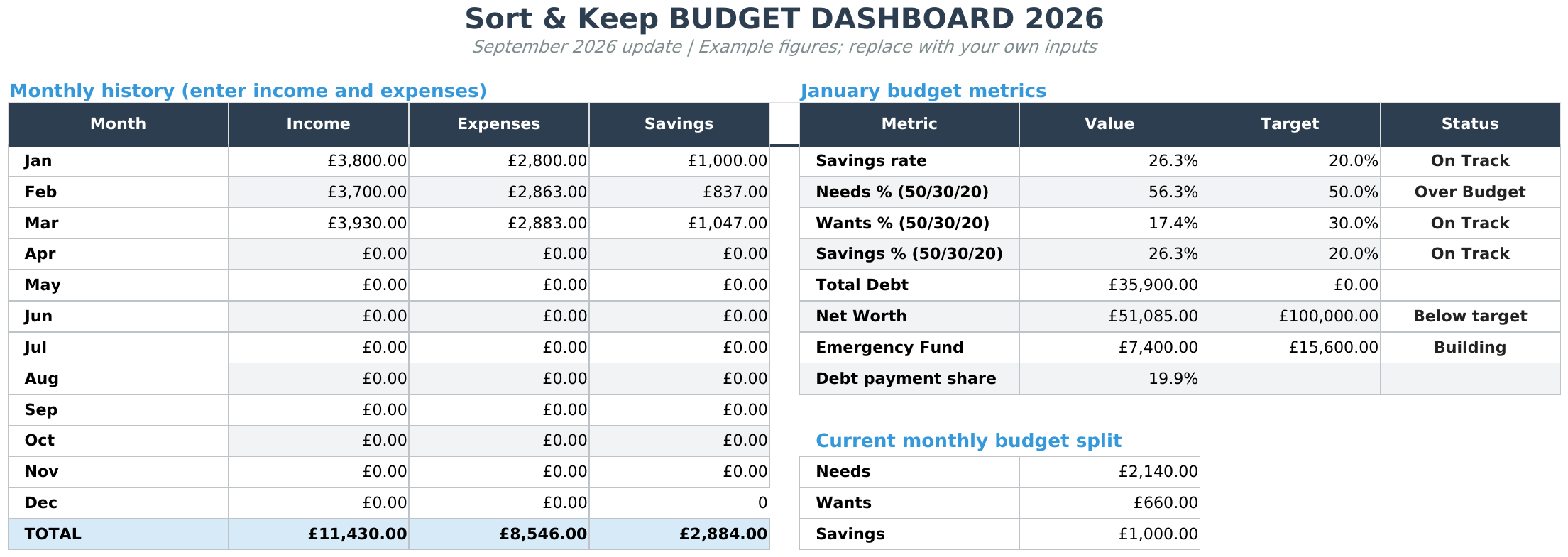
The Budget Dashboard (Sort & Keep) provides a place to plan personal spending after you have recorded business fees, expenses and any amounts set aside.
UK edition built for British finances. HMRC Self Assessment categories, council tax tracking, National Insurance (Class 2 and Class 4) calculations, ISA allowances, and GBP formatting throughout. US edition included with IRS tax brackets, 401(k) tracking, and USD formatting.
Pros:
- Clean monthly budget with category tracking
- Savings goal tracker with progress visualisation
- Debt payoff calculator (snowball and avalanche methods)
- Net worth tracker across all accounts
- $10.81 one-time. No subscription
- Works on any device via Google Sheets
Cons:
- Not gig-specific. No platform fee tracking, no hourly rate calculation, no mileage
- Manual income entry; you need to calculate your post-fee, post-expense number elsewhere first
- Google Sheets only
- Doesn't connect to bank feeds
Verdict: The right tool for the wrong stage if used alone. But as the personal budget layer on top of a gig-specific income tracker, it does exactly what you need. The savings goals and debt payoff features are particularly useful for gig workers building an emergency fund. Which, let's be honest, should be priority one when your income can drop 40% in a slow week.
5. Freelance Command Center. Best All-in-One for Gig Workers Who Also Freelance
Platform: Google Sheets
Price: $14.99 one-time
Best for: Gig workers who mix platform work with direct freelance clients
Full disclosure: we built this. Here's why it makes this list.
Many gig workers don't exclusively work platforms. You might drive for Uber three days a week and do freelance graphic design the other two. Or you run Deliveroo in the evenings while building a client base for web development during the day. The Freelance Command Center handles both sides: platform income (logged as "clients" with their fee percentages) and direct freelance work.
Pros:
- Tracks multiple income sources with individual fee/commission rates
- Tax set-aside calculator (configurable percentage)
- Effective hourly rate per income source. Shows which platform or client is most profitable
- Expense tracking with categories that cover vehicle costs, equipment, and subscriptions
- $14.99 one-time, no subscription
- Pairs with the Budget Dashboard for complete personal finance coverage
Cons:
- Designed for freelancers, not purpose-built for gig workers. Mileage tracking is manual
- No automatic GPS mileage logging
- Google Sheets only
- Manual data entry for all income
- Client CRM features are overkill if you're purely doing platform gig work
Verdict: If you're a hybrid worker. Part gig platforms, part direct clients. This is the most complete single-spreadsheet solution we've found. The hourly rate per income source feature is the one that changes behaviour: when you can see that Fiverr pays you £14.20/hour effective and Deliveroo pays £8.90/hour effective, you start making smarter decisions about where to put your time. Get the Freelance Command Center on Sort & Keep | Also on Sort & Keep.
What Your Budget Template for Gig Workers Must Include
When evaluating any budget tool as a gig worker, here's what separates useful from useless:
Multi-platform income consolidator. You need one view that shows all your platforms side by side. Gross earnings, fees deducted, net received. For the same time period. If a tool can't separate Uber income from Deliveroo income from Fiverr income in the same month, it's not built for your situation.
True hourly rate calculator. Gross earnings divided by hours "online" is a lie every platform tells you. Your true hourly rate is: (net platform earnings minus direct costs) divided by total hours worked including dead time. A gig worker earning £15/hour gross on Uber who spends 30% of their time driving to pickups unpaid, pays 25% in platform fees, and burns £3/hour in fuel is actually earning £7.25/hour. That number matters.
Mileage tracker with HMRC rates. If you're doing deliveries or rideshare in the UK, mileage is likely your single largest tax deduction. HMRC allows 45p per mile for the first 10,000 business miles and 25p per mile after that. At 800 miles per week (typical for a full-time delivery driver), that's 41,600 miles per year. Giving you a £11,400 deduction (10,000 at 45p + 31,600 at 25p). Your budget template needs to track this or you're leaving thousands on the table at tax time.
Platform fee comparison. Your template should show, at a glance, what percentage each platform is taking. When Deliveroo's effective fee rate creeps from 28% to 33% over three months, you want to see that trend. It might be time to shift hours to a platform that takes less. Or it might confirm that Deliveroo's higher gross fares still net you more despite the bigger cut.
Self-assessment tax set-aside. Gig workers are self-employed. HMRC doesn't deduct tax at source. You need a running total of estimated tax liability updated every time you log income. For most gig workers in the UK, the effective rate lands between 20-30% of net profit depending on total annual earnings. Setting aside 25% weekly is a safe baseline. Payments on account (31 January and 31 July) mean the bill comes in two lumps. Your budget needs to anticipate both dates.
Weekly review cadence. Monthly reviews don't work for gig income. Too much changes week to week. Your template should support weekly income logging and rolling 4-week averages so you can spot trends. A gradual decline in Uber earnings, seasonal pickup in Deliveroo, a Fiverr dry spell. Before they become cash flow problems.
Price Comparison
| Tool | Price | Multi-Platform | True Hourly Rate | Mileage | Tax Set-Aside | Personal Budget |
|---|---|---|---|---|---|---|
| Stride | Free | No | No | Yes (GPS) | Yes (US only) | No |
| Hurdlr Pro | $8.99/month | Yes (auto) | No | Yes (GPS) | Yes (US only) | No |
| DIY Spreadsheet | Free | Manual | Manual | Manual | Manual | Manual |
| Budget Dashboard | $10.81 one-time | No | No | No | No | Yes |
| Freelance Command Center | $20.28 one-time | Yes | Yes | Manual | Yes | Pairs w/ Dashboard |
So What Should You Actually Use?
Here's the honest recommendation based on how you work:
"I just do deliveries and rideshare. Keep it simple." Install Stride for mileage tracking (it's free and the GPS logging alone is worth it). Grab our free budget tracker (Sort & Keep) for personal budgeting. Log your weekly platform earnings in a simple spreadsheet or notes app. This costs you nothing and covers the basics.
"I run 3-4 platforms and I need to see the full picture." The Freelance Command Center (Sort & Keep) handles multi-platform income tracking, fee comparison, and true hourly rate calculation. Add the Budget Dashboard (Sort & Keep) for the personal spending side. Total cost: $22.98, no subscription. Use Stride alongside for GPS mileage logging.
"I mix gig platforms with direct freelance clients." The Freelance Command Center was literally built for this. It tracks both platform income (with fee percentages) and direct client work in the same sheet, with effective hourly rates for each. Pair it with the Budget Dashboard and you've got the complete pipeline from gross earnings to personal budget.
"I want everything automated. I don't want to enter data." Hurdlr Pro is the closest thing to automatic tracking for gig workers, but at $8.99/month it adds up, and the tax estimates are US-only. For UK gig workers, there's no fully automated solution that handles HMRC calculations properly. The reality is that 10 minutes of weekly data entry in a spreadsheet gives you better data than any automated tool currently available.
"I need to understand budgeting basics before adding gig complexity." Read our best budget spreadsheet templates for 2026 roundup first. Get a basic personal budget working. Then layer gig-specific tracking on top.
The Bottom Line
The gig economy sells flexibility. Work when you want, earn what you want, be your own boss. What it doesn't mention is that you're also your own accountant, your own HR department, and your own fleet manager. And every platform is quietly skimming 15-35% before you see a penny.
Keep payments, costs and hours together so you can review what each type of gig work contributes to your income.
Most gig workers we've talked to have never calculated their true hourly rate. When they do, it changes behaviour. They drop the platform that nets them £7/hour and double down on the one that nets £14. They switch from driving 15 miles to a pickup zone to working the zone they're already in. They realise that the Tuesday evening Deliveroo rush pays twice the Wednesday afternoon Uber lull, and they plan their week accordingly.
The tools we've covered range from free to $22.98 one-time. None of them cost more than a single tank of fuel. But the insight they give you. Knowing which hours are profitable and which ones aren't. That's worth considerably more than the spreadsheet it lives in.
Start with the six-stage pipeline. Gross earnings, platform fees, true hourly rate, expenses, tax, personal budget. Track it weekly. Review it monthly. Adjust your platform mix based on what the numbers tell you, not what the apps tell you. That's the entire system.
Related Reads
- Budget Template for Freelancers: Managing Irregular Income
- Budget Template for Remote Workers: Home Office Costs & Tax Relief
- Budget Template for Part-Time Workers: Variable Hours & In-Work Benefits
- Budget Spreadsheet Templates 2026: Compare Free and Paid Options
Get free spreadsheet templates and updates. New templates, feature updates, and practical guides delivered to your inbox. No spam, unsubscribe anytime.
Subscribe free → | Already have a template? Download the free budget tracker or free meal planner. Email required for delivery; newsletter optional.
Choose the right next step
Need a simple budget tracker spreadsheet? Start with the Free Budget Tracker. Use Budget Dashboard 2026 when you want budgets, debt, savings and net worth in one workbook. Choose the Complete Collection when several parts of life admin need sorting.



