
Budget Template for New Graduates: Your First Salary Budget
Budget template for new graduates. Handles student loan repayments, pension auto-enrolment, and the gross-to-net pay gap. Get the template.

From Sort & Keep, the maker of the linked templates. Our current product prices update with your selected currency. Worked examples and third-party prices keep their stated currency and date.
Your first real payslip is a shock. You accepted a job at £28,000 and divided by twelve in your head: £2,333 a month. Then the payslip arrives: £1,868. Income tax took £259. National Insurance took £130. Your workplace pension auto-enrolled you at 5%, which pulled another £76. And your student loan repayment of £5.25 kicks in next month when HMRC catches up with your employer.
That 20% gap between what you thought you'd earn and what hits your bank account is where most graduate budgets fail before they start. You planned rent, commute, and groceries around a number that doesn't exist.
Here's what worked.
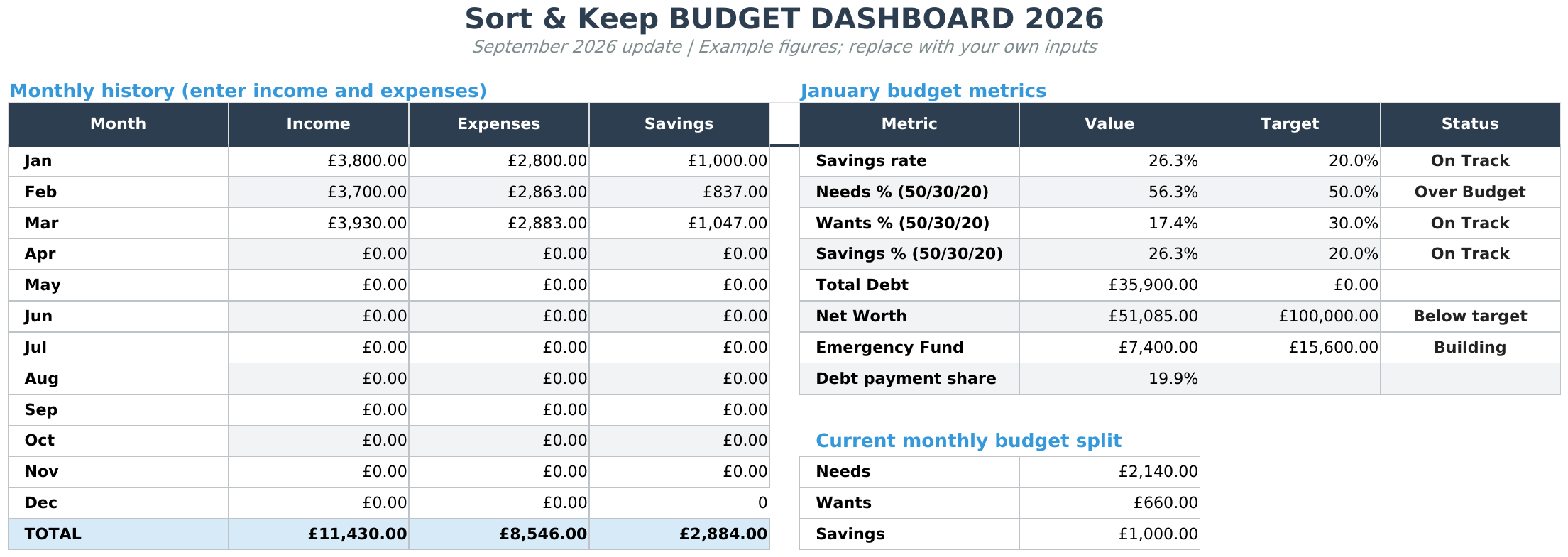
Skip the setup time. The Budget Dashboard 2026 is pre-built for UK graduates: net pay input, five expense layers, savings goal tracker, visual progress bars. Get it for $10.81 on Sort & Keep →
Why You Need a Budget Template for New Graduates
Most budget templates assume you're a settled adult with predictable finances. New graduates aren't that. Here's what generic templates miss.
Student Loan Repayments That Creep In
Check your repayment plan and current deductions on your payslip or student-loan account. Enter the actual deduction in your budget and update it when your pay changes.
Graduates starting from 2023 onwards may be on Plan 5, where the threshold is £25,000 and the repayment rate stays at 9%. Repayments bite earlier. £22.50 per month on a £28,000 salary.
Start your budget with the net pay shown on your payslip. Check deductions when your pay changes and avoid counting an amount that has already been deducted twice.
Workplace Pension Auto-Enrollment
Since 2012, every UK employer must auto-enroll you into a pension scheme. The minimum is 8% total: 5% from you, 3% from your employer. On a £28,000 salary, your 5% contribution is roughly £76/month, taken before you see your pay (if your employer uses salary sacrifice) or from your net pay (net pay arrangement). Most graduates don't notice this for the first few months. Then they wonder why their take-home is lower than the online salary calculator promised. A proper budget template for new graduates shows pension contributions explicitly. Not buried.
The Deposit Savings Problem
The average first-time buyer deposit in the UK is around £34,500 (2025 figures). Even a 5% deposit on a £200,000 property means £10,000 saved. On a graduate salary, putting away £200-300 per month is realistic. But only if your budget treats it as a non-negotiable line item rather than "whatever's left over." Whatever's left over is always zero.
The Lifestyle Inflation Trap
You've been living on a student budget for three years. Suddenly you have more money than you've ever seen. The urge to upgrade everything at once is real: new clothes, better food, nights out without checking your balance. A good graduate budget doesn't fight this entirely (you deserve to enjoy earning), but it puts guardrails around it before the month vanishes.
The New Graduate Budget Framework
Before we get into tools, here's the framework that actually works on a first salary. Forget the 50/30/20 rule for now. It doesn't account for the specific pressures graduates face. Work through these five layers in order instead.
Layer 1: Essentials (50-55% of net pay)
Rent, council tax, utilities, groceries, transport to work, phone contract, insurance. For a graduate in a city on £1,868 net per month, this typically looks like:
- Rent (room in a shared house): £650-800
- Council tax (your share): £80-100
- Utilities and broadband (your share): £60-80
- Groceries: £160-200
- Commute: £100-150
That's £1,050-1,330. Already 56-71% of net pay. That's why the 50/30/20 rule feels impossible on a starting salary in London or any major city.
Layer 2: Student Loan Repayment
Already deducted from your payslip, but track it. Knowing your balance and repayment trajectory keeps you sane, especially when you realise Plan 2 loans get wiped after 30 years and Plan 5 after 40 years. For many graduates, overpaying makes no mathematical sense.
Layer 3: Emergency Fund
If you have room to save, choose an initial buffer that fits your budget and review it as your circumstances change.
Layer 4: Lifestyle (15-20% of net pay)
Eating out, drinks, hobbies, subscriptions, clothes. This is where you actually live. Budget a specific number rather than spending freely and hoping for the best. £280-375 per month on a £1,868 net salary is realistic and doesn't require monk-like discipline.
Layer 5: Savings Goals (5-15% of net pay)
House deposit, further study, travel, investments. Even £100-200 per month adds up. A Lifetime ISA gives you a 25% government bonus on up to £4,000 per year. That's free money most graduates don't claim because they don't have a savings plan that directs them to it.
1. Banking Apps (Monzo, Starling, Chase)
Platform: iOS / Android
Price: Free
Best for: Graduates who want automatic tracking with no setup
Modern banking apps do a decent job of day-to-day tracking. Monzo's Salary Sorter automatically divides your pay into pots when it lands. Chase's round-up feature saves spare pennies. Starling's Spaces let you ring-fence rent and bills money so you can't accidentally spend it on a Friday night.
Pros:
- Transactions auto-categorize. No manual logging
- Pots/Spaces make it easy to separate rent money from spending money
- Real-time spending notifications keep you honest
- Already on your phone. Zero extra effort to start
Cons:
- No student loan repayment tracking. Your loan deduction is invisible
- Can't model pension contributions or salary sacrifice scenarios
- Monthly budget cycles only. No way to plan across six months or a year
- No savings goal calculators (how long until you hit £10,000 for a deposit?)
- Locked to one bank. Useless if your salary goes elsewhere
Verdict: Good for daily spending awareness, poor for the big-picture graduate financial planning you actually need. Use a banking app as your real-time layer, not your only layer.
2. Free Spreadsheet Templates
Platform: Google Sheets (any device with a browser)
Price: Free
Best for: Graduates who want control without spending money
A spreadsheet is the most flexible option because you can build exactly what you need. The problem is starting from scratch. Most people stare at a blank sheet, type "January" in cell A1, and give up.
Our Free Budget Tracker handles the basics: income, expenses, and category tracking in Google Sheets. For a new graduate, you'd customise it by adding your net salary as the income source and building out the five-layer framework above as your expense categories.
Pros:
- Completely free. No subscription, no trial period
- Full control over categories, formulas, and layout
- Easy to add a student loan tracker row with your Plan 2 or Plan 5 threshold
- Shareable with a partner or housemate for joint expense tracking
- Your data stays in your Google Drive, not locked in an app
Cons:
- Manual data entry for every transaction
- No pre-built pension contribution calculator or salary sacrifice modelling
- Requires basic spreadsheet comfort (SUM, IF formulas)
- Mobile experience on Google Sheets is tolerable but not enjoyable
- No visual dashboards unless you build charts yourself
Verdict: The best free starting point. If you're comfortable adding a few formulas, you can build a student loan repayment row and a deposit savings goal tracker in under an hour. Recommended for any graduate who wants to understand where their money goes without paying for the privilege.
3. Budgeting Apps (YNAB, Emma)
Platform: iOS / Android / Web
Price: YNAB $14.99/month ($99/year), Emma free tier available (premium from £4.99/month)
Best for: Graduates who want a guided system and will actually use it daily
YNAB's "give every pound a job" philosophy works well for graduates because it forces you to allocate your entire salary the day it arrives. No unassigned money means no accidental overspending. Emma connects to your bank accounts and gives you a consolidated spending view with category breakdowns.
Pros:
- YNAB's zero-based approach stops the "where did my money go?" problem entirely
- Emma auto-imports transactions from UK banks and categorizes them
- Both have savings goal features that track deposit progress
- Check the provider’s current learning resources
- Active communities where graduates share their specific setups
Cons:
- YNAB at $14.99/month is £144/year. A real cost when you're budgeting tightly
- Neither tracks student loan repayments natively. You'd add a manual category
- Neither models pension contributions or salary sacrifice trade-offs
- Emma's free tier is limited. The useful features (bill tracking, net worth) are premium
- App lock-in: your budget history stays in their system
Verdict: YNAB is genuinely excellent if you commit to it. The methodology alone is worth learning. But £144/year is hard to justify on a graduate salary when a spreadsheet does 80% of the same job for free. If you try YNAB, use the 34-day free trial properly. Budget every single transaction for a full month and see if the habit sticks. If it doesn't stick in YNAB, it won't stick anywhere. At least you learned the zero-based method you can apply in a spreadsheet.
4. Complete Spreadsheet Templates
Platform: Google Sheets or Excel
Price: $5-$30 one-time
Best for: Graduates who want dashboards, visualisations, and savings tracking without a subscription
Paid templates bridge the gap between a blank spreadsheet and a full budgeting app. They come pre-built with formulas, charts, and category structures that would take hours to create yourself.
The Budget Dashboard 2026 ($10.81) is what we'd recommend for graduates. It includes monthly income vs expense tracking, a savings rate calculator, visual dashboards, and a category breakdown that maps to the five-layer framework. You can add custom categories for student loan repayments and pension contributions, and the savings goal tracker shows your deposit progress month by month.
Grab the Budget Dashboard 2026 for $10.81 on Sort & Keep →
UK edition built for British finances: HMRC Self Assessment categories, council tax tracking, National Insurance (Class 2 and Class 4) calculations, ISA allowances, and GBP formatting throughout. US edition included with IRS tax brackets, 401(k) tracking, and USD formatting.
Pros:
- Pre-built dashboards that update as you enter data. Instant visual feedback
- Savings goal tracking with progress visualisation
- One-time cost of $10.81. No recurring subscription
- Category system flexible enough to add graduate-specific items (loan repayments, pension)
- Charts and visual progress bars keep you motivated through the boring middle months
Cons:
- Still requires manual data entry
- No native student loan repayment calculator (Plan 2 vs Plan 5 thresholds)
- No salary sacrifice modelling out of the box
- $10.81 is cheap but not free. Some graduates will hesitate
Verdict: The sweet spot for most graduates. You get 90% of what a budgeting app offers (minus auto-import) for a one-time cost less than a single month of YNAB. The visual dashboard is genuinely motivating. Watching your savings goal bar creep towards your deposit target makes the sacrifice feel worth it. If you're going to use one tool and stick with it, this is it.
5. DIY Advanced Spreadsheet (Build Your Own)
Platform: Google Sheets or Excel
Price: Free (but costs time)
Best for: Graduates comfortable with spreadsheets who want a fully customised system
If you're numerate and enjoy spreadsheets (some graduates genuinely do), you can build a system that no template or app can match. Start with the Free Budget Tracker as your base and add:
- A student loan tab that models your Plan 2 or Plan 5 repayment over time based on salary assumptions
- A pension contribution calculator showing the impact of salary sacrifice vs net pay arrangements
- A deposit savings projection showing when you'll hit your target at different monthly contributions
- A salary progression model (graduate salaries typically increase 8-15% in years 1-3)
Pros:
- Completely tailored to your exact situation
- Deepens your financial literacy. Building the formulas teaches you how money works
- No cost, no lock-in, no subscriptions
- Can model future scenarios (what if I get a raise? what if I increase pension contributions?)
Cons:
- Time investment: 3-5 hours to build something solid, plus ongoing maintenance
- Easy to over-engineer. You'll spend more time perfecting the spreadsheet than actually budgeting
- Errors in formulas can give you false confidence (you think you can afford something, but a broken SUM says otherwise)
- No auto-import, no notifications, no mobile-friendly interface
Verdict: Only worth it if you enjoy the process. If building spreadsheets feels like fun, this approach produces the most powerful and personalised result. If it feels like homework, use a pre-built template and spend your evenings doing something you actually enjoy.
Features That Matter in a Budget Template for New Graduates
After testing all five approaches, here are the features that separate a useful budget template for new graduates from a generic one.
Student Loan Repayment Tracker
Your budget needs to show your monthly repayment amount and ideally your remaining balance. For Plan 2 (threshold £27,295, 9% above), the formula is: (gross annual salary - £27,295) x 0.09 / 12. For Plan 5 (threshold £25,000), replace the threshold. Having this visible reminds you that it's already handled. You don't need to "budget" for it separately because it never reached your bank account. See how this fits into a student budget template if you're not quite graduated yet.
Pension Contribution Visibility
Whether your employer uses salary sacrifice or a net pay arrangement changes your take-home by up to £20-30/month at graduate salary levels. Your budget should show: gross salary, pension deduction, tax, NI, student loan, net pay. When you can see all five deductions, the gap between gross and net stops feeling like theft and starts making sense.
Deposit Savings Goal
A simple tracker: target amount (say £10,000), current balance, monthly contribution, and months remaining. At £200/month, that's 50 months. Just over four years. At £300/month, it's 33 months. Seeing that number drop each month is the most motivating thing a budget spreadsheet can do. The Budget Dashboard 2026 has this built in.
Salary Sacrifice Calculator
If your employer offers salary sacrifice for pension contributions, you pay less tax and NI but your gross salary is lower (which can affect mortgage affordability calculations). A good graduate budget lets you model: "If I sacrifice an extra 2%, what happens to my take-home? What happens to my pension pot in 40 years?" This is the kind of decision you make once and benefit from for decades.
Our Recommendation
For most new graduates, here's the setup that works.
Start with a banking app for daily tracking. Monzo or Starling with pots for rent, bills, and spending money. Set up Salary Sorter so your pay is divided the moment it lands. This handles the "where did £40 go last Tuesday?" problem.
Use a spreadsheet for monthly planning. Grab the Budget Dashboard 2026 or the Free Budget Tracker and set it up with your actual net pay. Not your gross salary. Not what the job ad said. The number that hits your bank account. Build your five layers from there.
Add a student loan row manually. Your plan type, your threshold, your monthly repayment. Update it once a year when thresholds change or when you get a raise.
Set a deposit savings goal with a target date. Even if buying a house feels impossibly far away, having a specific number and a monthly contribution makes it concrete instead of abstract.
Do a 15-minute monthly review. Compare actual and planned spending each month. Adjust categories that regularly differ from your estimates and review your savings contribution when your income changes.
The tool matters less than the system. A free spreadsheet with the five-layer framework, reviewed monthly, will outperform a £12/month app you opened twice. Start with what you can afford, build the habit first, and upgrade the tools only when the habit is solid.
For more on the budgeting frameworks that underpin all of this, see our guide to the 50/30/20 budget rule. And if you want to compare tools beyond the graduate-specific options here, check our full roundup of the best budget spreadsheet templates in 2026.
Related Reads
- Budget Template for Students
- Budget Template for Part-Time Workers: Variable Hours & In-Work Benefits
- Budget Template for Low Income: Making Every Pound Count
- Budget Spreadsheet Templates 2026: Compare Free and Paid Options
Final Thought
Your first budget needs to start with take-home pay and the housing costs you actually face. Use your payslip and bills to build a realistic picture, then adjust it as you settle into work.
A budget doesn't fix the gap between graduate salaries and living costs. But it stops you making the gap worse. It turns "I have no idea where my money goes" into "I have £280 for fun this month and £200 going to my deposit fund." One of those people is stressed. The other has a plan.
Pick one tool from the five above. Set it up this weekend. Give it three months before you judge whether it works. The graduates who build this habit in year one aren't panicking in year five.
Get the Budget Dashboard 2026 for $10.81 on Sort & Keep → Pre-built for UK graduates with the five-layer framework, savings goal tracker, and visual dashboards included.
Get free spreadsheet templates and updates. New templates, feature updates, and practical guides delivered to your inbox. No spam, unsubscribe anytime.
Subscribe free → | Already have a template? Download the free budget tracker or free meal planner. Email required for delivery; newsletter optional.
Choose the right next step
Need a simple budget tracker spreadsheet? Start with the Free Budget Tracker. Use Budget Dashboard 2026 when you want budgets, debt, savings and net worth in one workbook. Choose the Complete Collection when several parts of life admin need sorting.



