
Best Meal Planning Spreadsheet Templates in 2026
Meal planning spreadsheet templates ranked for 2026: free, keto, vegan, gluten-free, and allergy-safe options tested. Find the right fit.

From Sort & Keep, the maker of the linked templates. Our current product prices update with your selected currency. Worked examples and third-party prices keep their stated currency and date.
Meal planning apps want $10-15 per month. That's $120-180 a year to do something a spreadsheet handles just as well. Often better. A good meal planning spreadsheet template costs a few bucks once or nothing at all.
We're not anti-app. Some of them are genuinely good. No company sunset, no price hike, no "we're pivoting to AI and removing the features you actually used."
This is the complete guide we wish existed when we started. We evaluated each one on the things that actually matter. Grocery list generation, nutritional tracking, recipe scaling, dietary restriction handling, and whether the formulas actually work or just look pretty in the screenshots.
What Makes a Good Meal Planning Spreadsheet Template
Before we get into specific options, here's the checklist we used. A meal planning template needs to do at least four of these five things well, or you'll abandon it within two weeks:
1. Auto-generated grocery lists. You pick your meals for the week, and the spreadsheet builds your shopping list. If you're still manually writing out ingredients after selecting recipes, the template is wasting your time.
2. Nutritional tracking that goes beyond calories. Calorie counting is table stakes. A useful planner tracks macros (protein, carbs, fat) at minimum. For specific diets, you need micronutrient tracking too. Net carbs for keto, amino acid profiles for vegan, iron and B12 for celiac.
3. Recipe scaling. You found a recipe for four servings but you're cooking for two. The ingredients should update automatically. The protein scales but the seasoning stays fixed, or vice versa.
4. Weekly and monthly views. Daily planning is useful, but you need the weekly view to catch nutritional gaps and the monthly view to avoid meal repetition. The best planners show both.
5. Dietary restriction handling. Whether it's an allergy, a medical condition, or a lifestyle choice, the planner should filter out what you can't eat without you having to remember every time.
The Best Meal Planning Spreadsheet Templates We Found
We organized these by category because the "best" template depends entirely on what you need it to do.
General Meal Planners
1. Google Sheets Free Meal Planner Templates
Platform: Google Sheets | Price: Free
Google's template gallery includes a basic meal planner, and the community has built hundreds of variations. The best free options come from creators like Tiller Money and various Reddit contributors who share their personal setups.
Pros:
- Completely free, no sign-up required
- Highly customizable if you're comfortable with Sheets
- Cloud-based, accessible from any device
- Easy to share with a partner or family
Cons:
- Most free templates are bare-bones. A grid with days and meals, no formulas
- No nutritional tracking unless you build it yourself
- Grocery list generation is rare in free versions
- You're starting from scratch on anything beyond basic scheduling
Verdict: Fine for someone who just wants to write down what they'll eat this week. Not enough for anyone tracking nutrition, managing dietary restrictions, or wanting automation.
2. Sort & Keep Free Weekly Meal Planner
Platform: Google Sheets & Excel | Price: Free
This is our free meal planner. Review the workbook views to see its weekly layout and included sheets before requesting it by email.
Pros:
- Actually free (no email gate, no upsell pop-ups)
- Working formulas for grocery list generation
- Clean layout that doesn't overwhelm new meal planners
- Works in both Google Sheets and Excel
Cons:
- Limited ingredient database compared to our paid planners
- No dietary restriction filtering
- Basic macro tracking only. No micronutrients
- Single-person, not designed for families
Verdict: The best free starting point we've found. If all you need is weekly meal planning with a grocery list and basic nutrition info, this handles it without costing anything. If you need dietary-specific tracking, you'll outgrow it.
The grocery list builds itself from your weekly meal selections. Ingredients are grouped by store section and quantities adjust automatically when the same ingredient appears in multiple recipes.
Download the Free Weekly Meal Planner | Also on Sort & Keep
3. Plan to Eat
Platform: Web app + mobile | Price: $5.95/month or $49.95/year
Plan to Eat has been around since 2012 and has a loyal following. Its core strength is the recipe clipper. You can save recipes from any website and it automatically extracts ingredients and instructions.
Pros:
- Excellent recipe import from any URL
- Drag-and-drop meal calendar
- Automatic grocery list from planned meals
- Recipe scaling works reliably
Cons:
- $50-70/year adds up over time
- Nutritional tracking is minimal (it's a planner, not a tracker)
- No dietary restriction intelligence. It won't warn you about allergens
- Mobile app is functional but clunky compared to newer competitors
Verdict: A solid choice if your primary need is organizing recipes and generating grocery lists. Falls short if you need nutritional analysis or dietary-specific features.
4. Mealime
Platform: iOS & Android app | Price: Free (basic) / $5.99/month (Pro)
Mealime is the most polished free meal planning app available. The free tier gives you recipe suggestions based on dietary preferences, portion adjustment, and grocery lists. Pro adds nutritional info and more customization.
Pros:
- Beautiful interface, genuinely enjoyable to use
- Smart grocery lists that combine ingredients across recipes
- Filters for common diets (keto, paleo, vegetarian, etc.)
- Free tier is surprisingly capable
Cons:
- You're locked into their recipe database. Can't add your own on the free tier
- Nutritional data requires Pro subscription
- No spreadsheet export. Your data lives in their app
- If Mealime shuts down, your recipes go with it
Verdict: Best free app for people who want curated recipes and don't mind living inside someone else's space. Not ideal if you want full control or custom recipes.
Dietary-Specific Planners
This is where general-purpose tools fall apart. If you're managing a specific diet. Whether by choice or medical necessity. You need a planner that understands the nuances of that diet. A generic "filter by keto" toggle is not the same as a planner built from the ground up for keto.
5. Keto & Low-Carb Meal Planner (Sort & Keep)
Platform: Google Sheets & Excel | Price: $9.99 (one-time)
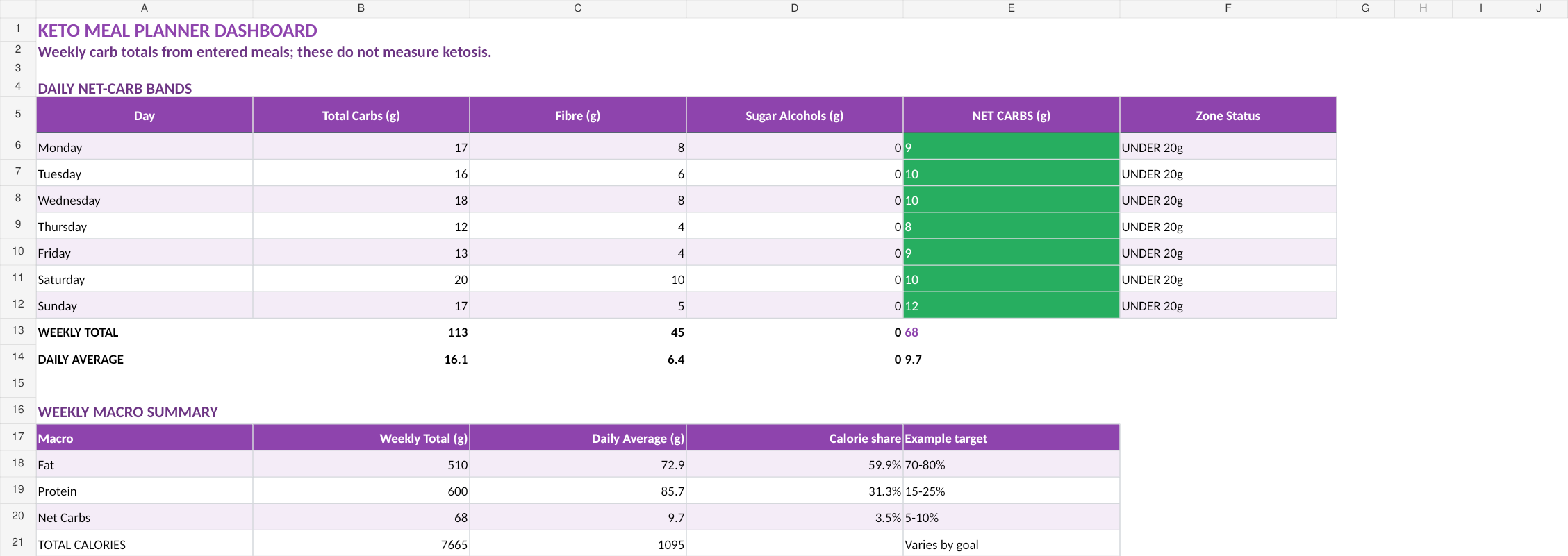
Net carbs. Total carbs minus fiber minus sugar alcohols. Are what determine whether you stay in ketosis. Getting this wrong means either restricting foods unnecessarily or eating yourself out of ketosis without realizing it.
Pros:
- Accurate net carb calculator that handles sugar alcohols correctly (erythritol vs maltitol)
- Ketosis zone indicator with customizable threshold (20g, 30g, 50g)
- Electrolyte tracking for sodium, potassium, and magnesium (the keto flu killers)
- Supports standard, cyclical, and targeted keto protocols
- 250+ verified keto ingredients from USDA data
- Weekly macro averaging. Because ketosis responds to trends, not single meals
Cons:
- Focused specifically on keto/low-carb. Not a general planner
- Ingredient database, while curated, is smaller than app-based databases
- No barcode scanning (it's a spreadsheet, not an app)
Verdict: The most accurate keto planning tool we've found at any price point. The net carb calculator alone is worth it if you've been frustrated by generic trackers that lump all carbs together.

The net carb calculator distinguishes between fiber and different sugar alcohols (erythritol has zero glycemic impact, maltitol does not). A distinction most trackers ignore entirely.
Get the Keto Meal Planner ($13.52) | Also on Sort & Keep. Full review: Keto Meal Planner with Net Carb Calculator
Every Sort & Keep meal planner is built twice. The UK edition uses FSA regulations, British ingredient names, gram portions, and McCance and Widdowson nutritional data. The US edition uses FDA guidelines, USDA data, and American measurements. Not a find-and-replace. Separate sourcing for each market.
6. Vegan Meal Prep & Macro Balancer (Sort & Keep)
Platform: Google Sheets & Excel | Price: $9.99 (one-time)
Use the vegan meal planner to organise meals and review the information you enter. Verify food data and dietary needs separately; the workbook cannot assess nutritional adequacy.
Pros:
- Protein pairing engine for complete amino acid coverage
- Tracks the seven micronutrients vegans actually need to watch: B12, iron, calcium, vitamin D, iodine, zinc, and omega-3
- 300+ vegan ingredient database with full amino acid profiles
- Batch prep planner that groups meals by shared cooking steps
- Cost-per-meal calculator (spoiler: whole-food vegan is cheap)
- Supplement integration. See food + supplement intake in one view
Cons:
- Ingredient prices need manual entry (your local prices vary)
- Protein pairing suggestions require understanding of the basics to fully use
- No app-style recipe photos
Verdict: Solves the two problems that make people quit veganism: incomplete protein intake and invisible micronutrient deficiencies. The batch prep planner is a genuine time-saver.
Get the Vegan Meal Prep Planner ($13.52) | Also on Sort & Keep. Full review: Vegan Meal Prep with Protein Pairing
7. Gluten-Free Meal Planner & Cross-Contamination Guard (Sort & Keep)
Platform: Google Sheets & Excel | Price: $9.99 (one-time)
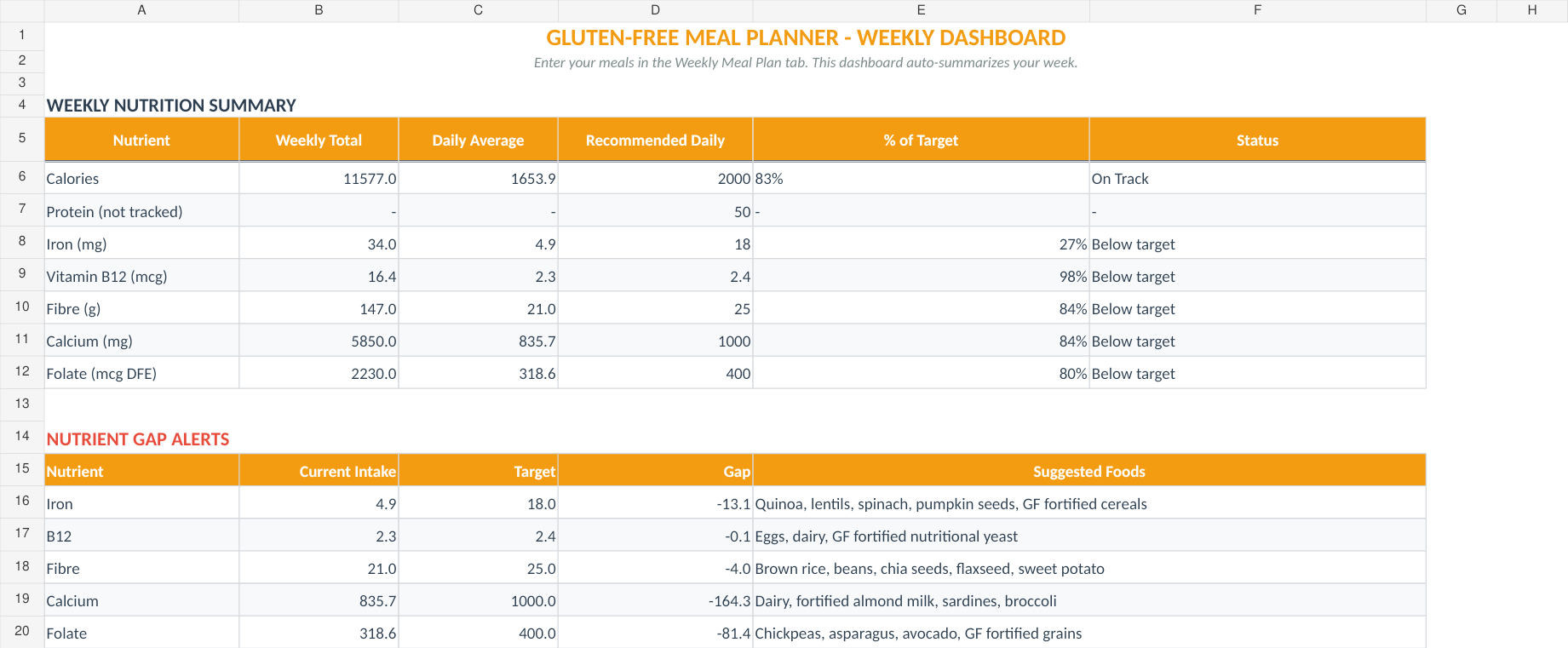
Use the gluten-free meal planner to record meals and preparation notes. Check ingredients, handling and individual requirements separately; the workbook cannot establish safety.
Pros:
- 200+ ingredients pre-classified as safe, risky, or banned for celiac
- Distinguishes between "labeled gluten-free" and "certified gluten-free" (under 20ppm)
- Cross-contamination checklist for shared kitchens
- Tracks the five nutrients celiac patients most commonly lack: iron, B12, fiber, calcium, folate
- Mixed household mode for families where only some members eat GF
- Multi-restriction layering (GF + dairy-free, GF + low-FODMAP, etc.)
Cons:
- Heavily focused on celiac. Overkill if you're just casually reducing gluten
- Brand recommendations are US and UK focused
- Cross-contamination checklist is thorough but takes time to complete initially
Verdict: The only meal planning tool we've seen that treats celiac disease with the seriousness it requires.
Get the Gluten-Free Meal Planner ($13.52) | Also on Sort & Keep. Full review: Gluten-Free Meal Planner for Celiac Families
8. Multi-Allergy Family Meal Planner (Sort & Keep)
Platform: Google Sheets & Excel | Price: $12.99 (one-time)
This is the planner for families where dinner is a combinatorial puzzle. Your oldest can't have tree nuts. Your youngest is dairy-free and egg-free. Your partner just discovered a sesame allergy. Finding one meal that won't send anyone to the hospital is the daily reality. And nothing else on the market handles it.
Pros:
- Up to 6 family member profiles, each with independent allergen flags
- Covers all Top 14 allergens (FDA + EU combined list) plus additional triggers
- Cross-family meal optimizer finds meals safe for everyone at the table
- Ingredient substitution engine with two-step safety check (removes problem allergen, checks for new ones)
- Elimination diet tracker for diagnosing new sensitivities
- Printable emergency allergy cards for schools, babysitters, and restaurants
- School lunch compliance mode for nut-free or allergen-restricted campuses
Cons:
- Most complex of our planners. Setup takes 15-20 minutes
- At $12.99, it's the most expensive in the lineup (but it handles the hardest problem)
- Ingredient database is curated for safety, not breadth. Specialty items may need manual entry
Verdict: Nothing else does what this does. If you're managing multiple food allergies across a family, the allergy profile system and cross-family optimizer save hours of mental load every week. The emergency cards alone are worth the price for peace of mind.
Each family member gets an independent allergy profile. The planner cross-references all profiles when suggesting meals, so nothing unsafe reaches the table.
Get the Multi-Allergy Family Planner ($17.58) | Also on Sort & Keep. Full review: Multi-Allergy Family Meal Planner
Which Planner for Which Diet?
If you're not sure which direction to go, here's the quick decision matrix:
| Your Situation | What You Need Most | Best Option |
|---|---|---|
| Just want to organize weekly meals | Grocery list + basic scheduling | Free Weekly Meal Planner (Sort & Keep) |
| Keto or low-carb | Net carb calculator, electrolyte tracking | Keto Meal Planner (Sort & Keep) ($13.52) |
| Vegan or plant-based | Protein pairing, B12/iron tracking | Vegan Meal Prep Planner (Sort & Keep) ($13.52) |
| Celiac or gluten-free | Cross-contamination alerts, certified-GF flagging | Gluten-Free Planner (Sort & Keep) ($13.52) |
| Family with multiple food allergies | Multi-profile allergen filtering, safe-meal optimizer | Multi-Allergy Planner (Sort & Keep) ($17.58) |
| Want curated recipes, don't mind a subscription | Recipe discovery, barcode scanning | Mealime Pro or Plan to Eat |
| Comfortable building your own system | Maximum customization | Google Sheets blank template |
A few specific notes on diet matching:
Keto and low-carb diets live or die on carb accuracy. A net carb calculator is non-negotiable. The difference between total and net carbs can swing 10-15g per meal, which is enough to knock you out of ketosis. Generic planners that track "carbs" without the net calculation are actively harmful for keto.
Vegan diets can use the workbook to record meals and review food information. Verify nutritional data and individual requirements separately.
Food allergies require a planner that never forgets. The number one complaint across allergy app reviews is profiles that reset or settings that silently revert. When a mistake means an EpiPen, "it usually remembers" isn't good enough. A spreadsheet with locked profiles won't randomly forget your child's nut allergy after an update.
Families with multiple dietary needs can review the Multi-Allergy Planner’s layout for keeping household requirements together. Check every ingredient and meal independently for each person.
Spreadsheet vs. App: An Honest Comparison
We use both. There's no religious war here. But the trade-offs are real and worth understanding.
Where Spreadsheets Win
Customization. You can modify any formula, add columns, create new views, and build the exact workflow you need. Try doing that in Mealime.
No subscription. A one-time purchase (or free template) means no recurring cost. Over three years, a $10 spreadsheet saves you $350+ compared to a $10/month app.
Offline access. Excel works without internet. Google Sheets caches for offline use. No app server outage will lock you out of your meal plan on grocery day.
Data ownership. Your spreadsheet is a file you control. Export it, back it up, share it, modify it. If the company behind an app shuts down or pivots, your data goes with it. Your spreadsheet stays on your drive forever.
Privacy. A spreadsheet doesn't track what you eat and sell that data to advertisers. Some free meal planning apps do. Read the privacy policies. "anonymized nutritional data shared with partners" appears more often than you'd expect.
Where Apps Win
Recipe databases. Plan to Eat and Mealime have thousands of recipes with photos, ratings, and one-click import. Building a recipe library in a spreadsheet takes more upfront effort.
Barcode scanning. Scan a product, get the nutritional data. This is genuinely faster than manual entry for packaged foods. No spreadsheet can replicate this.
Social features. Sharing meal plans, following other users, community recipe boards. If meal planning is a social activity for you, apps do this well.
Push notifications. Reminders to prep, reminders to shop, reminders to defrost. Useful if you need the nudge. Annoying if you don't (and potentially undermining if the app sends you notifications about cake when you're doing keto).
Visual polish. Apps are prettier. If a beautiful interface motivates you to actually use the tool, that matters. A spreadsheet will never look like an Instagram food account.
The Bottom Line
If you value control, cost savings, and dietary accuracy, spreadsheets win. If you value convenience, recipe discovery, and a polished mobile experience, apps win. Most people who stick with meal planning long-term end up using a spreadsheet for the planning and tracking, and an app or website for recipe inspiration. The two aren't mutually exclusive.
Our Recommendation
Start with the Free Weekly Meal Planner | Also on Sort & Keep. Seriously. Even if you know you need a dietary-specific tool, the free planner helps you build the habit of planning meals in a spreadsheet. Use it for two weeks. If you stick with it and want more, upgrade to the planner that matches your diet.
If you already know your specific need:
- Keto? The net carb calculator alone justifies the $13.52 (Sort & Keep). Stop guessing whether you're in ketosis.
- Vegan? The protein pairing engine solves the problem that makes most people feel lousy six months into plant-based eating. $13.52 (Sort & Keep).
- Celiac? A generic "gluten-free filter" is not enough. The cross-contamination guard treats your safety seriously. $13.52 (Sort & Keep).
- Multiple allergies in the family? Nothing else handles this problem. The multi-profile system is the only tool we've found that manages per-person allergen filtering across an entire household. $17.58 (Sort & Keep).
Every paid planner is a one-time purchase. No subscriptions, no upsells, no "premium tier" that gates the features you actually need. Google Sheets and Excel compatible. All formulas built in and protected so nothing breaks when you add your own data.
We built these because we needed them and couldn't find them anywhere else. We think you'll find they solve the same problems for you.
More from this cluster
If gluten-free planning is the real job, these are the next two reads that keep the restriction visible while you plan. More to read
Gluten-Free Meal Planner vs Generic Meal Templates: What Actually Prevents Cross-Contamination?
Compare generic meal templates with a gluten-free planner built to track safe ingredients, prep steps, and cross-contamination risk. Open guide Read the comparison More to read
Weekly Gluten-Free Meal Prep Workflow: Spreadsheet System for Busy Celiac Households
Build a weekly gluten-free prep workflow that keeps safe meals, shopping lists, and cross-contamination checks in one place. Open guide Read the workflow
Get Gluten-Free Meal Planner & Cross-Contamination Guard
More Meal Planning Guides
Beyond choosing a template, these guides cover the practical side of making meal planning work in real life:
- Best Spreadsheet for Tracking Macros. Macro tracking in Google Sheets vs apps, with honest comparisons
- Grocery Budget Tracker Template. Track weekly spend, cut waste, and save 20-30% on groceries
- How to Meal Prep on a Budget. Batch cooking strategies, a £30/week menu, and cost-per-meal tracking
- Meal Planning for Families with Picky Eaters. Acceptance matrices, modular meals, and exposure logging
Related Reads
- Grocery Budget Tracker Template
- How to Meal Prep on a Budget
- Budget Spreadsheet Templates 2026: Compare Free and Paid Options
Get free spreadsheet templates and updates. New templates, feature updates, and practical guides delivered to your inbox. No spam, unsubscribe anytime.
Subscribe free → | Already have a template? Download the free budget tracker or free meal planner. Email required for delivery; newsletter optional.
Choose the right next step
Start with the Free Weekly Meal Planner for a basic week and grocery list. For a dietary workflow, choose the gluten-free planner, vegan meal-prep planner, keto and low-carb planner, multi-allergy family planner. The Meal Planning Bundle puts all four specialist workbooks in one purchase.



