
Budget Template for Part-Time Workers: Variable Hours & Benefits
Budget template for part-time workers handling variable hours, UC taper rates, and NI thresholds. Free spreadsheet. Get the template.

From Sort & Keep, the maker of the linked templates. Our current product prices update with your selected currency. Worked examples and third-party prices keep their stated currency and date.
There are 8.4 million part-time workers in the UK. Nearly every budget template on the internet assumes a fixed monthly salary. See the problem?
Part-time income can vary when hours or shifts change. Start with actual pay and confirmed payment dates. A budget template for part-time workers needs to account for all of this, or it is just a spreadsheet with the wrong numbers in it. The interaction between variable earned income and the benefits system creates cliffs and tapers that catch people out constantly. Earn £1 more than a threshold and lose £1.80 in benefits. Work an extra shift and wonder why your take-home barely moved. These are the everyday reality of part-time work in the UK, and your budget needs to see them coming.
Why Full-Time Budget Templates Fail Part-Time Workers
Generic budgeting tools assume three things that do not apply to part-time work: stable income, simple tax, and no interaction with the benefits system. Here is where they break down.
Income can vary each week. A full-time worker on £28,000 knows they will take home roughly £1,870 every month. A part-time retail worker on a 16-hour contract who picks up extra shifts might earn £800 one month and £1,300 the next. Entering a single "Monthly Income" figure into a standard template is fiction. You need rolling averages, not snapshots.
The UC taper rate means earning more does not always mean keeping more. Universal Credit reduces your payment by 55p for every £1 you earn above your work allowance (£404/month if you have no housing costs, £673/month if you do). So that extra shift worth £80 gross? After the taper, you keep £36 of it in UC terms. After tax and NI (if you are above the thresholds), even less. A budget that does not model this taper will overestimate your actual income every single month.
National Insurance thresholds create invisible lines. You only start paying Class 1 NI once you earn above the primary threshold. £242/week (£12,570/year) in 2025/26. Below that, you pay nothing but still build qualifying years for State Pension if you earn above the lower earnings limit (£125/week). Between those two numbers is a sweet spot. Your budget template should know where you sit relative to these lines, because crossing the primary threshold changes your effective take-home rate.
Pension auto-enrolment has its own trigger. If you earn above £10,000/year, your employer must auto-enrol you into a workplace pension. For part-time workers hovering around this threshold, some months you are paying 5% pension contributions and some months you are not. A template that does not track this will get your net pay wrong.
Tax-free personal allowance gets wasted. The personal allowance is £12,570. If you earn £9,000/year part-time, you have £3,570 of unused allowance. Which matters if you have a second income source like savings interest or a side job. Most budget templates do not track how much of your allowance you have used.
A 50/30/20 template assumes you know what your income is. For part-time workers, figuring out what your income actually is. After tapers, thresholds, and top-ups. Is the hard part.
The Part-Time Budget Framework
This framework is built around the reality that your income has two components: what you earn from work, and what the state tops up based on what you earned. Both move. Your budget needs to handle that.
Step 1: Calculate Your Average Monthly Income (3-Month Rolling)
Do not budget from last month's payslip. Take your last three months of total income. Wages plus UC plus any other benefits. And average them. This smooths out the peaks and troughs.
Example: if your last three months of total income (wages + UC combined) were £1,280, £1,150, and £1,340, your 3-month average is £1,257. Budget to that number. When a month comes in above average, the surplus goes to your buffer. When it comes in below, the buffer covers the gap.
Update this average every month. It takes two minutes and prevents you from budgeting to an outlier.
Step 2: Set Your Essential Floor
This is the minimum you need every month regardless of how many hours you work. Add up:
- Rent or mortgage (after any housing element from UC)
- Council Tax (after any Council Tax Reduction)
- Gas and electricity
- Water
- Food (realistic. Not aspirational)
- Phone (basic contract or PAYG)
- Transport to work
Know this number exactly. For most part-time workers in the UK, it lands between £700 and £1,200 depending on housing costs and location. This is the non-negotiable line. Everything else in your budget exists to protect this number.
Step 3: Model Your UC Top-Up
If you receive Universal Credit, your payment changes every assessment period based on your reported earnings. The formula is straightforward but unforgiving:
- Start with your maximum UC entitlement (standard allowance + any housing element, child element, disability element, etc.)
- Subtract 55% of your net earnings above the work allowance
- The result is your UC payment for that period
If your maximum entitlement is £1,100/month and you earn £900 net in your assessment period with a £673 work allowance, the calculation is: £900 - £673 = £227 above the allowance. £227 x 0.55 = £125 taper reduction. UC payment: £1,100 - £125 = £975.
Track this monthly. When your hours go up, your UC goes down. And vice versa. Your total income is more stable than either component alone, but only if you model both.
Step 4: Variable Spending Allocation
After your essential floor is covered, allocate the remainder in order of priority:
- Debt minimums (credit cards, overdrafts, UC advance repayments)
- Buffer savings (target: one month of essential floor costs)
- Everything else (clothing, social, subscriptions, discretionary)
In a good month, you fund all three. In a lean month, you fund number one only and leave the rest. The buffer exists precisely for months like that.
Step 5: Build a Low-Hours Buffer
Compare lower-income months with essential outgoings to see the possible gap. If there is room in the budget, record money set aside for that gap.
Budget Template for Part-Time Workers: Options to compare
The criteria: can it handle income that changes monthly, does it account for benefit interactions, and can a part-time worker on a tight budget actually afford it?
1. Pen and Paper Envelope System
Platform: Physical notebook + cash envelopes
Price: Free
Setup time: 15 minutes
The original variable income budget. When your pay arrives, divide cash into envelopes labelled Rent, Food, Bills, Transport, and Spending. When an envelope is empty, that category is done for the month.
Pros:
- Genuinely free
- Physically separating money makes overspending almost impossible
- No technology barriers. Works for everyone
- Forces you to confront your actual numbers every payday
Cons:
- Does not work well if you are paid by bank transfer (most people are)
- No way to model UC taper or track benefit changes
- Cannot calculate rolling averages without a calculator
- Easy to fall behind if you skip a week
Verdict: Better than nothing, and the tactile nature of handling physical money has real psychological power. But it cannot handle the complexity of UC interactions, NI thresholds, or income averaging. Use this as your spending control method, but you need something else for the planning side.
2. Monzo / Starling Pots (Digital Envelope Method)
Platform: iOS, Android
Price: Free
Setup time: 20 minutes
The digital version of envelopes. Both banks let you create sub-accounts ("pots" on Monzo, "spaces" on Starling) where you ring-fence money for specific purposes. When wages arrive, move rent into the Rent pot, bills into the Bills pot, and so on. What remains in your main balance is your spending money.
Pros:
- Free accounts, no monthly fee
- Pots physically separate your money within the same bank
- Real-time spending notifications help track variable spending
- Standing orders to pots can partially automate the process
- Both banks are DWP-compatible for UC payments
Cons:
- No UC taper calculation or benefit tracking
- Cannot model income averaging across months
- Salary sorting automation requires Monzo Plus (£5/month)
- Does not flag NI threshold crossings or pension trigger points
Verdict: Excellent for the execution side. Making sure rent money does not accidentally become takeaway money. Weak on the planning side. If you pair this with a spreadsheet that handles the income modelling and UC calculations, you get a solid system. On its own, it is half a solution.
3. Benefit Calculators (EntitledTo / Turn2us)
Platform: Web (entitledto.co.uk, turn2us.org.uk)
Price: Free
Benefit calculators can help you check potential eligibility based on your household circumstances. Confirm the results with the relevant service.
Pros:
- Completely free and independent
- EntitledTo shows a detailed UC calculation including taper rate impact
- Turn2us includes a grants database for one-off financial help
- Cover UC, Housing Benefit (legacy), Council Tax Reduction, free school meals, Healthy Start, Warm Home Discount, and more
- Updated each April when thresholds change
Cons:
- A one-off eligibility check
- Results still require you to apply for each benefit separately
- Does not integrate with any spreadsheet or banking app
- Can feel overwhelming when it surfaces multiple unclaimed entitlements
Verdict: Run both of these before you set up any budget template. If you are working part-time and have not checked your entitlements in the last six months, there is a genuine chance you are leaving £50-£200/month on the table. The budget template tracks what you have. These tools make sure you have everything you should.
4. Free Budget Spreadsheet
Platform: Google Sheets
Price: Free
Link: Free Budget Tracker | Also on Sort & Keep
A pre-built spreadsheet with income tracking, expense categories, and a monthly overview. Enter your numbers. Wages, UC, any other income. And it handles the arithmetic.
Pros:
- Completely free, no trial period, no upsell
- Works on any device with Google Sheets (including library computers and cheap smartphones)
- Customisable. Rename income categories to Wages, UC Payment, Child Benefit, PIP, or whatever applies to you
- Add rows for different shift patterns or multiple part-time jobs
- Enter and review transactions using your own records
Cons:
- No built-in UC taper calculator (you calculate this separately and enter the result)
- No automatic NI threshold tracking
- Manual data entry required. No bank feeds
- Basic design, no visual dashboards
Verdict: This is our primary recommendation for part-time workers. It costs nothing. It works. You can customise the categories to match your actual income sources. Not the generic "Salary" field that every other template uses. Pair it with EntitledTo for your UC calculations and you have a complete system for £0. Start here.
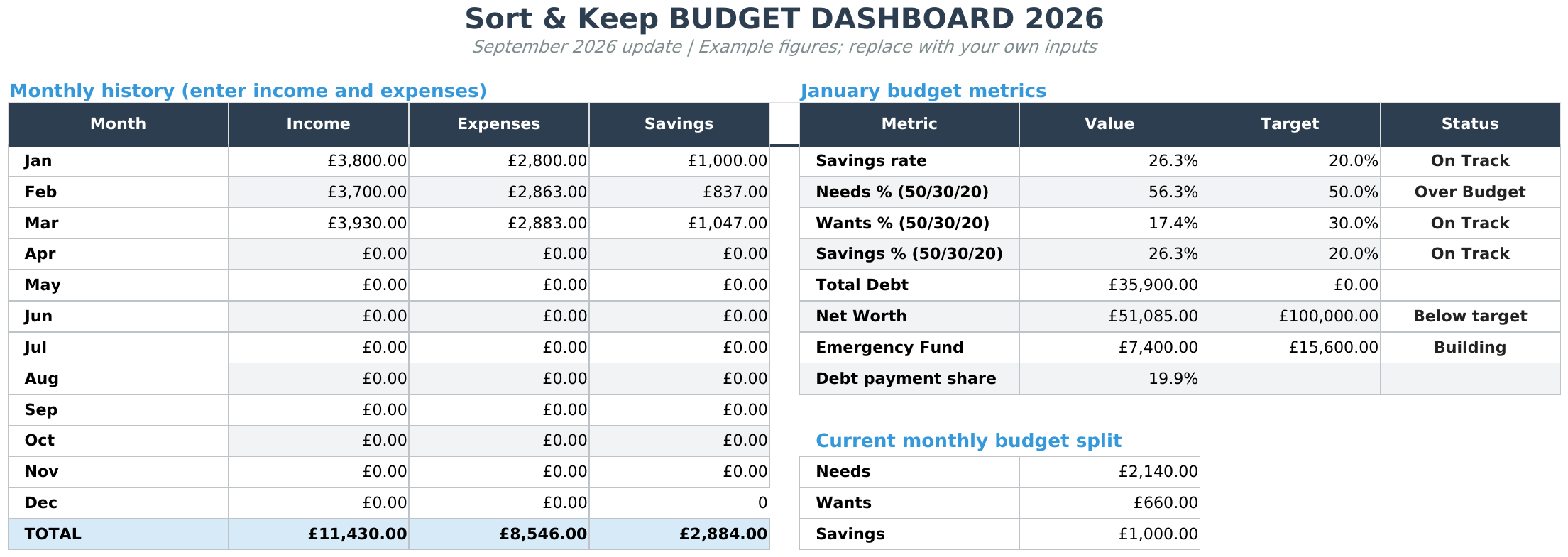
5. Budget Dashboard 2026
Platform: Google Sheets
Price: $10.81 (one-time)
Link: Budget Dashboard 2026 | Also on Sort & Keep
UK edition built for British finances. HMRC Self Assessment categories, council tax tracking, National Insurance (Class 2 and Class 4) calculations, ISA allowances, and GBP formatting throughout. US edition included with IRS tax brackets, 401(k) tracking, and USD formatting.
A more detailed spreadsheet with savings goals, debt tracking, visual dashboard, and. Importantly for part-time workers. A yearly overview that shows income patterns across all 12 months.
Pros:
- One-time cost, not a monthly subscription eating into a part-time wage
- Yearly overview reveals seasonal income patterns (retail workers: your December spike and January crash become visible)
- Debt tracking handles UC advance repayments alongside credit card minimums
- Savings goals with progress bars. Even micro-savings targets feel tangible
- Dashboard gives a visual snapshot of where you stand without scrolling through rows
Cons:
- $10.81 is real money on a part-time budget. Needs to earn its place
- Still requires manual data entry
- No built-in UC taper or NI threshold calculators
- More features mean a slightly steeper learning curve
Verdict: Worth upgrading to once you have used the free template for two to three months and know you will stick with budgeting. The yearly overview is particularly powerful for part-time workers. Seeing 12 months of variable income side by side lets you spot patterns your memory misses. That January dip? It happens every year. Now you can prepare for it in November.
Budget Template for Part-Time Workers: Features You Need
Whatever tool you use, these are the features that separate a useful template from a generic one when your income depends on a rota.
Variable income averaging. Compare several months of actual take-home pay. Label future amounts as estimates and keep confirmed shifts or payments separate from assumptions.
UC taper rate calculator. The 55p reduction per £1 earned above your work allowance is the single most important number in a part-time budget. Your template should show: gross earnings, work allowance, earnings above the allowance, taper reduction (55%), and resulting UC payment. Without this, you will overestimate income in good months and underestimate it in bad ones.
NI threshold tracker. The primary threshold is £242/week (£12,570/year) for 2025/26. Below it, zero NI. Above it, 8% on everything over the threshold. For part-time workers earning £11,000-£14,000, a few extra shifts can push you over. Your budget should flag which months you cross the line.
Tax-free personal allowance usage. Earning under £12,570/year means unused personal allowance. This matters if you have savings interest, a second job, or side income. The remainder of your allowance shelters that income from tax.
Shift pattern income predictor. If your employer publishes rotas 2-4 weeks ahead, multiply confirmed shifts by your hourly rate, deduct estimated tax and NI, and you have a forward-looking income estimate. This turns your budget from reactive to proactive.
In-work benefit entitlement checker. Your budget should prompt you to check eligibility for: Council Tax Reduction, free school meals (UC with net earnings under £7,400/year), Healthy Start vouchers, NHS Low Income Scheme, broadband social tariffs, and the Warm Home Discount. Collectively these can be worth £150-£300/month.
The Cliff Edges to Watch
Part-time work in the UK comes with income cliffs where earning slightly more can leave you barely better off. Your budget needs to flag these.
The UC taper slope. Every pound earned above £673/month (with housing costs) or £404/month (without) reduces your UC by 55p. Combined with 20% income tax and 8% NI above those thresholds, your effective marginal rate hits 67.7%. Earning an extra £100 nets you £32.30. Worth knowing before you pick up overtime.
The free school meals cliff. Eligibility cuts off at £7,400/year net earnings on UC. One penny above and you lose roughly £400-£500 per child per year. Near this threshold, the arithmetic of an extra shift changes dramatically.
The pension auto-enrolment trigger. Above £10,000/year, your employer must auto-enrol you. The 5% employee contribution is money towards your future, but it reduces take-home by 5% immediately. If you are hovering around this line, model both scenarios.
Check how a change in hours affects your overall income and deductions before relying on an estimate.
Our Recommendation
Start free. The complexity of part-time budgeting is in the income modelling, not the tools.
Today: Run the EntitledTo benefit calculator with your current hours and earnings. This takes 15 minutes and will confirm whether you are receiving everything you qualify for. If it surfaces even one unclaimed entitlement, the rest of this article is a bonus.
This week: Download the Free Budget Tracker | Also on Sort & Keep and set it up with your actual income sources. Rename the categories: Wages, UC Payment, Child Benefit, whatever applies. Enter last month's real numbers. See where you stand.
This month: Start tracking your monthly income (wages + benefits combined) to build a 3-month rolling average. Use this average. Not last month's number. As the basis for your budget. Three months of data is enough to start.
Every assessment period: Estimate your UC payment using the taper calculation. Gross earnings minus work allowance, multiply the excess by 0.55, subtract from your maximum entitlement. Write this down. Compare it to what actually arrives. If the numbers do not match, check for deductions (advances, overpayments, third-party debts).
When you are ready: If you have been using the free template for a few months and want to see yearly income patterns, track savings goals, or manage debt repayment, the Budget Dashboard 2026 | Also on Sort & Keep ($10.81, one-time) adds those features without a subscription. But only upgrade when the free version genuinely is not enough.
The reality of part-time work is that your income is a moving target. Tax thresholds, benefit tapers, shift patterns, and seasonal hours all pull it in different directions. You cannot control how many hours your employer offers next week. But you can know exactly what those hours mean for your total income. Wages and benefits combined. And make sure every pound is accounted for before it arrives. That is not optimisation. That is control. And on variable hours, control is everything.
Related Reads
- Budget Template for Low Income: Making Every Pound Count
- Budget Template for Gig Workers: Multiple Income Streams & Platform Fees
- Budget Template for New Graduates: Your First Salary Budget
- Budget Spreadsheet Templates 2026: Compare Free and Paid Options
Get free spreadsheet templates and updates. New templates, feature updates, and practical guides delivered to your inbox. No spam, unsubscribe anytime.
Subscribe free → | Already have a template? Download the free budget tracker or free meal planner. Email required for delivery; newsletter optional.
Choose the right next step
Need a simple budget tracker spreadsheet? Start with the Free Budget Tracker. Use Budget Dashboard 2026 when you want budgets, debt, savings and net worth in one workbook. Choose the Complete Collection when several parts of life admin need sorting.



